


- Home
- Captivate
- Discussions
- Names of objects and objects not aligned in timeli...
- Names of objects and objects not aligned in timeli...
Names of objects and objects not aligned in timeline...

Copy link to clipboard
Copied
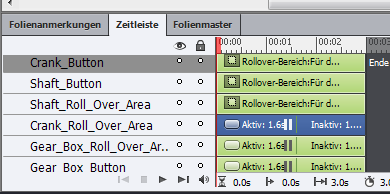
Has anyone had this problem before? I am starting to find a lot of problems with Captivate 7 : /
Ryan


 9
Replies
9
9
Replies
9


Copy link to clipboard
Copied
I had this problem sometimes with Captivate 6, first release. Didn't have it with 7 yet. What if you go to another slide and come back? Still same problem?
Copy link to clipboard
Copied
Ok. It's working now. I went to a few slides and deleted them, and now the object and object names are aligned again. Maybe all I had to do was leave that slide and come back.... Thanks !


Copy link to clipboard
Copied
Try killing your Preferences file.
Copy link to clipboard
Copied
Rod, in 6 just moving around in CP or restarting it solved the problem; I hate killing Preferences because that means to reconstruct all customisation.

Copy link to clipboard
Copied
Hi Rod,
I have no technical knowledge so please excuse what what seem a very stupid statement.
I have often seen on this forum the suggested "fix" to a problem as being "Delete / Recreate your preferences file" or similar. Many a time this solution is suggested by Adobe staff.
I have asked them (via this forum) why are people having to delete something and start again to fix a problem when really shouldn't Adobe fix the root cause of the problem?
I just get the feeling Adobe are avoiding making the required repair and churning out the same old mantra "Remove / Replace Preference File".
Noel
Copy link to clipboard
Copied
Hi Noel
I'm pretty sure RodWard is just a user helping other users.
Copy link to clipboard
Copied
Yes - you are right. Rod is a user helping other users and a very knowledgeable one at that.
He is always very helpful on this forum.
My comments were more directed at Adobe - on the basis that it it strikes me (limited technical knowledge) that surely they should establish the root casue of the problem rather than ask people to "delete" and "recreate" things.
Almost like rebooting your PC in the hope the problem might go away for a while.
Noel
Copy link to clipboard
Copied
Noel,
There are two sides to this issue.
On the one hand I agree with you that it would be great if Adobe made Captivate's preferences more bullet-proof and incorruptible. I too don't like continually telling people to kill the preference folder to fix issues. But it works, and I'm definitely FOR anything tha solves an issue quickly.
On the other hand, I suspect that making Preferences unable to be corrupted would require adding a lot of extra checks and balances into the software, thereby adding a lot of extra overhead that would significantly slow down save actions and general functionality.
I suspect Adobe have done the sums on which of these two options is better overall and they've gone with a faster and more nimble preference architecture, rather than something that would slow down an already slowish app.
Copy link to clipboard
Copied
Hi Rod,
Thank you for the explanation.
It makes sense now I can see it from both sides.
Noel


Get ready! An upgraded Adobe Community experience is coming in January.
Learn more
 AdChoices