


Copy link to clipboard
Copied
Good morning,
Does anyone know how to name slides so that they show up in the table of contents? It's strange because it seems like I have done it but it won't show up in the TOC...is there some trick that I'm missing? As you can see by my pictures, I have names some slides in the properties panel, and their names show up in the filmstrip; however, it still said Slide 1, Slide 4, etc. in my TOC. Any ideas? Thanks.




 1 Correct answer

Hi there
You need to open the TOC editor and click the "Reset TOC" button.
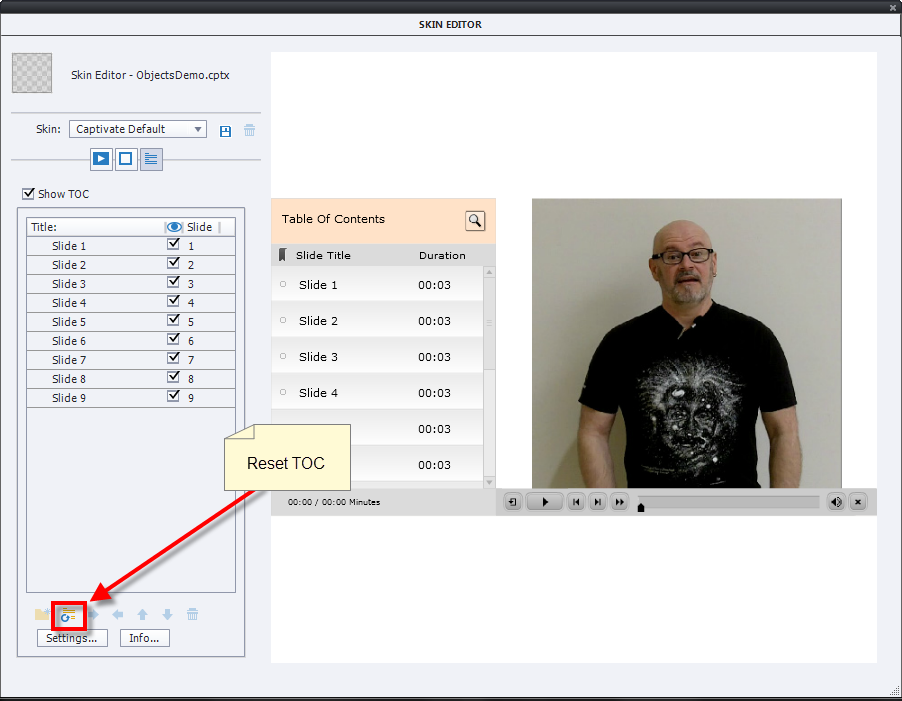
Cheers... Rick 

 2
Replies
2
2
Replies
2

Copy link to clipboard
Copied
Hi there
You need to open the TOC editor and click the "Reset TOC" button.

Cheers... Rick 
Copy link to clipboard
Copied
Thank you - that worked!! That one had me baffled for sure!
Tanya


Get ready! An upgraded Adobe Community experience is coming in January.
Learn more
 AdChoices