
On-screen transcript tips?
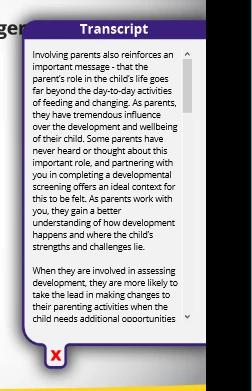
To make training more user friendly I’ve been using a text area widget on each slide for displaying the slide’s transcript. I’ll put an image behind the widget, group them together, and then show/hide the group with buttons. This is how it appears in the training.
I had always assumed that a user would hide the transcript before opening the glossary or other objects that display across an entire project. A recent test of a nearly finished training resulted in someone having a transcript open first and then showed the help system. Since I publish to HTML5, the text area widget gets placed above everything else which results in the following appearance in the training for when the help system is displayed.
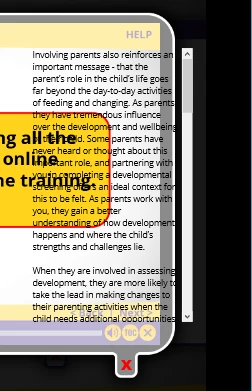
One option is to add a hide action to the help and glossary show buttons that will hide all the transcripts should they already be open, but that’s going to be 80+ hide commands. The other option is to place the help and glossary smart shapes on every slide instead of on a single master page, but then I would have to create 80+ advanced actions for those buttons on every slide that would hide the transcript. (Which is even more work than just adding in the hide actions in the master page smart shapes)
So I’m inquiring about how other people handle transcripts and/or if you’ve found a way around this issue when publishing to HTML5.
 AdChoices