


- Home
- Captivate
- Discussions
- Pause / Resume button combination not working when...
- Pause / Resume button combination not working when...
Pause / Resume button combination not working when set to display for "rest of project"

Copy link to clipboard
Copied
Good day,
I have created a set of four objects on slide2 of my project
1. Smart Object rounded rectangle with text "(playing) - CLICK to Pause" [this is the graphic the user sees]
2. Smart Object rounded rectangle with text "(paused) - CLICK to Resume" [this is the graphic the user sees]
3. Smart Object rectangle, transparent, used as button, set to not display in project - btn_Resume
4. Smart Object rectangle, transparent, used as button - btn_Pause
A. Script assigned to btn_Pause hides btn_Pause and the "CLICK to Pause" graphic, shows the btn_Resume and "CLICK to Resume" graphic, and pauses the project by setting the system pause variable to 1
B. Script assigned to btn_Resume hides btn_Resume and the "CLICK to Resume" graphic, shows the btn_Pause and "CLICK to Pause" graphic, and resumes the project by setting the system resume variable to 1
C. All items are set to display from the beginning of slide2 for the "rest of project"
On slide 2, the buttons hide/show and pause/resume behaviors work correctly.
On slide 3, the correct initial button and graphic appears, and the click sound works when clicked, but no behaviors (show/hide/pause) occur until a good amount of time into the slide: you can click all you want for 20-30 seconds, but nothing works except the click sound. Eventually, the behavior will work.
On slides 4 and following, the correct initial button and graphic appears, and the click sound works when clicked, but no behaviors EVER work.
If the behaviors NEVER, EVER worked, I would keep looking for what I did not have set correctly, but the correct working on the slide where they are set, delayed behavior on the next, and no behavior on the remainder of slides following has me stumped.
Captivate version 6.0.1.240
Windows 7 OS
I hope I'm missing something obvious here, and I'm more than willing to face-palm if you tell me  . Otherwise, I have not been able to find any setting that makes any difference. I would REALLY rather not duplicate the buttons and scripts on every page of the project. Given the blog posts I have seen saying this method should work just fine, I'm hoping there is a side quirk somewhere that I'm missing.
Thanks for any help you can give.


 4
Replies
4
4
Replies
4


Copy link to clipboard
Copied
I suppose you are also pointing to my blog here. Could you post a screenshot of the advanced actions you are using for both shape buttons? I tested it out, and it is possible to have both buttons exactly in the same place (was not the case for previous versions), so I suppose something goes awry with the actions. Are those normal slides, I mean no question slides?
Lilybiri
Copy link to clipboard
Copied
No question slides, and the behavior works perfectly when the buttons are stacked together on the first slide, not on any following.
"Place Object on Top" is confirmed set for all objects, and none of the objects are grouped (not that it should matter).
Also, after some further testing today, I note that when I separate the two sets (pause button and graphic smartshape, stacked) and (resume button and graphic smartshape, stacked) the appearance is not what I want (they are in different positions, so it looks odd), but it works. It seems to be that functionality only breaks 1)when all four objects are stacked and 2)when that 4-stack appears on all slides after the first one.
Here are screens of the actions:

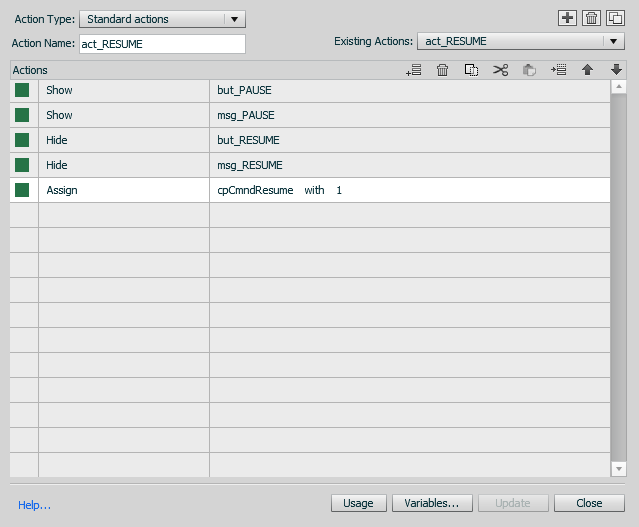

so, this works:  - this being an invisible smartshape over a visible smartshape with the informative text. These will work on every slide. Stack the two groups together, so that the appearance of "only one button" is achieved, and it only works on the first slide.
Copy link to clipboard
Copied
Will double-check, but puzzled again: why do you use two objects for each button? You can have the image in the smart shape that is configured as a button? That is my work flow as described in my blog. I do not see any reason to complicate by splitting it up in two objects, could you explain?
Lilybiri
Copy link to clipboard
Copied
Without clouding with too much explanation, this technique arose out of a need to deal with (in a different project) objects that were grouped, and wanting to deal with the groups in as simple a way as possible, allow for easy swapping of group assets, and having a few buttons do multiple things. The idea of being able to have multiple interactive buttons stacked on top of each other while appearing for the rest of the project led to trying this simple construct before trying something more complex.
You are correct, that there is a simpler solution, which we ended up using because we were not able to get two interactive buttons stacked on top of each other while displayed for the rest of the project to work properly (although that is SUPPOSED to work, as far as I understand).
Here's what we ended up doing:
A) Two smartshapes used as messaging graphics
B) A single (one) interactive smartshape used as a button
C) A conditional action to pause/resume and show/hide the appropriate messaging graphics
D) All three objects (A&B) stacked, B on top.
E) All objects set to always appear on top, and to display for rest of project.
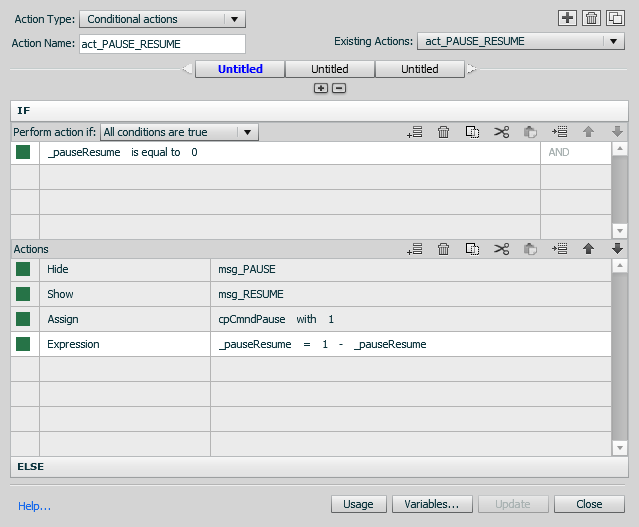

Our hypothesis, then, is that you are not able to stack interactive objects on top of each other and then display for the rest of the project.
If anyone has evidence to the contrary, we would, gladly, take a look.
Thanks for your interest Lilybiri, and for your input.
Best regards,
Hank


Get ready! An upgraded Adobe Community experience is coming in January.
Learn more
 AdChoices