


SCORM 2004 Quiz issue

Copy link to clipboard
Copied
Using Captivate 9.0.2.437.
I am publishing a course to SCORM 2004, 2nd Edition. When I test the course on the LMS, I get to the end and take the graded Quiz (11 questions). If I leave the course after completing 4 questions, when I re-enter the course and get to the Quiz, the answer to my first question is still there and I cannot proceed through the quiz, basically stuck.
I have checked "Self-Paced Learning" in the TOC Settings, but I thought that would not affect a SCROM course.
Any help would be appreciated. Thank you.


 8
Replies
8
8
Replies
8


Copy link to clipboard
Copied
If Never Send Resume data is not checked, the user will be returned to the last slide which he visited. Normally you shouldn't allow to go back in a Quiz at all (there is an option in the Quiz Preferences for that). Given answers are frozen, as usual in a Quiz.
Copy link to clipboard
Copied
"Normally you shouldn't allow to go back in a Quiz at all (there is an option in the Quiz Preferences for that)."
Where is this option?
What if a user's network connection breaks in the middle of a quiz? They cannot go back in and take the quiz?
Isn't there a way to clear the Quiz questions on exit?
Thanks.
Copy link to clipboard
Copied
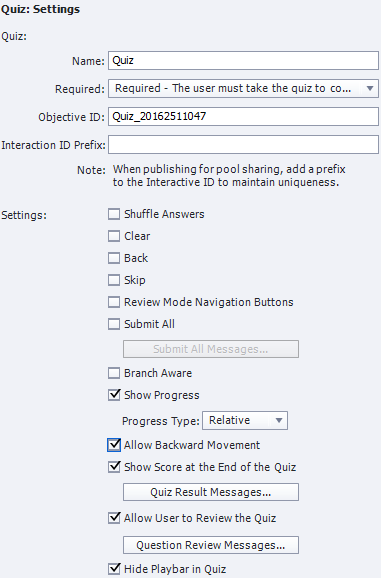
Here are my settings:
Copy link to clipboard
Copied
Uncheck 'Allow Backward Movement'.
Copy link to clipboard
Copied
This did not work.
I went back in and unchecked 'Allow User to review the Quiz' and I unchecked 'Self-Paced Learning' in the TOC Settings.
Now when I Exit during the quiz and resume, the Quiz starts off at the first unanswered question and my previous answers are remembered.
Copy link to clipboard
Copied
That is very strange, because the TOC setting for bookmarking with a 'normal' LMS is overridden by the SCORM settings. TOC is using cookies or local storage. Did you perhaps check the option 'Never Send Resume Data'?
Unchecking the Review option has no real link with bookmarking.
Copy link to clipboard
Copied
I just looked and 'Never Send Resume Data' is unchecked. What happens if I check that option?
Copy link to clipboard
Copied
Bookmarking will be turned off, which you don't want.
Still puzzled here, it must be linked with your LMS, this is not a common behavior which you are explaining.


Get ready! An upgraded Adobe Community experience is coming in January.
Learn more
 AdChoices