


SCORM Compliance

Copy link to clipboard
Copied
Hi,
I am very new to captivate. I have created a quiz in Captivate 4 and done the settings for scorm compliance as below:
SCORM 1.2
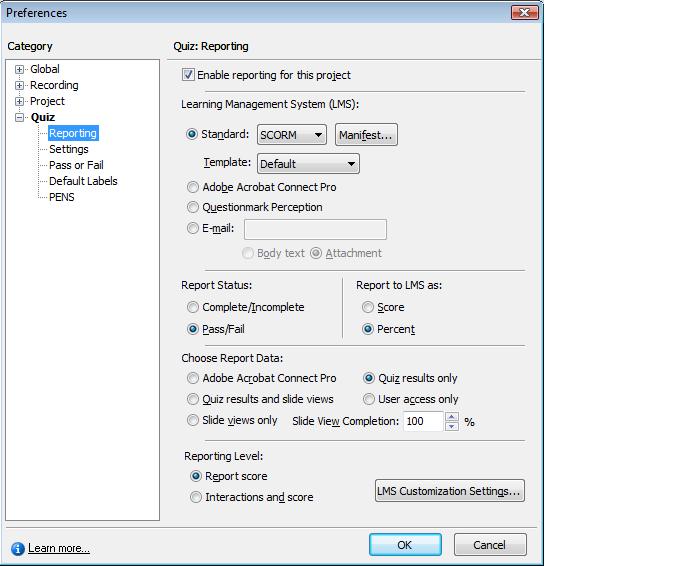
When i m uploading course on ADL test suite its not getting launched and through some error.
Please provide the solution.


 10
Replies
10
10
Replies
10


Copy link to clipboard
Copied
Hello and welcome on the forum,
Until a real LMS-specialist pops in, could you check the Manifest settings too? For our LMS (Blackboard) I have to check that the Mastery Score set in the Quiz Preferences is the same as in the Manifest parameters. Moreover, but for BB, I get better results by choosing Complete/incomplete than with Pass/Fail. And since I want to check everything after reporting I'm also preferring Quiz results & Slide views, and Report Interactions and score.
But I repeat, those are the settings working best for my purpose on Blackboard. I don't have any experience with other LMS's.
Lilybiri
Copy link to clipboard
Copied
Thanks for the reply.
But the course is not getting launched and throwing permission denied error for ADL test suite.
when i tried with RTE it gets launched.
Do i need to do some settings?

Copy link to clipboard
Copied
The ADL test suite runs the test as local files, so it sounds like you are hitting the default restriction on running active content locally setting in your browser.
If you are using internet explorer, you can find it under Tools / Internet Options / Advanced, in the section on Security settings.
Checking "Allow active content to run in files on My Computer" may get you past that first part.
The SRTE is different as it behaves as a simulated server/runtime environment.
Hope that helps.
Russ
Copy link to clipboard
Copied
Hi,
I tried with the settings mentioned but still having same issue.
Thanks,
Prajkta
Copy link to clipboard
Copied
First make sure the new setting really saved.
Also, for the test suite to work, the flash player also needs to be allowed to access the content directory for the test suite specifically.
You can edit your player settings here: http://www.macromedia.com/support/documentation/en/flashplayer/help/settings_manager.html
Alternatively, if you click on any swf playing on a page, choose Global Security Settings to go there.
Then add the ADL test suite directory as always allowed.
The default location would be C:\ADL.
But you may have installed it elsewhere.
Both the browser and player would need permission for the test suite to run flash content locally.
And yes, it is quite a lot of hoops to jump through.............
Russ


Copy link to clipboard
Copied
Can you please take a screenshot of your settings under the SCORM Manifest button, and also those under the LMS Customisation Settings button?

Copy link to clipboard
Copied
I'm having similar issues. When I sent a sample course to our developer, he responded with:
"I ran the course through the ADL SCORM test suite and it did not work. The lms_initialize() function was never called, which means it's not SCORM conformant."
Does anyone know where to call this function in the manifest and what I need to do to ensure it's SCORM 1.2 conformant?
Copy link to clipboard
Copied
The lms gets initialized by a command sent from the course via the api.
But if you are getting denied before the content can even run, then it would never send the instruction.
Unfortunately, initializing is not part of the manifest.
Of course this is all assuming that the course was packaged properly.
Copy link to clipboard
Copied
I've also read other blog posts that say the ADL test suite also objects to a line of HTML code that is right at the top of the Captivate HTM template.
Go to the Captivate install directory and find the HTM templates at: Adobe\Adobe Captivate 5\Templates\Publish
Make a backup of the particular HTM template/s you use. If you're delivering to an LMS these will be the Default.htm files inside either the SCORM or AICC folders there.
Delete these lines from the very top of the template:
<!-- Copyright [2008] Adobe Systems Incorporated. All rights reserved -->
<!-- saved from url=(0013)about:internet -->
This will mean that the first line of HTML code the test suite sees is the DOCTYPE declaration.
Hopefully that will get you even closer to your goal.
It needs to be said that the ADL Test Suite is now quite antiquated and the reason it's tripping up over this code and saying the Captivate lesson is "Not SCORM Compliant" has nothing to do with the actual compliance of the lesson but the limitations of the design of the ADL Test Suite, which was designed to test HTML-based elearning courses, not modern FLash-based courses.
You can take the same Cp course lesson that the ADL suite rejects and plug it into most LMS systems and it will work fine.

Copy link to clipboard
Copied
Just to add to Rod's excellent suggestion. Instead of using the ADL Test Suite (I know that sometimes this is client requirement), you might want to test your course using SCORM Cloud (free) instead. SCORM Cloud works really well with courses created in Adobe Captivate.
Best regards,
Mark


Get ready! An upgraded Adobe Community experience is coming in January.
Learn more
 AdChoices