


swf compilation failed

Copy link to clipboard
Copied
I am having trouble publishing to video. I continue to get a swf complitation failed. I get this message even with publishing a blank presentation to video, so I know it has nothing to do with actionscript. I've tried Adobe technical support and every solution I could find on the boards and was wondering if anyone has any other suggestions.
So far I've:
- reinstalled Captivate twice this week (once on my own, once with Adobe support) and updated to the latest version 11.5.5.553
- updated the .ini file with Use32BitJVMForPublish = 1 and 32BitJVMForPublish = 1
- deleted cache, preferences, all temp files
I need an .mp4 format so I am not sure what to try next.


 10
Replies
10
10
Replies
10


Copy link to clipboard
Copied
Is this a new project created in this version? Did you check the HTML tracker? Do you have software simulation slides, and are some of them FMR (Full Motion Recording) slides?
Copy link to clipboard
Copied
The project was created in this version. It can be a brand new project that is completely blank and I still have the problem.
Copy link to clipboard
Copied
Did you try to clean the Preferences?
Copy link to clipboard
Copied
Yes.


Copy link to clipboard
Copied
If you are seeing an error message related to SWF compilation, that would seem to indicate Captivate thinks you are trying to create Flash content.
Can you please show us screenshots of your settings when you try to publish to video?
Copy link to clipboard
Copied
Thanks for the help. Here is the screen capture:
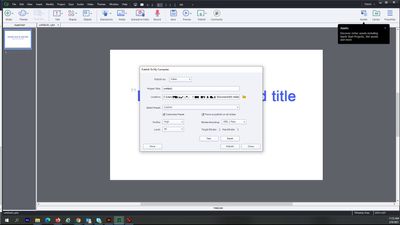
When I select test, it says the settings are valid. It doesn't matter if I change the select preset either. I've tried them all and still have the error. I can deselect force re-publish on all slides, and still get the same error. I've tried changing the publishing location and project title as well, with no success.
Copy link to clipboard
Copied
Nothing looks wrong with your settings to me. But since you indicated earlier that you cannot even publish a new blank Captivate project to MP4 video output, I would say there is something wrong with your Captivate installation. I would recommend that you reinstall Captivate and then see if that resolves the issue. Don't forget to reset your preferences after the reinstall as that is always the required procedures for updates or reinstalls.
Copy link to clipboard
Copied
I reinstalled Captivate (a third time). I've updated to the latest release. Editted the .ini file and cleared my preferences.
I've now tried all the changes on 3 different systems and still have no luck. A coworker is having the same issue with his projects as well.
Adobe support looked at my system again yesterday and couldn't solve the issue either.
I can publish a video demo (.cpvc) to video, but not a captivate project (.cptx). Is it still possible to publish slides to video?
Copy link to clipboard
Copied
I can only answer your last question: yes, it is still possible to publish a cptx file to video.
Copy link to clipboard
Copied
Thanks for letting me know. At least I know it's something I should be capable of doing.


Get ready! An upgraded Adobe Community experience is coming in January.
Learn more
 AdChoices