



Copy link to clipboard
Copied
In Captivate 4 there is a preference setting under the Recording Settings node: Hide Task Icons. Does anyone know what this setting does and what exactly is a "task icon"?


 1 Correct answer

Hi there
I'm assuming you are talking about this?

If so, I believe this refers to the Captivate icon on your Windows taskbar as pictured below:
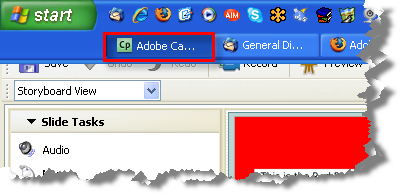
If your recording will capture part or all of the Windows Task Bar, you may not wish the viewer to see Captivate running! So this allows you to record without seeing it listed.
Cheers... Rick 
|


 2
Replies
2
2
Replies
2

Copy link to clipboard
Copied
Hi there
I'm assuming you are talking about this?

If so, I believe this refers to the Captivate icon on your Windows taskbar as pictured below:

If your recording will capture part or all of the Windows Task Bar, you may not wish the viewer to see Captivate running! So this allows you to record without seeing it listed.
Cheers... Rick 
|
Copy link to clipboard
Copied
Thanks, Rick. I think your answer must be correct.


Get ready! An upgraded Adobe Community experience is coming in January.
Learn more
 AdChoices