Birch19
Known Participant
August 19, 2022
Question

Text Entry Boxes in HTML5

  • August 19, 2022
  • 2 replies
  • 560 views

I am trying to solve for what I will say is a fussy TEB's in my project. Like many of posted this has become more of an issue with HTML5. In my current role I am creating content to train the use of our financial systems. So my focus is software simulations.

My current situation is that on some of the screens the TEB works as designed and some they do not. Here is my workflow on a TEB.

1: Add the TEB to the slide
TEB Style Tab
2: Check the Validate User Input (old habit) does not seem to be working now
3: Add Correct entries to the Correct entries box
TEB Actions Tab
4: Check Infinite Attemps
5: Set Shortcut to Tab (This is how the user interacts with the native application)
6:Set On Focus Lost to  Execute Advanced Actions (This is a shared Advanced Action used for every TEB in the project)
7: Check Failure in Display ( although this does not seem to show since I moved to HTML5)
8: Add a Text Caption and change the style that looks like the Failure Display in step 7
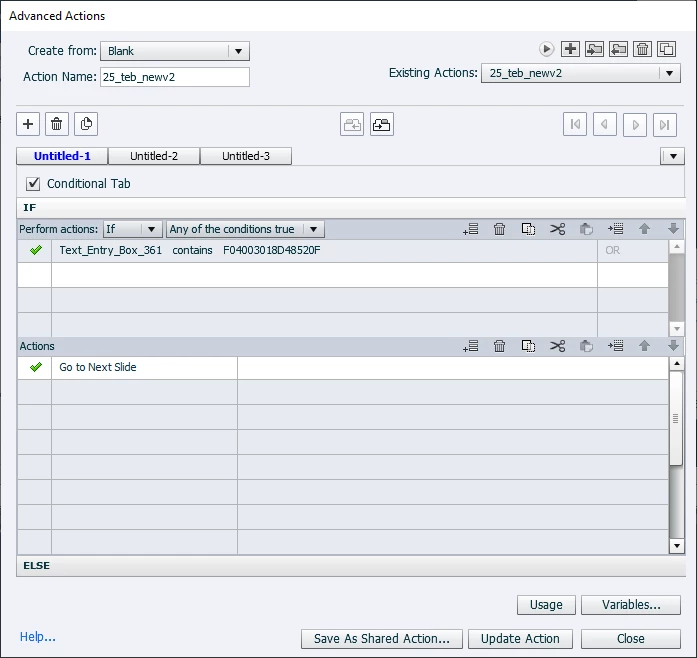
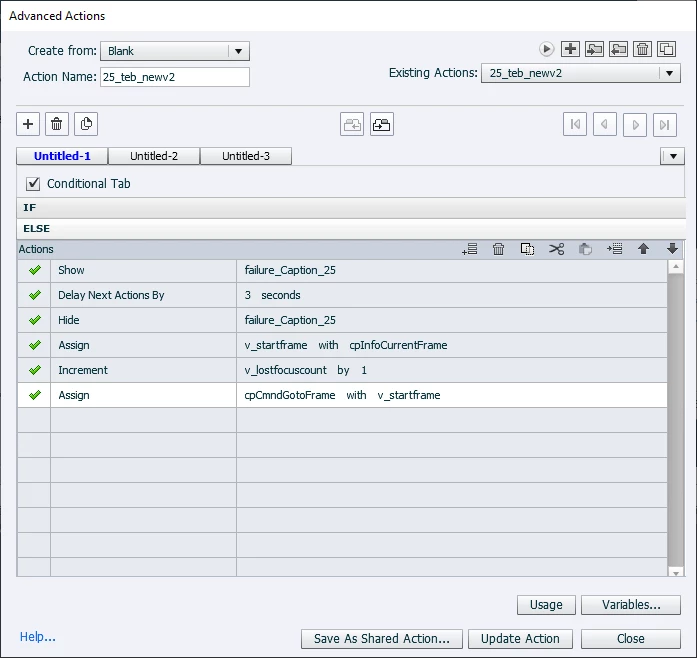
9: Fill in the Advanced action (See Images)
    The advanced action does this:
    a: Looks at the TEB variable to see what the learner entered. If the entry is correct it moves to the next slide.
    b: If the entry is incorrect it diplays the failure caption created in Step 8 and then hides it.
    c: the next three lines moves the playhead back so the learner can enter text again.


What I am seeing is the failure message shows most of the time on my TEB's but sometimes it does not. No matter what I do I can not get the failure to show. Now if the learner enters the correct text it moves on. The problem is if the learner enters the text incorrectly they never see the failure message instructing them to enter text again.


4:

This topic has been closed for replies.

2 replies

Lilybiri
Legend
August 19, 2022

Why do you not use the Failure message which is built in? You are always showing the same Failure caption anyway. More in:

http://blog.lilybiri.com/text-entry-boxes-back-to-basics


The micro-navigation which you try will not rewind the playhead to before the pausing point of the TEB. That means that you may end up later than the pausing point. That micro-navigation workflow worked fine for SWF output but not always for HTML output. You could rewind to the first frame of the slide, for which you can store the frame number with the On Enter action of the slide.

If you don't need scoring for the TEB, which seems to be the case because you offer Infinite Attempts like for a KC slide, I could also propose an alternative by using the Scrolling Text interaction to replace the TEB. You have a lot more control in that situation.


Birch19
Birch19Author
Known Participant
August 19, 2022

Thanks everyone for your responses. I have taken out the "micro-navigation" as suggested. I have used another method of redisplaying the slide after TEB is entered and learner presses Tab. I am now able to see my failure messages. Liv the defualt failure message will not display. So this is why I have created a failure message. I have tested my project in HTML5 preview and all TEB's are behaving as desired. Here is the update adv action ELSE settings.

Lilybiri
Legend
August 19, 2022

Very strange that the default Failure message is not displayed. It works fine for me, there must be a reason why it is not functional for you. Why are you now jumping to another slide or is slide 25 the slide where the TEB is sitting and you just want to replay the slide? In that case make it less specific and use:

    Expression cpCmndGotoSlide =  cpInfoCurrentSlide - 1

Why the need to stop triggered audio? That command works only on audio clips which are started with the Play Audio command. It looks like you have a lot more going on on that TEB slide....

TLCMediaDesign
Inspiring
August 19, 2022

You do have an issue that you are resetting the v_startframe variable with the current frame so it will not back up, it will just stay where it is. If you are setting the v_startframe in an on enter action, you shouldn't need to assign it a value again.