Here is what is happening:
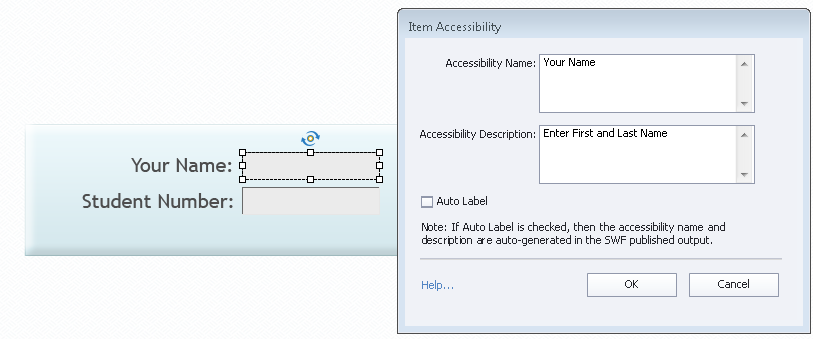
When a form field is used in a Blank project and the Accessibility Name (Your Name) and Description (Enter First and Last name) are filled in, upon Publishing, the <input> will contain the aria-label attribute which contains the content of the Accessibility Name and description: <input aria-label="Your Name Enter First and Last name"/>
When this same process is followed in a Responsive project, upon publishing, the <input> looks like this: <input aria-label="[object Object]"/>
HTML for Blank Project:<input tabindex="2500" aria-label="Your Name Enter First and Last Name" id="StudentName_1_inputField" style="display: block; left: 0px; top: 0px; position: relative; width: 137px; height: 27px; font-family: "Trebuchet MS"; font-size: 12px; color: rgb(77, 77, 77); border-width: 1px; border-style: solid; -moz-border-top-colors: none; -moz-border-right-colors: none; -moz-border-bottom-colors: none; -moz-border-left-colors: none; border-image: none; border-color: rgb(105, 105, 105) rgb(230, 230, 230) rgb(230, 230, 230) rgb(105, 105, 105); border-radius: 0px; padding-left: 2px; background-color: rgb(235, 235, 235); outline-style: none;" type="text">
HTML for Responsive Project: <input tabindex="2500" aria-label="[object Object]" id="StudentName_1_inputField" style="display: block; left: 0px; top: 0px; position: relative; width: 100%; height: 100%; border-width: 1px; border-style: solid; -moz-border-top-colors: none; -moz-border-right-colors: none; -moz-border-bottom-colors: none; -moz-border-left-colors: none; border-image: none; border-color: rgb(105, 105, 105) rgb(230, 230, 230) rgb(230, 230, 230) rgb(105, 105, 105); border-radius: 0px; padding-left: 2px; background-color: rgb(235, 235, 235); font-family: Trebuchet MS; font-size: 12px; color: rgb(77, 77, 77); font-weight: normal; text-decoration: none; font-style: normal;" type="text">
Does anyone have an idea how to get the Responsive project to use the correct aria-label? Is this a bug?
It would be nice if the onscreen text could be designated as the <label> for the <input> with a for attribute in the <label> which match the id attribute in the <input>:
<label for="NameID">Your Name</label>
<input id="NameID"/>
This would greatly improve accessibility for screen readers and other assistive technology such as Braille displays.
Thanks,
Valorie







 AdChoices