


Creating a Quit Button

Copy link to clipboard
Copied
I have been trying to find a way to create an interactive button in Captivate 5.5 that will allow the learner to exit my project. Today I came across the Rapid eLearning / Adobe Captivate Blog titled "Creating Custom Adobe Captivate 5 buttons". This question was asked and the response was that there is a workaround.
- Create a blank slide as the last slide and give it a duration of 0.1 sec.
- Set the action for the Quit button to Jump to slide and link it to the last slide.
- Click Edit > Preferences > Project > Start and End
- For the Project End Options, Select close this presentation.
Has anyone done this and been successful? I've tried this and can't seem to make it work. Either nothing happens or for some reason it just advances my presentation to the next slide. I would really love any help I can get to make this work. Thanks.


 13
Replies
13
13
Replies
13


Copy link to clipboard
Copied
Can you show us a screenshot of the Properties > Actions accordion of the button?
Copy link to clipboard
Copied
Here are screen shots from the Actions accordion for the page with the button along with the Actions accordian from the last slide and the Properties window.


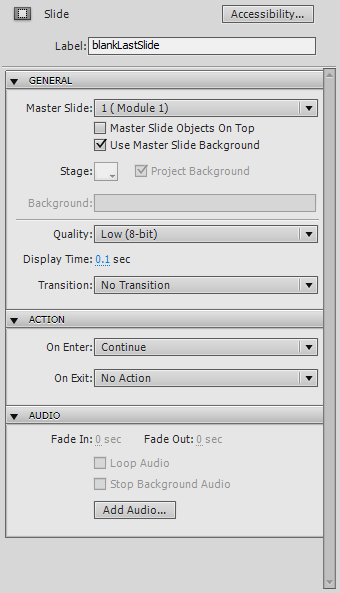

Thanks for your help.
Kim
Copy link to clipboard
Copied
Does it work if you change your button type to an ordinary text button and make your final slide a little longer duration, say 1 second?
Copy link to clipboard
Copied
I just tried that and it didn't work either. So far nothing I've found seems to work. I may just have to use the exit button that the skin provides when It's published.

Copy link to clipboard
Copied
Hi Kim
If you read the link I pointed you to, you will discover that the Exit button on the playback control will most likely also fail.
Cheers... Rick 
| Helpful and Handy Links Captivate Wish Form/Bug Reporting Form |

Copy link to clipboard
Copied
Hi Kim
I think it might behoove you to read the link below.
Cheers... Rick
| Helpful and Handy Links Captivate Wish Form/Bug Reporting Form |

Copy link to clipboard
Copied
How do you publish the project? Would it be an option to publish to PDF?

Copy link to clipboard
Copied
Can you assign JS to the button?
javascript:top.window.close();
Copy link to clipboard
Copied
Can you tell me how to do that and I'll give it a try. I'm using version 5.5
Copy link to clipboard
Copied
Here's how I did mine.
- On the last screen of my course I inserted a button. The button type is Text Button and the caption I chose was "Close". The caption is just what text you want to display on the button.
- Under the action, On Success, I chose Execute Javascript.
- Click the script window button.
- Copy and paste this code: javascript:top.window.close();
That's it. You can publish and test it locally on your computer.
Copy link to clipboard
Copied
Hi James
And are you saying that this works 100% of the time in all browsers regardless of how the window was opened? 
Cheers... Rick
| Helpful and Handy Links Captivate Wish Form/Bug Reporting Form |
Copy link to clipboard
Copied
I wish that was the case. This was tested using Internet Explorer. Our courses are opened in their own window when being launched from the SkillSoft LMS.
Therefore, I cannot say for sure if this works for Safari, Chrome, FireFox, etc...

Copy link to clipboard
Copied
It works in Chrome too.
But only when I do "Preview in Web Browser" from Captivate.
Published file does not work in Chrome, or Explorer for that matter.


Get ready! An upgraded Adobe Community experience is coming in January.
Learn more
 AdChoices