


refresh button

Copy link to clipboard
Copied
Hi, I allready inserted a "go back" and "continue" button to my slides. I would like to insert kind of a refresh button, meaning that when I am on a slide and I want to see it again. Does anyone know how to do it?


 11
Replies
11
11
Replies
11


Copy link to clipboard
Copied
I have looked for this in the past.. i presume u mean like a replay button to replay the entire slide form the start??
this video explains it best... from my knowledge there is not a simply replay slide function
This certainly works tho
Copy link to clipboard
Copied
Yes exactly that's what I mean. Unfortunately I can not watch the video as it is blocked by my computer (company computer)...is there a chance to explain it to me in short? sorry and thanks anyways!

Copy link to clipboard
Copied
There are two parts to this process:
A. Insert button/smart shape and create variable
- Insert a smart shape or button
- If it is a smart shape ensure the click to use as button is selected in the Properties panel. Name it such as Replay
- With Smart selected go to Action/On Success click on the drop down and select Execute Advanced Actions
- Under Script, click on folder on the right of the box to bring up Advanced Action box
- Click on Variables, create a New Variable name is something like: A_RestartFrame, click SAVE, close
- Create a New Standard action and name it: REPLAY
- Double click in first column under Actions and select Assign
- Double click in column to right and select: cpCmndGotoFrameAndResume
- Double click in column to the right and select your Variable A_RestartFrame
- Click Save
- Click Close
- Make sure the Replay Advanced action you just created is attached to the smart shape, with the smart shape selected go to Properties/Action/Script, click on drop down and select your Replay advanced action

B. Create an Advanced Action on Slide Enter
- With the slide in the filmstrip selected, that has the replay button/smart shape on, go to Properties panel
- In Properties > Action > On Success, click the drop down and select Execute Advanced Actions
- Click on the folder beside Script to bring up the Advanced Actions box
- Create a New Standard Action and Name it such as: RestartFrame
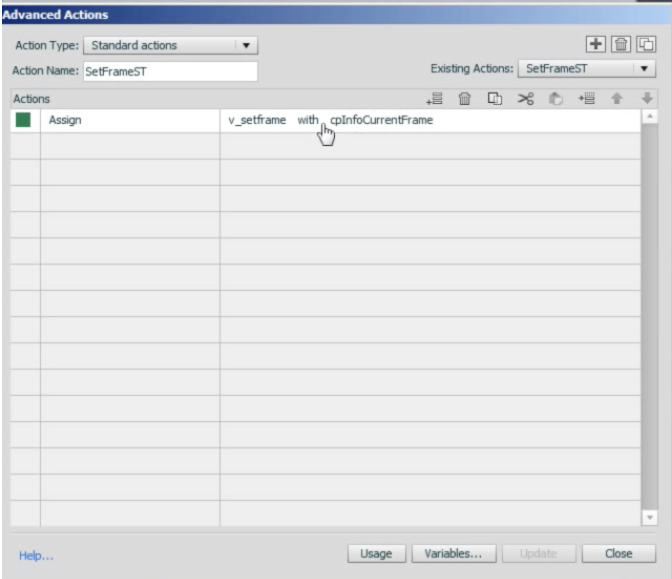
- Under Actions, double click in first column and select Assign
- In column to right double click and select your Variable A_RestartFrame
- In column to right double click and select the system variable cpInfoCurrentFrame
- Click Save/ Close
- Go back to Properties of the slide under Action/Script, click on the drop down to select your new advanced action
Copy link to clipboard
Copied
Hello Anita, thanks a lot for this detailed and understandable answer:-)
I have two problems. In B point 2 I only have on Enter or on Exit. Furthermore (when I chose on Enter) in point 7 there is no cpInfoCurrentFrame but only cpInfoCurrentSlide or rdInfoCurrentFrame. So When I select either of them when I use the button it directs me to the previous slide but not to the beginning of the current one...Do you know what I might have to do?
Copy link to clipboard
Copied
Hi there,
Yes, sorry I forgot to mention on B point 2 it should be the Slide > Properties > Action > On Enter > Execute Advanced Actions
What version of Captivate are you using? But even in the the video he mentions that he's using Cp.5.5 there is an cpInfoCurrentFrame. Did you double check?
Even if you use rdInfoCurrentFrame (captivate 7 doesn't have variables beginning with rd any longer), try reversing the action so that it is:
Assign rdInfoCurrentFrame with A_RestartFrame (or whatever you called the variable you created).
Also Michael Lund has some free replay widgets for versions 4, 5, and 6. Be advised these widgets are not HTLM5 (mobile device) compatible yet.
Here is a link to the versoin 6. http://www.cpguru.com/replay-slide-widget-for-adobe-captivate/http://www.cpguru.com/replay-slide-wid...
Hope that helps!
Copy link to clipboard
Copied
Hello Anita. Thanks a lot. unfortunately it does not work:-( however I downloaded the replay button from Michael Lund. Now when I click on that, the audio is replayign but not the slide. I created and animated it in Power Point and then imported it...do you maybe know how I can make the slide replay too?
Copy link to clipboard
Copied
What version of captivate are you using?

Copy link to clipboard
Copied
He uses 5.5 but is a real newbie.
Copy link to clipboard
Copied
Thanks Lieve.
Well, even in the video that Lefthook77 published on YouTube, he is using 5.5, and he has: cpInfoCurrentFrame. Did you double check to make sure you really don't have: cpInfoCurrentFrame, maybe you missed it.
Are you sure you downloaded the 5/5.5 versoin of the Michael's widget?
Unfortunately, I don't have 5.5 on my computer so I'm at a loss as to what else to offer.
If you really don't have cpInforCurrentFrame. I'd probably try uninstalling and reinstalling the program, but before you go that far, maybe someone else has a suggestion.
Copy link to clipboard
Copied
Hey anita,
Yes I checked again. I do not have it. I managed to download the real widget from Michael but there the problem is that only the audio replays but not the slide (probably it is because I importet powerpoint slides).
Copy link to clipboard
Copied
Opps, just double checked and the in the video he is actually using Captivate 6, not 5.5. So I guess 5.5 doesn't have it, sounds like your back to using the Assign rdInfoCurrentFrame with (your variable). If that doesn't work and the widget doesn't work, I'm really sorry I can't help you further. I typically don't import PP into my projects (for a variety of reasons) but that maybe one of them. You should probably to ask Michael (the creator of the widget) as to why it's not replaying the slide, only the audio.


Get ready! An upgraded Adobe Community experience is coming in January.
Learn more
 AdChoices