


Copy link to clipboard
Copied
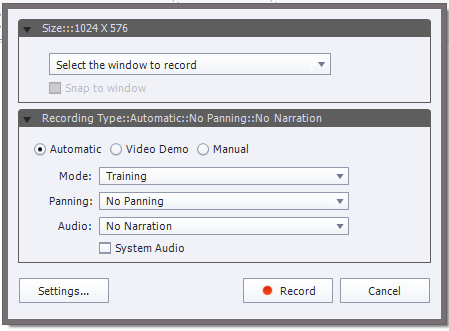
I'm trying to find a way to resize Adobe Captivate 8's demo and simulation recording window. I am only able to "snap to window", but that's it. I want to customize it and decrease/increase window size. I haven't been able to find any answers addressing this issue. Can anyone help me? This is currently how the window looks:


 1 Correct answer

The full options should display if you select Software Simulation from the New menu. The options you're viewing should only come up in a responsive project. The dimensions you're getting match the default page size for a responsive project. Perhaps changing your project page dimensions to fit the size you need would do it.
If the simulation can/should be a fixed size, you can just go with the regular software simulation.

 4
Replies
4
4
Replies
4

Copy link to clipboard
Copied
The full options should display if you select Software Simulation from the New menu. The options you're viewing should only come up in a responsive project. The dimensions you're getting match the default page size for a responsive project. Perhaps changing your project page dimensions to fit the size you need would do it.
If the simulation can/should be a fixed size, you can just go with the regular software simulation.
Copy link to clipboard
Copied
Thanks so much!! When you stated the "New menu" in your response, I realized I kept clicking on the "Slides" button then clicking on software simulation. Instead, I should have click on "File" and "New Simulation." Thanks for your help!


Copy link to clipboard
Copied
If you're adding captures to an existing project file the size of the capture window will be fixed at the current size of the project you're adding it to.
Start a new capture project and you can stipulate the size.
Copy link to clipboard
Copied
Thanks Rodward! That actually makes a lot more sense!!


Get ready! An upgraded Adobe Community experience is coming in January.
Learn more
 AdChoices