- Home
- Character Animator
- Discussions
- Re: Cycle Pause Layers not being detected
- Re: Cycle Pause Layers not being detected
Cycle Pause Layers not being detected

Copy link to clipboard
Copied
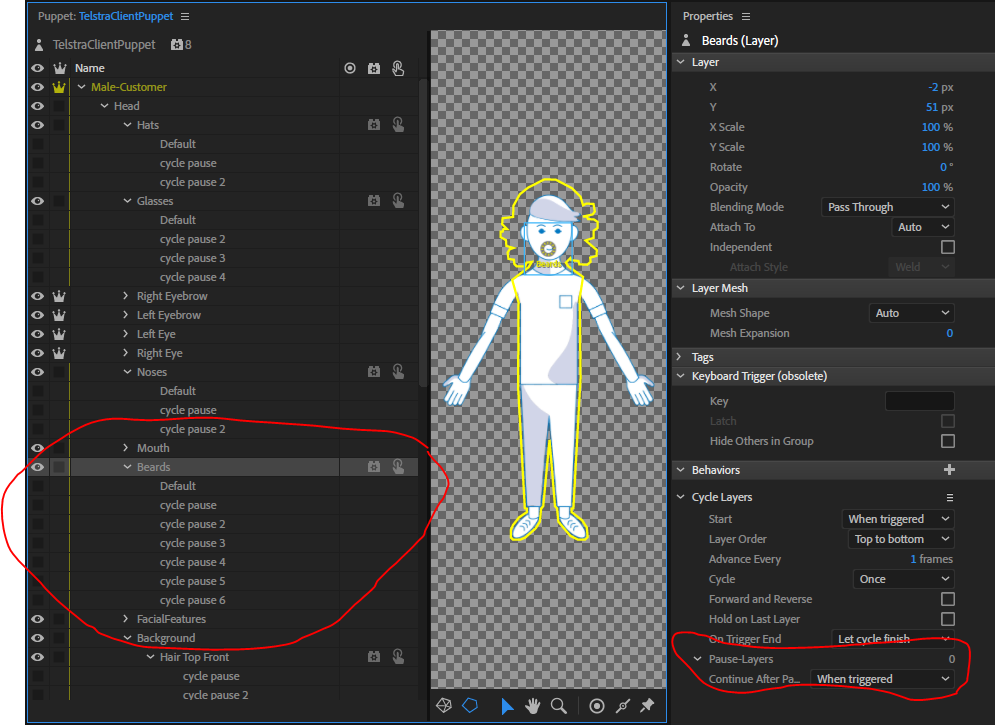
Hi There. I am creating a character builder which lets me cycle through various bodies, beards, hair, glasses, wrinkles, etc to create a range of different characters. I have built the character in Photoshop, Imported and Rigged and all is well. EXCEPT...My Cycle Layers are not working properly. Both my Hat Cycle Layers and Glasses Cycle layers work perfectly. The Noses, Beards, Facial Features, Hair and Bodies all do not detect the 'Cycle Pause' layers. I have renamed and renumbered the layers multiple times. Re-imported the puppet. Restarted my machine. I cannot figure out why the Pause-Layers is decting as 0 instead of the correct number. Thanks in advance.


 6
Replies
6
6
Replies
6


Copy link to clipboard
Copied
I would reach out to some Adobe folks or contact support and share your puppet directly with them. Looks perfectly fine to me too - no idea why one works and the other does not.
Copy link to clipboard
Copied
Thanks. When you say 'reach out to some Adobe folks' do you have any particular contacts in mind, as I don't know any Character Animation experts. Cheers.
Copy link to clipboard
Copied
Folks like @dantull and @oksamauri came to mind... hmmm, cannot @mention them any more in new forums?
Copy link to clipboard
Copied
Thanks a million 😀
Copy link to clipboard
Copied
Ok, so I was able to work around this, and I'm leaving the problem/solution here for others.
Basically, there is a bug which does not recognise changes in the layer names to 'cycle pause' in the original photoshop (and I'll assume Illustrator) file after import. In my case the Cycle Pause layers which were called 'cycle pause' when I first imported the photoshp file woirked perfectly, but the ones I went back and adjusted after they'd already been imported into CA did not. This was very noticable under the 'Cycle Layers' behavior where the 'Pause-Layers' count read as 0. So the workaround was to start a new file and re-import the puppet again. All 'cycle-pause' layers were then recognised.
Copy link to clipboard
Copied
Ah, good to know, thanks. I think what happens is there is auto tagging based on the layer name and it looks like that did not kick in. There are tags over in the properties panel for each layer. What might have worked is to manually add the pause tags to the layers where auto tagging did not work. CH behaviors use the tags, not the layer names, to find parts of the artwork it needs. It just auto tags for you (normally) so you don't notice - but you can always manually set up the tags if the layer names don't match (i always recommend to use the right layer names)


Get ready! An upgraded Adobe Community experience is coming in January.
Learn more
 AdChoices