


Copy link to clipboard
Copied
My original PSD file has moved. Can I relink it in Character Animator project? If I import same file, it creates a new puppet. My home and office file structure is different which is what caused this issue.
If not, is best practice to keep PSD file in CA project folder to enable "portability"?
Thanks


 1 Correct answer

At Adobe Character Animator Help | Puppets near the bottom you can see how to relink.
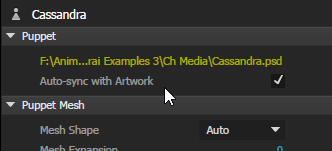
Basically, select the missing puppet in the project panel, then look to the far right and click on the puppet behavior. Click on the yellow location and then select the missing puppet wherever it is on your computer

 3
Replies
3
3
Replies
3

Copy link to clipboard
Copied
At Adobe Character Animator Help | Puppets near the bottom you can see how to relink.
Basically, select the missing puppet in the project panel, then look to the far right and click on the puppet behavior. Click on the yellow location and then select the missing puppet wherever it is on your computer
Copy link to clipboard
Copied
Here is what it looks like on the right side. The location is yellow only when the puppet is missing.


Copy link to clipboard
Copied
Jerry is right. You can also:
- Do File > Copy Media Files Into Project Folder before sharing/sending to gather and supplemental media stuff
- Do File > Export > Puppet to send a file with the original artwork and rigging. See 10:43 in the video below for more about how to do this.


Get ready! An upgraded Adobe Community experience is coming in January.
Learn more
 AdChoices