Exit
  • Global community
    • Language:
      • Deutsch
      • English
      • Español
      • Français
      • Português
  • 日本語コミュニティ
  • 한국 커뮤니티
3

remove background

Community Beginner ,
Mar 21, 2025 Mar 21, 2025

can someone please tell me how can i remove the background of a puppet on adobe illustrator

TOPICS
FAQ , How to
1.1K
Translate
Report
Community guidelines
Be kind and respectful, give credit to the original source of content, and search for duplicates before posting. Learn more
community guidelines

correct answers 1 Correct answer

Community Expert , Mar 22, 2025 Mar 22, 2025

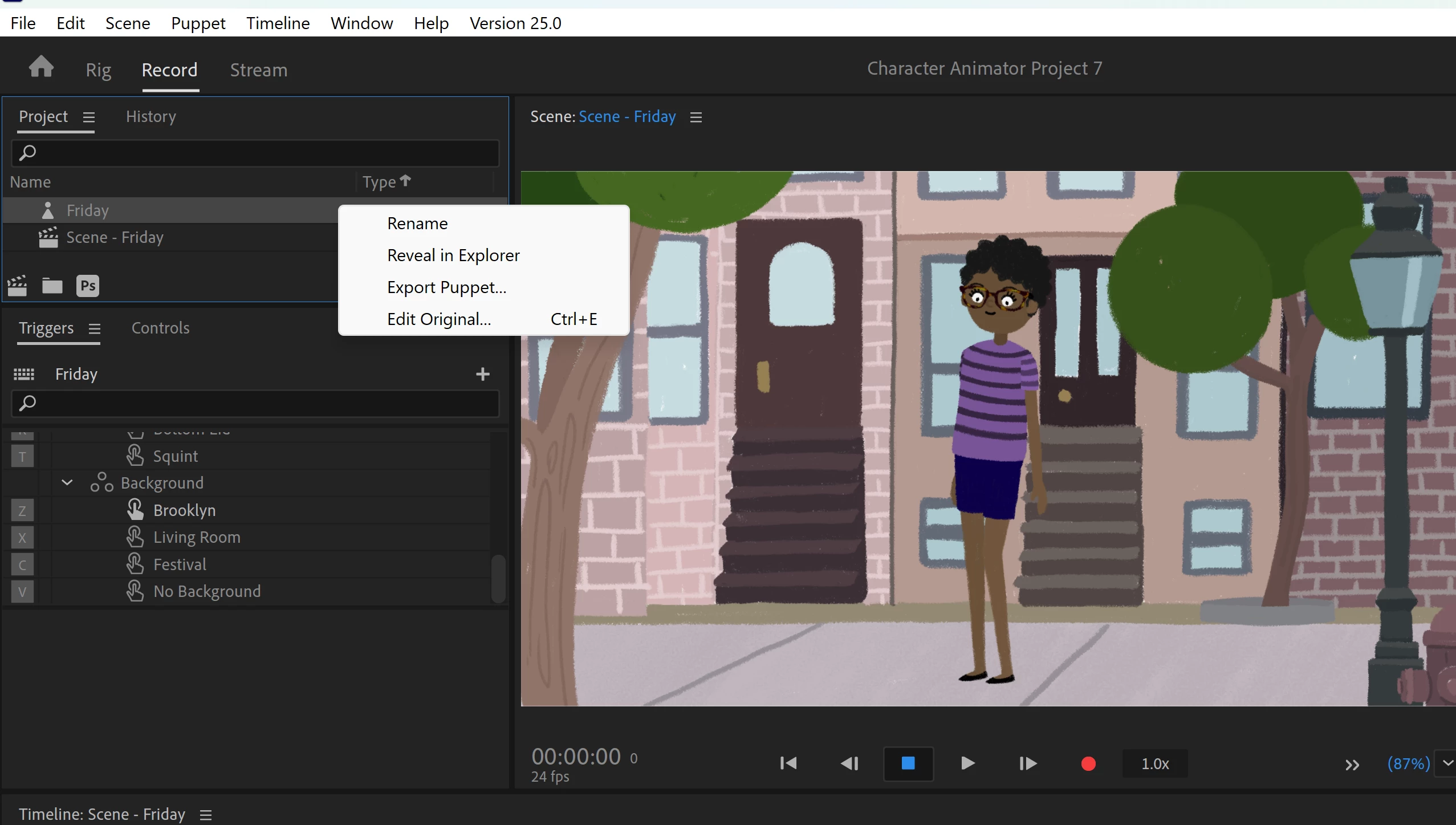
Start in Character Animator. In the Project panel to the left, select your puppet (not the scene). Right-click on the puppet and select "Edit Original" to open up the program it was edited in (usually Photoshop).
editoriginal.png

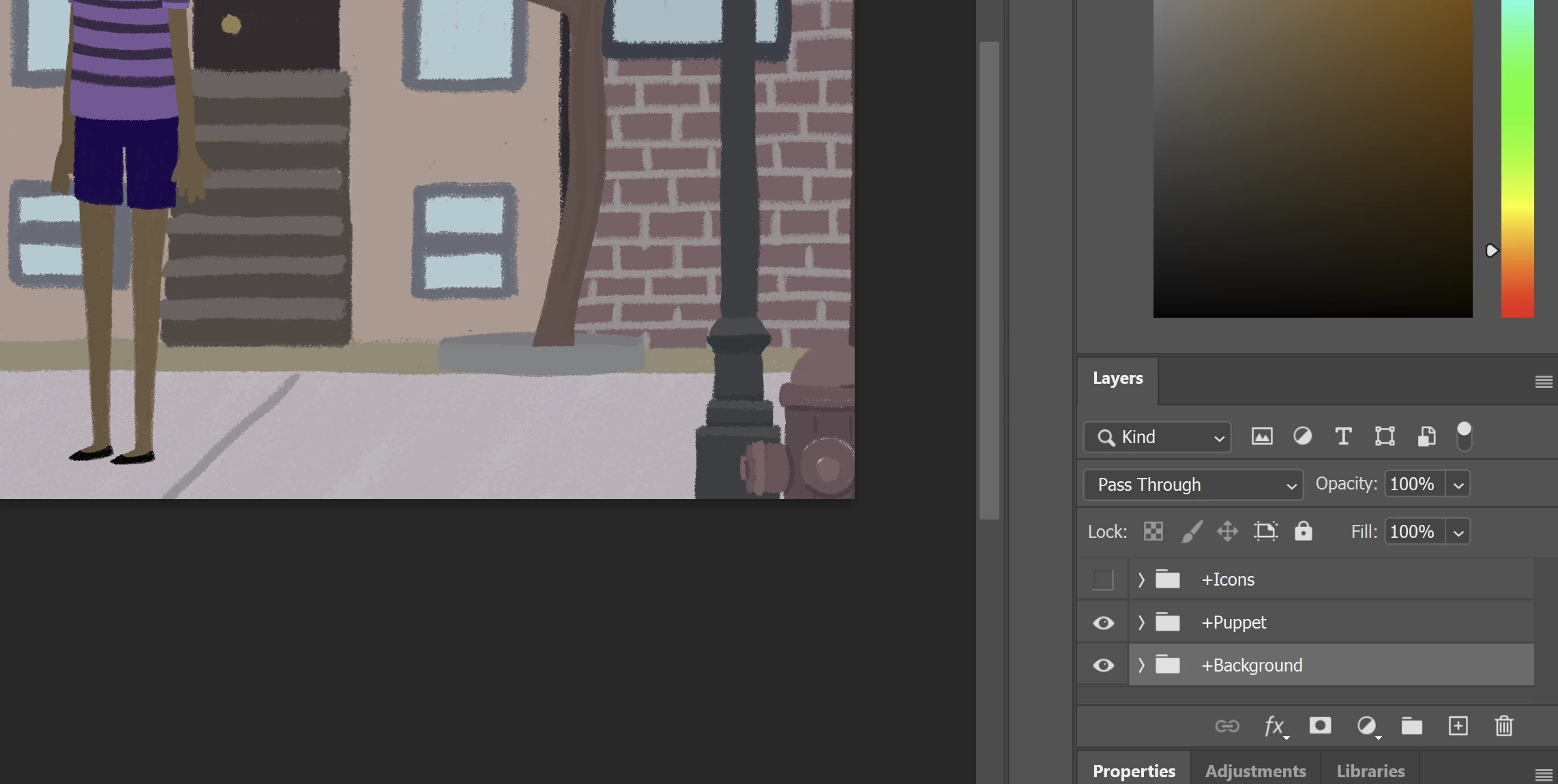
Once you are in Photoshop, find the "Layers" panel. At the bottom of the list of layers is a folder called "Background." Drag background over to the garbage can in the layers panel to delete it. 
PSDLayers.png

Once the backgrounds have been deleted, save your file and exit Photoshop. When you retur

...
Translate
Community Expert ,
Mar 22, 2025 Mar 22, 2025

Which puppet are you working with? There's so many of them and I can't seem to find one that's in Illustrator.

Translate
Report
Community guidelines
Be kind and respectful, give credit to the original source of content, and search for duplicates before posting. Learn more
community guidelines
Community Beginner ,
Mar 22, 2025 Mar 22, 2025

It's a puppet on adobe character animator , i made one with puppet maker and i need to remove the default background since i can't do it on character animator

Translate
Report
Community guidelines
Be kind and respectful, give credit to the original source of content, and search for duplicates before posting. Learn more
community guidelines
Community Expert ,
Mar 22, 2025 Mar 22, 2025

In your last post you were using the Puppet "Friday." If so, that puppet is only editable in Photoshop. Would you like instructions on how to do that?

Translate
Report
Community guidelines
Be kind and respectful, give credit to the original source of content, and search for duplicates before posting. Learn more
community guidelines
Community Beginner ,
Mar 22, 2025 Mar 22, 2025

Yes please,  that would be helpful 🙏 

Translate
Report
Community guidelines
Be kind and respectful, give credit to the original source of content, and search for duplicates before posting. Learn more
community guidelines
Community Expert ,
Mar 22, 2025 Mar 22, 2025

Start in Character Animator. In the Project panel to the left, select your puppet (not the scene). Right-click on the puppet and select "Edit Original" to open up the program it was edited in (usually Photoshop).

editoriginal.png

Once you are in Photoshop, find the "Layers" panel. At the bottom of the list of layers is a folder called "Background." Drag background over to the garbage can in the layers panel to delete it. 

PSDLayers.png

Once the backgrounds have been deleted, save your file and exit Photoshop. When you return to Character Animator, the puppet will automatically update. Then you will be able to add your new background. by importing it and dragging it into your scene beneath your puppet.

Translate
Report
Community guidelines
Be kind and respectful, give credit to the original source of content, and search for duplicates before posting. Learn more
community guidelines
Community Beginner ,
Mar 22, 2025 Mar 22, 2025
LATEST

Thank you so much, you're a life saver 

Translate
Report
Community guidelines
Be kind and respectful, give credit to the original source of content, and search for duplicates before posting. Learn more
community guidelines