


tommuck1
Inspiring
February 9, 2022
Answered

CF 2018 cookies not secure

  • February 9, 2022
  • 2 replies
  • 844 views

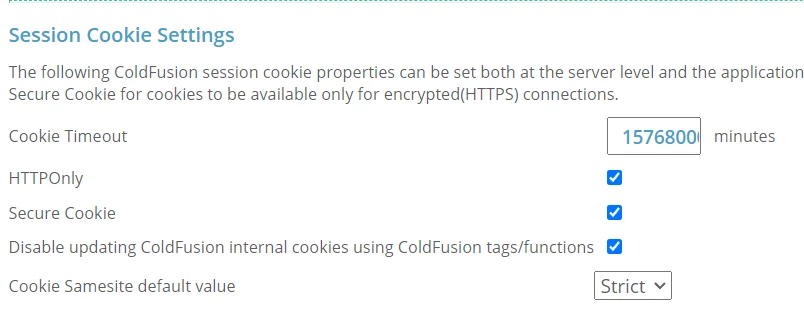
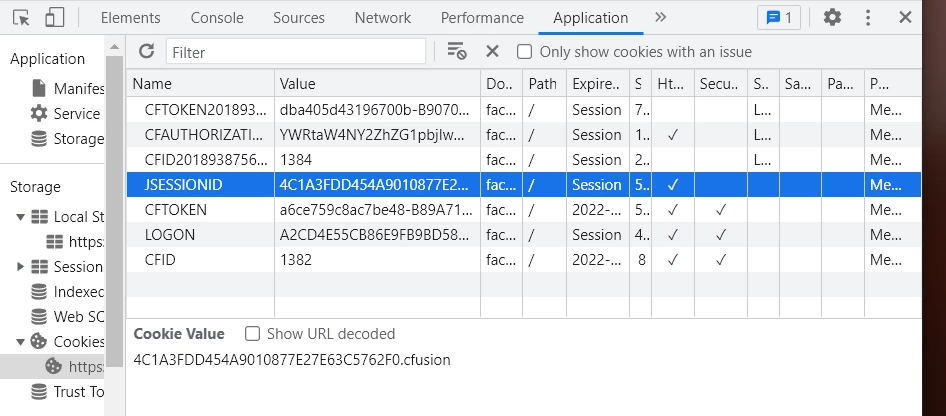
I have the CF Admin setting for cookies set to Secure and HTTPOnly, however when I browse the app, the session cookies are NOT secure. Is there something else that needs to happen to make the cookies secure?
 

Thanks,

Tom Muck

    This topic has been closed for replies.
    Correct answer tommuck1

    Thanks, Charlie, I did have those settings in place. We found an irule to use in the F5 to secure the jsessionid cookie at the firewall, and that took care of the issue. This is the irule, in case anyone comes across this with a similar problem:


    when HTTP_RESPONSE {
        set ckname "jsessionid"
        if { [HTTP::cookie exists $ckname] } {
            HTTP::cookie secure $ckname enable
            HTTP::cookie httponly $ckname enable
        }
    }


    Tom Muck

    2 replies

    Charlie Arehart
    Adobe Expert
    February 14, 2022

    Tom, if you don't find the explanation elsewhere, I will note first that your screenshot DOES show at least the cfide and cftoken ARE being set as secure and httponly (as well as the long timeout). But you're highlighting in the screenshot the jsessionid, so I am assuming you have the CF Admin "j2ee sessions" setting set.


    In that case, control is turned over by CF to Tomcat (or whatever underlying app server it may be running on). And in the case of Tomcat (the default app server it runs on), the default is that the jsessionid SHOULD be secure and httponly if you make an https call...and it seems from the screenshot that you ARE using an https call, is that right? If you are not, and you change it to be https, does that solve it? Would that be a good enough solution?


    If not, the control of these attributes (secure and httponly) for the jsessionid cookie it creates is set in the web.xml underlying your CF instance, which would be in at [coldfusion]\cfusion\runtime\conf\ (or [coldfusion]\[instancename]\runtime\conf if you're running multiple instances. 


    You'll see there a session-config element, and by default it has just one sub-element. You could tweak it to have these (make a backup of the file, to recover if you make a mistake):

    <session-config>
        <session-timeout>30</session-timeout>
        <cookie-config>
            <http-only>true</http-only>
            <secure>true</secure>
        </cookie-config>
    </session-config>


    I found that when I put that in place of the existing one, and restarted CF, I then found that the jsessionid cookies did have the secure and httponly attributes even when requested via http.


    But sure, there can be still other factors influencing your situation, like a firewall, proxy, or even just your web server (like IIS or Apache or nginx), or rewrite rules within that web server. You may also experience different things with a request made to CF using such a web server as opposed to the built-in web server in CF (that serves the CF admin).


    Let us know how things may shake out.

    /Charlie (troubleshooter, carehart. org)
    tommuck1
    tommuck1AuthorCorrect answer
    Inspiring
    February 17, 2022

    Thanks, Charlie, I did have those settings in place. We found an irule to use in the F5 to secure the jsessionid cookie at the firewall, and that took care of the issue. This is the irule, in case anyone comes across this with a similar problem:


    when HTTP_RESPONSE {
        set ckname "jsessionid"
        if { [HTTP::cookie exists $ckname] } {
            HTTP::cookie secure $ckname enable
            HTTP::cookie httponly $ckname enable
        }
    }


    Tom Muck

    BKBK
    Adobe Expert
    February 17, 2022

    Thanks for sharing that.

    BKBK
    Adobe Expert
    February 10, 2022

    Hmm, yes, I wouldn't expect that either. Browse the same page on two more browsers.


    Do you confirm the same behaviour on 3 different browser brands?

    tommuck1
    tommuck1Author
    Inspiring
    February 10, 2022

    Different browsers, same behavior. Looking into other causes now, firewall, etc.


    Tom