Inspiring
September 1, 2023
Answered

CF 2023 SOLR installed but cant access coldfusion collections

  • September 1, 2023
  • 1 reply
  • 2799 views

I've installed CF 2023, the Add-on service is running.

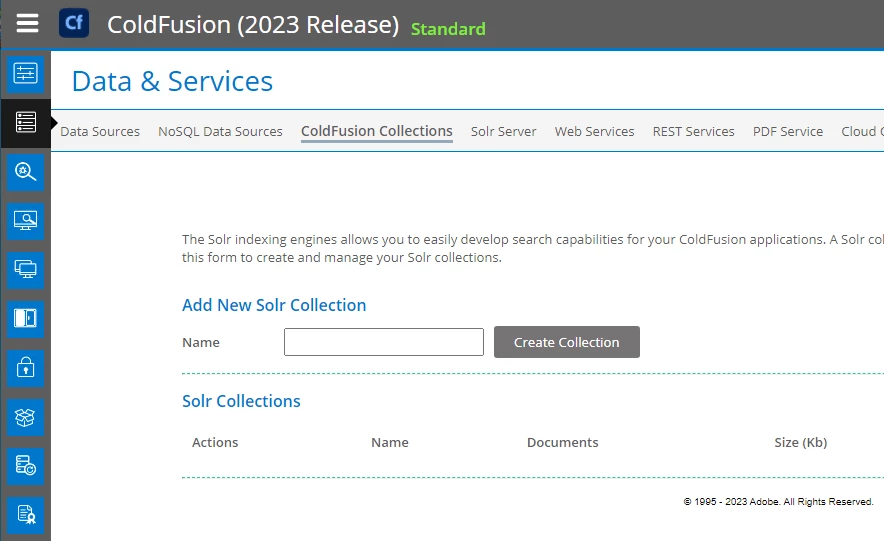
I can bring up the SOLR server admin page (in CFadmin)

but when I click on Coldfusion collections I see this error message


Unable to retrieve collections from the Search Services.
Ensure that you have installed ColdFusion Search Service and it is running.


the SOLR files appear to be all there under /cfusion/jetty

The install log says it installed without any errors


Summary
-------

Installation: Successful.

897 Successes
0 Warnings
0 NonFatalErrors
0 FatalErrors

Action Notes:

None

Install Log Detail:

Check Disk Space: C:\ColdFusionAdd-onServices
Status: SUCCESSFUL
Additional Notes: NOTE - Required Disk Space:755,448,814 Bytes Free Disk Space:62,365,196,288 Bytes


how do i fix this?
    This topic has been closed for replies.
    Correct answer xamax

    It seems you misunderstood the most important point (and first "solution") I posed (but I posed a lot, so I can understand losing track).


    First, this is not at all about WHERE you access the CF Admin from.


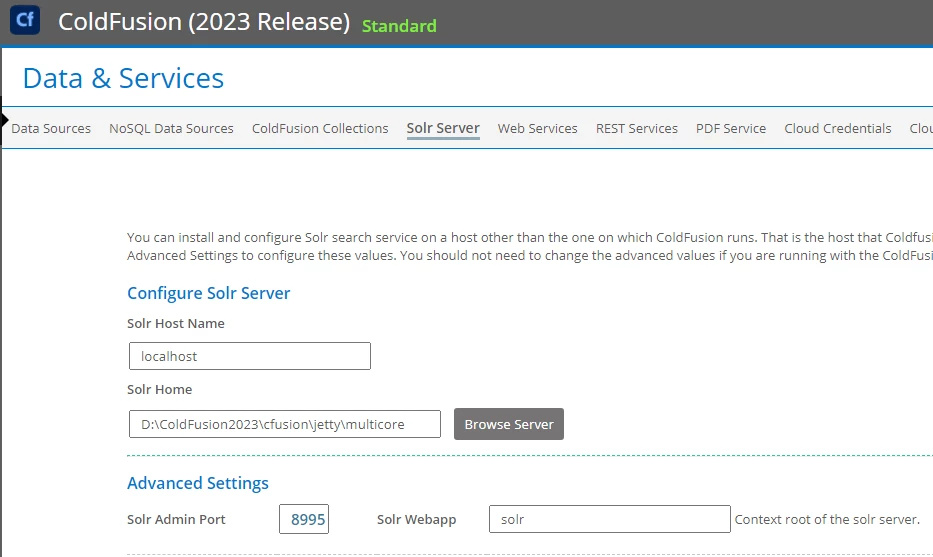
    Second, I had said (with the emphases added in my original reply): "Now that you've shared the screenshot of the CF Solr Server page, I see you have an ip address there of 10.81.7.39. The default would be "localhost", but I guess you had your reason for changing it. (Is it that you tried that as a possible fix?) If you set it back to localhost, does it work? If you felt you needed to change it, see my point 3a below that may be relevant." This is about the "solar host name" field on that page, to be clear, not the URL used for accessing the CF admin.


    Finally, that log looks fine, and your saying the localhost:8995 works is great, so I think we're close to the solution. 🙂


    Charlie,


    Setting the SOLR host name to "localhost" on the CFadmin page fixed the problem.

    I didn't change any of the settings under that page, those are the settings it installed with,

    but either way, it's fixed and I appreciate you giving me the opportunity to enjoy the 3 day weekend 🙂


    thanks

    Michael


    1 reply

    Charlie Arehart
    Community Expert
    Community Expert
    September 1, 2023

    More questions than answers, as it's easy for things to have gotten messy in your setup:

    • What is the port for the solr server, on the solr server page of the cf admin?
    • Are you using that or another for the url to the solr admin?
    • You mention having run the separate solr add on installer. Why did you do that, if you have the cfusion/jetty folder? Does it have a solr folder?
    • Where are your collections, if you had any from before? In what folder, under either of these? 
    • There's a port for solr in the jetty.lax file found in both that coldfusionaddonservices folder, and in the cfusion/jetty folder. They will likely differ. What are they?
    • What do you see if you use this other port for viewing the solr admin?
    • Does that solr admin show any collections in the drop down on the bottom left for "cores" (solr's technical name for what cf calls collections)? 
    • And what if you change the solr server page in the cf admin admin to this other port? Do you then see any collections on the cf admin collections page? 
    /Charlie (troubleshooter, carehart. org)
    xamaxAuthor
    Inspiring
    September 1, 2023

    Charlie,


    thanks - here is the information.


    it is a clean CF2023 standard build on a new win2016 server. There were no existing collections

    the main CF install was run, and the SOLR option check box was checked.

    I am not trying to run a separate instance of SOLR or anything .. it's completely as it is out of the box.
    Both installs reported successful installations.


    the SOLR admin port as report in CF admin is 8995

    the port from the jetty.lax file is

    lax.nl.java.option.additional=-server --add-opens=java.base/jdk.internal.ref=ALL-UNNAMED -Xmx512m -XX:+ScavengeBeforeFullGC -XX:-UseParallelGC -DSTOP.PORT=8077 -DSTOP.KEY=cfstop -Dsolr.solr.home=D:\ColdFusion2023\cfusion\jetty\multicore

    changing the CFadmin to port 8077 still produces the same error on the collections page

    it does not show the usual create a collection input area.


    my CF2023 folder, there is no separate coldfusionaddonservices folder


    here are the processes running


    I am only viewing the SOLR settings under the CF admin page.
    all of these values are as they were, nothing has been changed.
    I am not looking at a separate SOLR admin page, besides this one.


    thanks

    Michael


    Charlie Arehart
    Community Expert
    Community Expert
    September 1, 2023

    Ah OK, Michael. I see now where I got confused. More on that in a moment.


    As for your challenge, I think I see what may be the problem and a solution. Now that you've shared the screenshot of the CF Solr Server page, I see you have an ip address there of 10.81.7.39. The default would be "localhost", but I guess you had your reason for changing it. (Is it that you tried that as a possible fix?)


    If you set it back to localhost, does it work? If you felt you needed to change it, see my point 3a below that may be relevant.


    Otherwise, I have some refinements/corrections to what I'd offered, and in reply to what else you have now offered.


    1) First, let me share that I was thrown off by what you reported in the your original post here, where you shared output from the install log, which you said showed:

    Check Disk Space:         C:\ColdFusionAdd-onServices
                              Status: SUCCESSFUL

    THAT path reference is why I thought you had installed a separate service. To be clear, there IS support for doing such a separate service with its own installer, but most don't need it. And even in your last reply here you say "I am not trying to run a separate instance of SOLR or anything .. it's completely as it is out of the box. Both installs reported successful installations." By "both installs", I would have thought, "what is this other installer, then?"


    But I realize now that you have been referring to the install log you find IN the cfusion/jetty folder. And I am noticing now (for the first time ever) that that log DOES in fact refer to C:\ColdFusionAdd-onServices, even there there is no such directory! I just confirmed, and in fact what I pasted above here is out of my own install log in that cfusion/jetty folder. Wow on that, and a lesson learned. So you can ignore my 3rd bullet. 


    2) As for the "solr admin" I referred to in the second bullet, I misread that you meant simply the "solr server" page in the CF Admin (though I did make reference to that as well).  To be clear, there IS an available Solr Admin, which IS available at a different URL than the CF Admin. More on that in a moment


    3) As for finding what port Solr DOES listen on, I was mistaken in saying it was in the jetty.lax. (And it's definitely NOT that 8077 which you tried. That's indicated on that line you quoted as being the "stop" port. This has nothing to do with what you'd put in either the CF Admin or in to get to that Solr Admin.)


    Instead, the port that the solr service would listen on is defined in the start.ini file| (in that cfusion/jetty folder). And I find for a CF2023 install that it does indeed default to 8995. The line is this:\

    jetty.http.port=8995

    And indeed THAT is the port you should be putting into that "solr server" page of the CF admin.


    3a) Note that right above that is a line that's (by default) commented out as # jetty.http.host=0.0.0.0. That's for indicating the IP address from which Solr is willing to accept connections. And I believe that the default (if it's commented out like that) is to only accept requests from localhost--which makes sense when CF and Solr are on the same box, as here.


    But again you had changed your CF Solr Server page to name that other IP Address. If you really feel you MUST do that for some reason, then uncomment this and put in that IP address. (Or you could leave it as 0.0.0.0, which means any IPv4 ip address. And since Solr listens on that non-standard port of 8995 by default, that port would be blocked from access into this machine by any normal firewall.)  Does that help the CF Admin collections page to work?


    4) If not, and assuming your port was that 8995 value, what do you see at http://localhost:8995/solrThis should show the solr admin I was referring to in my second bullet, and others.


    If it comes up, that confirms that indeed Solr is running and on that port. (But since you now confirm you have no collections defined, there's not going to be any "cores" shown via the drop-down on the left of its UI, as I asked about in my last reply.)


    5) If instead somehow the UI does NOT come up, for that port found in that start.ini, then that's a problem. And that could also explain why CF was not succeeding in showing collections--when you had the Solr Server page pointing to that "correct" port.


    And if that may be what's happening for you (once you correct that port), your next step would be the logs in the cfusion/jetty/logs folder. There's one with the current date pepended to the words ".stderrout.log", so today's would be 2023_09_01.stderrout.log. I realize you may not know how to make sense of all that's there, but give it a look.


    (BTW, you can ignore if you see an error like "Address already in use: bind" referring to that very 8070 "stop port". That may be in use by something else, like even CFBuilder running within VSCode. That port is not anything important if Solr is running via that CF Addon service. The stopping of that does not rely on that "stop port". )


    6) I will add finally that I have CF2023 running, and the add on service, and it's running on that 8995 port, and I have no problem viewing the "coldfusion collections" page in the CF2023 Admin. I have no collections currently. 


    So you should indeed expect that this would be so in your "standard install". There has to be an answer to what's amiss. Hope something above helps. Sorry it's been so many words to help get there.


    If the above doesn't help, and others don't offer a better solution, I have still more I could propose for diagnosing things.

    /Charlie (troubleshooter, carehart. org)