moalspvic
Participant
December 9, 2025
Answered

CF 2023 Update 15/16 trouble with encryption keys

  • December 9, 2025
  • 4 replies
  • 1299 views

We are running CF 2023 and just updated from Update 14 to Update 16.  

We have two errors that are occuring, because of the reference to Bouncy Castle, one of them looks like the CFMAIL error  that others experieneced, however clearing the felix-cache and restarting the instances did not work for us.  In both cases, we are using encryption keys and the code base hasn't changed and worked previously on Update 14.

1) trouble with <cfftp>

<cfftp action="open"
            server="sftp.********.com"
            port="22"
            username="********"
            key="C:\********\privateKey.ppk"
            passphrase="********"
            secure="yes"
            connection="connFTP" />


This call is now returning the following error message.

struct

Cause

'argon2' is required, but it is not available.

Detail

Verify your connection attributes: username, password, server, fingerprint, port, key, connection, proxyServer, and secure (as applicable). Error: 'argon2' is required, but it is not available..

Message

An error occurred while establishing an sFTP connection.


2) We are using a utility to manage webPush requests through a web service and have to bind our keys to the object

<cfset PushService = createObject("java", "nl.martijndwars.webpush.PushService").init(variables.publicKey, variables.privateKey, "mailto:​x​xxx@xxxxxx.xxx")>
This call is now returning the following error message.
- Type: java.security.spec.InvalidKeySpecException > Undefined
- Type: java.security.spec.InvalidKeySpecException
- Diagnostics: key spec not recognized null


    Correct answer BKBK

    Hi @moalspvic , it appears as if your application fails to load one or more packages related to encryption. So I would suggest that you install all the packages. At least, to start with. 

    Assuming you are on Windows, you could proceed as follows:

    1. Stop ColdFusion 2023;
    2. Open the Command Prompt (cmd) as Administrator;
    3. Use the DOS cd command to navigate to  {CF2023_HOME_DIR}/cfusion/bin;
    4.  Type cfpm and press ENTER. You should get ColdFusion's package manager prompt cfpm;
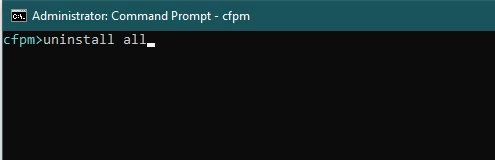
    5.  Run the command uninstall all
      BKBK_4-1765463887506.png
    6. Wait for the CFPM tool to finish uninstalling all the packages.
      Then, leaving the Command Prompt window open, restart the ColdFusion service;
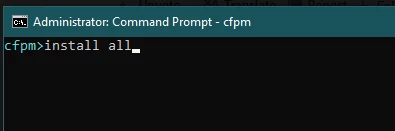
    7.  Run the CFPM command install all

    BKBK_2-1765463216769.png

    8.  Note down the name of any package that the CFPM tool says has not been installed or could not be installed.
    Keep running the command install all till the result is either an irreversible error or ColdFusion tells you that "All the packages are already installed".

    9. If any packages were not installed or if there were errors, then share that with the forum. Otherwise, restart the ColdFusion 2023 service.
    10. Test by running your cfftp code.

    4 replies

    Community Expert
    December 11, 2025

    I'm not putting a lot of thought into this, but if you can, just regenerate new keys for your users without using the argon2 encryption library.


    Dave Watts, Eidolon LLC
    moalspvic
    moalspvicAuthor
    Participant
    December 11, 2025

    Dave, thanks for your thoughts.
    As requested by the third party provider, we created RSA SHA2 keys.  We did not specify the algorithm.  We have a key on PROD and I created a key for my DEV machine. Both were created using puttyGen.  So to say, create new keys without argon2, we didn't specifically request argon2. Additionally, as similar issue, with different error (noted above) is taking place when trying to authenticate using a different key for a webPush service. We're just starting with troubleshooting the ftp issue first as it is simpler to reproduce. 
    Again, noting that both of these prodecures worked prior to the application of Update15/16 and associated package updates. 
    Thanks. 

    Community Expert
    December 11, 2025

    My thought was that Argon2 is baked into openssl, and if you couldn't get CF to support it, you could (ugh) downgrade openssl to a prior version that still uses SHA-256 and regenerate users' keys. But then I looked it up, and the last version of openssl that uses SHA-256 by default is 3.1 - which is pretty old. The Argon2 encryption library is, I think, more suited to end-user PKE than SHA-256, so if you can add Argon2 support by switching CF or Java libraries, that's a better solution than mine.


    Dave Watts, Eidolon LLC
    BKBK
    Community Expert
    BKBKCommunity ExpertCorrect answer
    Community Expert
    December 11, 2025

    Hi @moalspvic , it appears as if your application fails to load one or more packages related to encryption. So I would suggest that you install all the packages. At least, to start with. 

    Assuming you are on Windows, you could proceed as follows:

    1. Stop ColdFusion 2023;
    2. Open the Command Prompt (cmd) as Administrator;
    3. Use the DOS cd command to navigate to  {CF2023_HOME_DIR}/cfusion/bin;
    4.  Type cfpm and press ENTER. You should get ColdFusion's package manager prompt cfpm;
    5.  Run the command uninstall all
      BKBK_4-1765463887506.png
    6. Wait for the CFPM tool to finish uninstalling all the packages.
      Then, leaving the Command Prompt window open, restart the ColdFusion service;
    7.  Run the CFPM command install all

    BKBK_2-1765463216769.png

    8.  Note down the name of any package that the CFPM tool says has not been installed or could not be installed.
    Keep running the command install all till the result is either an irreversible error or ColdFusion tells you that "All the packages are already installed".

    9. If any packages were not installed or if there were errors, then share that with the forum. Otherwise, restart the ColdFusion 2023 service.
    10. Test by running your cfftp code.

    Charlie Arehart
    Community Expert
    Community Expert
    December 11, 2025

    That's an interesting theory, bkbk. But in that case wouldn't the simpler question have been simply to ask moalspvic to report what packages, if any, were listed as not installed (such as are listed in the CF Admin display of "available packages")?


    And if they did alredy have all installed, then what really could be expected by doing such a complete uninstall all then install all? To be clear, they'd already reported that "All packages were downloaded successfully" and they confirmed seeing in the logs "a long list of packages being unistalled, then a list of packages starting...without error".


    Please don't get me wrong: I'm not saying someone "shouldn't do what you pose" or that you were incorrect to propose it. But I am saying that it seems a bit of using a hammer where a screwdriver might have been sufficient. If nothing else, I would want to propose this question (what packages are not installed, if any) before they bothered with all that effort. (And FWIW, doing that "install all" may install packages that they didn't WANT to install and that may have nothing to do with solving the problem, so it's a potential side-effect folks should be wary of when it's suggested.)


    No need to repeat your mantra that this is an open forum and that there are many paths to an answer. I do truly understand it. Consider this more of iron sharpening iron. In any case, I do certainly look forward as well to whatever moalspvic may have to offer in reply to my earlier suggestions in the other thread here. Inded, their running that simpler diagnostic and reporting the finding may be a lot less effort (and have no side-effect).

    /Charlie (troubleshooter, carehart. org)
    Charlie Arehart
    Community Expert
    Community Expert
    December 10, 2025

    Without a simple test case we can attempt, we're in a tough spot to confirm your problem. But before concluding the bug is in something changed IN the update (any of the 3), have you confirmed first (in any of the failing instances) that:

    • There are 0 fatalerrors in the log for the update
    • The downloading of packages tracked near the bottom of that log was successful
    • And on the startup of cf following the update, do you see it showing uninstalling the packages updated and then starting each package, without error

    If errors happened any of those places (which could be unique to you for any of various reasons), then the problem is not in the update but in the failed implementation of the update. It can happen, silently (if one does not check these logs after each update).


    I cover this in a bit more detail in my blog post about each update, including the one yesterday, here.

    Hope that's helpful. 

    /Charlie (troubleshooter, carehart. org)
    moalspvic
    moalspvicAuthor
    Participant
    December 10, 2025

    Charlie, 

    Thanks for the information.  On first pass, I was wondering if anyone else had seen a similar issue or had thoughts on how this may be similar to the CFMAIL issue that was introduced with Update 15 when mail needed to be signed by a key/cert.  I thought perhaps similar, yet different, because we are experiencing like problems when trying to use keys/certs for authentication/signing.


    I followed the steps outlined in the post you referenced and it doesn't appear that there were any issues with the application of the update. 

    • From the update log
      • Installation: Successful.
      • 1222 Successes
        0 Warnings
        0 NonFatalErrors
        0 FatalErrors
    • All packages were downloaded successfully and copied into location for each of the 3 instances.
    • There is a long list of packages being unistalled, then a list of packages starting...without error


    Since you have not experienced either of these errors, what additional information can I provide that would assist with troubleshooting this?  

    I appreciate your help.  Thank you.

    Charlie Arehart
    Community Expert
    Community Expert
    December 10, 2025

    Thanks for confirming. So if that is indeed so, I'm afraid I have nothing more I can propose. You may need to rely on that contact you have with Adobe, if no one else chimes in here.  But perhaps in time someone else will see something you can consider or do.


    I will say again that if there's ANY possible way you can create a test case (of just a few lines of code) that we can use to see if WE get the error, that would at least allow us to confirm if we experience the error (we may or may not). It would also dramatically help Adobe solve the problem, if they too are unable to recreate it based solely on the words you have offered.


    Of course, your test case would need to somehow connect to something (that we can reach publicly) that uses what you're trying to use....so that we can confirm it "works" in the older CF update and then "fails" in the newer one/s.


    I realize you may feel that's "impossible", if you think only that you "can't make your stuff web accessible". But I'm not proposing you do that. I'm proposing you find some way that WE are able to access SOMETHING that is web accessible which supports the connection approach you're attempting. I'm not saying it will be easy to find or arrange. I'm just saying that without it, we're stabbing in the dark.


    Finally, FWIW, I have sometimes found that even for such seemingly very challenging problems, if I am able to get on a shared desktop consulting session with someone (perhaps even for just 15 minutes), I may help them find or assess something about the issue that was only possible to see "on their machine", while they remoted in and I "watched". I don't need direct access: we'd use Zoom or anything like it you may prefer. I know some people feel they "can't" do that, or they feel they "can't pay for help" (even just for 15 minutes).  Anyway, if you're at all interested, see the consulting page at carehart.org for more on my rates, approach, satisfaction guarantee, online calendar, email, phone, and more.

    /Charlie (troubleshooter, carehart. org)
    moalspvic
    moalspvicAuthor
    Participant
    December 10, 2025

    I've reached out to Adobe for assistance with this as well and response has been slow.  Their initial advice was to add -Dcoldfusion.sftp.enable-sha1-algorithms=true  to the jvm.config, stop the service, clear felix-cache, restart.  This did not help address either issue.  


    I tried to debug on a DEV machine, however am getting the same results.  I installed Update 17 locally and received the same error.  I am not sure what was changed by the update to 15/16, but it has broken the two processes where we use keys to authenticate a connection (ftp and pushService).


    We have not rolled back to Update 14 yet, as we'd like to go forward and figured leaving this in place would be the best way to troubleshoot and resolve the issue(s).  However, we will have to rollback (and hope that resolves the issue) soon as we need to have the connection to the pushService operational again soon.


    Any thoughts?  Thanks in advance for your help.


    moalspvic
    moalspvicAuthor
    Participant
    December 11, 2025

    ..