

tnsenthil
Participating Frequently
February 2, 2021
Answered

Cold fusion 2021 - when i try to add new datasource through administrator page, i'm getting below me

  • February 2, 2021
  • 3 replies
  • 7316 views


Hello,

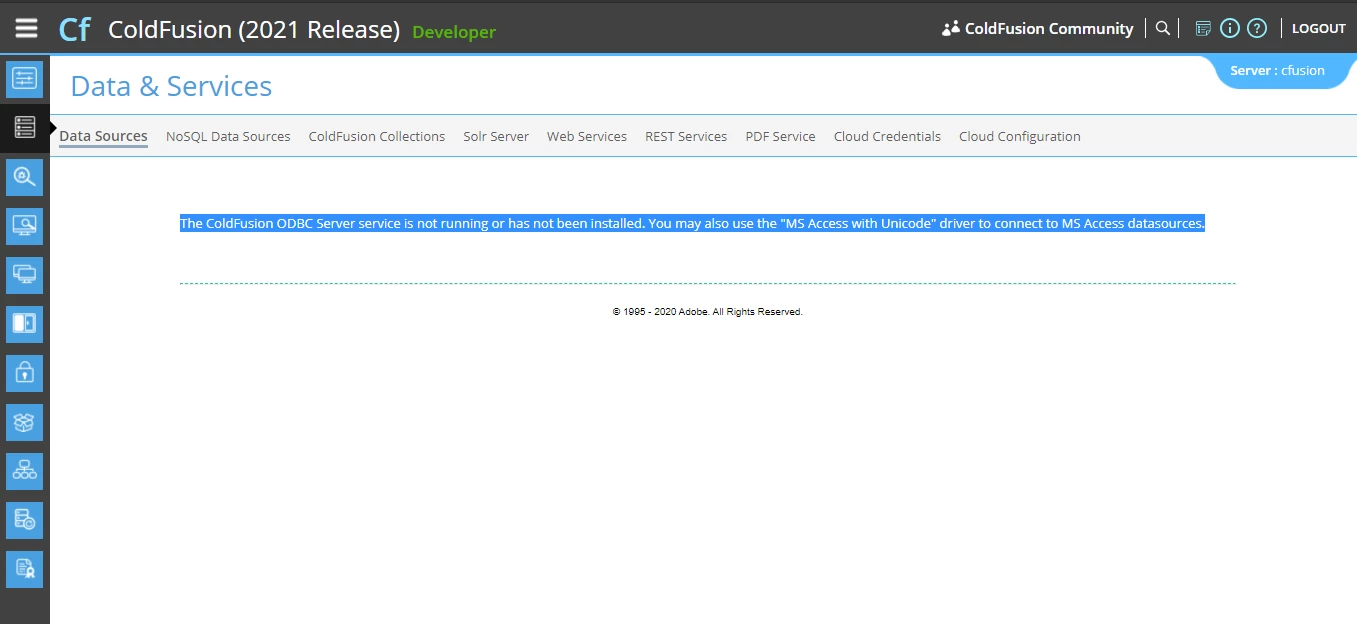
when i try to add new datasource through administrator page, i'm getting below error message.

NOTE:

Im using cold fusion 2021 version with coldfusion builder 2018

I tried to add microsoft access driver. Could you please let me know how to fix this issue?

"The ColdFusion ODBC Server service is not running or has not been installed. You may also use the "MS Access with Unicode" driver to connect to MS Access datasources."
    Correct answer BKBK

    Yes, I Agree with you.


    @tnsenthil and @enricomangia, the community's advice that you phase out Microsoft Access from your applications is good advice. MS Access has had its time.


    However, you may be stuck with MS Access for a while yet. For example, you may not have the resources or the time to migrate to a new database. But you have to keep delivering services. So what then?


    Nil desperandum! I have good news for you: Ucanaccess.


    With Ucanaccess, you will still be able to create MS Access datasources in ColdFusion 2021. I explained how you can do so, step-by-step, in a previous post: https://community.adobe.com/t5/coldfusion/coldfusion-2021-and-access-database/m-p/11735544  

    3 replies

    Inspiring
    July 25, 2022

    Hi all,


    Apologies for ressurecting an old thread, but I'd just like to add a comment to describe the method by which I managed to get the ODBC Client/Server services running correctly, so it may provide assistance to others in the future.


    1. In the CF 2021 Administrator, go to 'Package Manager'
    2. In Package Manager, expand the 'Installed Packages' section
    3. Select the 'ODBC' package and click 'Uninstall'
    4. In Package Manager, expand the 'Available Packages' section
    5. Select the 'ODBC' package and click 'Install'.


    I should add that I haven't used MS Access in many, many years, and I certainly don't advocate using ODBC when a JDBC option is available. The only reason I had to get those services working was to connect to an old legacy system where ODBC was the only option.


    Hope this helps someone in the future!


    Cheers,

    Mike.


    Participating Frequently
    May 25, 2023

    It work thanks

    Charlie Arehart
    Community Expert
    Community Expert
    February 3, 2021

    What Dave says may indeed get you going, but I won't be surprised if either you don't find the services, or you can't install them.


    First, some may notice when installing CF2021 that when you get to the page about installing optional services (like the .NET service, the Solr service, the PDFG service, and indeed the ODBC service), the CF2021 installer curiously grays out the ODBC one, so you can't turn them off or on. But after the install (via the full CF installer) you WILL find the "ColdFusion 2021 ODBC Agent" and Server services are installed--but you can't start them. Nor will they start from the command line.


    And I have not found any log in either the slserver54 folder (within CF, used by those services) nor in the CF logs folder that explains what's amiss. Perhaps someone else may have more luck digging for that.


    Some more confusion could arise from tnsenthil indicating that they are using CFBuilder. Note that when you install CFBuilder, it also offers an option to install CF (which gets implemented in a CF folder WITHIN CFBuilder rather than the traditional CF folder). And I am pretty sure that installer does NOT even offer to install the external services, like ODBC.


    That's why I say that you may not even find the ODBC services (and while you can find SOME such additional installers for CF at the downloads page, the ODBC service has never been offered there. Instead there are blog posts from Adobe over the years showing how to add the ODBC service via some CFML code calling the Admin API.)


    Is all this ugly as hell? Yes. Frustrating for those wanting to use ODBC? Yes. And it's clear that you want to use Access in particular--and by default it relies on ODBC. But as Dave and I have discussed with folks in other forum threads in recent weeks, ODBC's time has come and gone (really, before the turn of the century). Starting with CF6 (in 2002), all CF datasources OTHER than Access started using JDBC drivers instead.


    And while Adobe provides JDBC drivers for most DBs, they never did for Access. Are there JDBC drivers for Access? Yes there are, and you should really consider that instead. See the discussion in the other post from last month, where BKBK shared news of that and a post he's done in the past on it. He even offered an updated list of steps in a later post in that thread. (I don't know that Adobe will ever bundle that with CF. Really, Access should not be used with a multiuser application server like CF. Folks should be moving to anything else.) But for those who want it, the option is there.


    Let us know if any of this gets you going.

    /Charlie (troubleshooter, carehart. org)
    tnsenthil
    tnsenthilAuthor
    Participating Frequently
    February 3, 2021

    Thanks a lot Charlie for the detailed explanation.

    You are correct, As you said "the CF2021 installer curiously grays out the ODBC one, so you can't turn them off or on. But after the install (via the full CF installer) you WILL find the "ColdFusion 2021 ODBC Agent" and Server services are installed--but you can't start them. Nor will they start from the command line."


    Also My coldfusion 2021 Adminstrator page behave differently on each time when i loged in.(for exaple data sources link tab under DATA and SERVICES link is not selectable ).

    So, I uninstall both cf builder and coldfusion server and again re installed only coldfusion server 2021.

    This time i have noticed the ODBC Services are running properly and adminstrator pages also working fine without cold fusion builder( not sure about this). 

    so again i tried to create MS Acesses DSN, this time DSN created with connection verification Error,

    "Connection verification failed for data source: ASDSN
    java.sql.SQLException: [Macromedia][SequeLink JDBC Driver][SequeLink Server]The specified data source is not defined."

    Not sure what mistake i have made. Im still working on this. Thanks once again.

    tnsenthil
    tnsenthilAuthor
    Participating Frequently
    February 4, 2021

    I'm glad to see you've come around to letting go of Access, and that you regard the question as resolved.


    But I am surprised that you marked your last comment as the answer. For the question you raised, you had acknowledged above that my first one answered that. And I did also there  (like Dave later) recommend you move off Access.


    I don't press this point to "win" but sincerely to help someone else who may later find your question to see the more specific answer (and suggestion). Or do you disagree? 


    Yes, I Agree with you.

    Community Expert
    February 2, 2021

    This might be a dumb question, but have you installed the ODBC Services as part of your CF install? The Microsoft Access driver that is included from DataDirect (I think that's the vendor) requires them.


    Dave Watts, Eidolon LLC

    Dave Watts, Eidolon LLC
    tnsenthil
    tnsenthilAuthor
    Participating Frequently
    February 3, 2021

    Thanks Dave.

    I have installed ODBC Servicees as part of MyCF Install. but for some reason the services are not running. even if i start manualy .