


Copy link to clipboard
Copied
Hi
When i logout from my index Page then Login Page Open but when i click on back button in Browser Then Index Page open. I want once logout then not open other when clik on back button in Browser page like facebook..
I add my code Follow:
Application.cfc
<cfcomponent>
<cfset this.datasource = "TestingDataSource">
<cffunction name="onRequest">
<cfargument name="templatename"/>
<cflogin>
<cfif isdefined("form.submit")>
<cfif form.username is "admin" and form.password is "admin">
<cfloginuser name="#form.username#" password="#form.password#" roles="admin">
<cfelse>
<cfset request.errorMessage = "Incorrect Login,Please try again..">
<cfinclude template="login.cfm">
<cfreturn>
</cfif>
<cfelse>
<cfinclude template="login.cfm">
<cfreturn>
</cfif>
</cflogin>
<cfinclude template="#arguments.templatename#" >
</cffunction>
</cfcomponent>
index.cfm
<!DOCTYPE html>
<html>
<head>
<meta http-equiv="Content-Type" content="text/html"; charset="utf-8"/>
<title>
Untitled Document
</title>
</head>
<body>
<h1>Home Page</h1>
<h3>
Welcome to Photo Gallary.....
</h3>
<a href="logout.cfm">Logout</a>
</body>
</html>
login.cfm
<!DOCTYPE html>
<html>
<head>
<meta
http-equiv="Content-Type" content="text/html"; charset="utf-8"/>
<title>
Untitled Document
</title>
</head>
<body>
<cfform>
<table width="500" border="0">
<tr>
<td>
User Name:
</td>
<td>
<cfinput name="username" type="text" required="yes" message="Please enter Username"/>
</td>
</tr>
<tr>
<td>
Password:
</td>
<td>
<cfinput name="password" type="password" required="yes" message="Please enter password"/>
</td>
</tr>
<tr>
<td>
<cfinput type="submit" name="submit" value="submit">
</td>
</tr>
</table>
</cfform>
<cfif isdefined("request.errorMessage")>
<p style="color:red">
<cfoutput>#request.errorMessage#</cfoutput>
</p>
</cfif>
</body>
</html>
logout.cfm
<cflogout>
<cflocation url="login.cfm" >


 1 Correct answer


I have tested the latest code I gave you on Internet Explorer 11, Firefox 29 and Chrome. It works. When I press the back button, it does not take me back to index.cfm.
To test, use the latest version of Application.cfc (posted May 6, 2014 4:53 PM ). Use the following, new set of meta tags in index.cfm to prevent caching.
<meta http-equiv="cache-control" content="max-age=0" />
<meta http-equiv="cache-control" content="no-cache" />
<meta http-equiv="expires" content="0" />
<meta http-equiv="expires" co
...
 46
Replies
46
46
Replies
46

Copy link to clipboard
Copied
Done it above you say.....
this.sessionTimeOut = createTimeSpan(0,0,20,0);
if(current_page is "index.cfm" AND (isDefined("session.pageLastVisited") and session.pageLastVisited is "login.cfm"))
if(structKeyExists(form, "login") AND structKeyExists(form, "username") AND structKeyExists(form, "password"))
if(form.username EQ "admin" AND form.password EQ "password")
if(NOT session.loggedin AND NOT find("login.cfm", arguments.req))
if(NOT structIsEmpty(form) AND NOT structKeyExists(form, "login"))
if(session.loggedin AND structKeyExists(session, "formData") and isJSON(session.formData))
Still not work it.....
Not Work means when logout and click back button then the previous page(index.cfm) will open.....
Now????
Copy link to clipboard
Copied
Try these 3 meta tags for preventing caching. View the page source to confirm the meta tags are arriving at the browser.
index.cfm
<!DOCTYPE html>
<html>
<head>
<meta http-equiv="Content-Type" content="text/html"; charset="utf-8"/>
<!--- Tell browser not to cache this page, and to make fresh request of page each time --->
<meta http-equiv="Cache-Control" content="no-cache, no-store, must-revalidate">
<meta http-equiv="Pragma" content="no-cache">
<meta http-equiv="Expires" content="0">
<title>
Untitled Document
</title>
</head>
<body>
<h1>Home Page</h1>
<h3>
Welcome to Photo Gallary.....
</h3>
<a href="logout.cfm">Logout</a>
</body>
</html>
Copy link to clipboard
Copied
Please show us the current code of login.cfm and logout.cfm.
Copy link to clipboard
Copied
login.cfm
<h2>Please Login</h2>
<p>Use admin and password for your username and password.</p>
<cfif structKeyExists(url, "error")>
<p>You didn't enter the right credentials!</p>
</cfif>
<form action="index.cfm" method="post">
username: <input type="text" name="username"><br/>
password: <input type="password" name="password"><br/>
<input type="submit" name="login" value="Login">
</form>
logout.cfm
<cfset session.loggedin = "false">
<cflogout>
<cflocation url="login.cfm">
Copy link to clipboard
Copied
Thanks. Expect me back in a moment.
Copy link to clipboard
Copied
Shraddha,
Strip the code down to its bare essentials, and you will find that the suggestion I gave you works. For example, put the following 4 files in the same directory. Then open index.cfm in the browser, and click on the 'Logout' link. You will arrive at login.cfm. Clicking on the browser's back button will not take you back to index.cfm.
Application.cfc
component {
this.name="logindemo";
this.applicationTimeout = createTimespan(1,0,0,0);
this.sessionManagement="true";
this.sessionTimeOut = createTimeSpan(0,0,20,0);
this.loginStorage = "session";
public boolean function onRequestStart(string targetPage)
{
var current_page = listLast(arguments.targetPage, "/");
if(current_page is "index.cfm" AND (isDefined("session.pageLastVisited") AND session.pageLastVisited is "login.cfm"))
{
location(url="login.cfm");
}
session.pageLastVisited = current_page;
return true;
}
}
index.cfm
<!DOCTYPE html>
<html>
<head>
<meta http-equiv="Content-Type" content="text/html"; charset="utf-8"/>
<!--- Tell browser not to cache this page, and to make fresh request of page each time --->
<meta http-equiv="cache-control" content="no-cache">
<meta http-equiv="expires" content="Mon, 22 jul 2002 11:12:01 GMT"><!---Time in the past--->
<title>
Untitled Document
</title>
</head>
<body>
<h1>Home Page</h1>
<h3>
Welcome to Photo Gallary.....
</h3>
<a href="logout.cfm">Logout</a>
</body>
</html>
login.cfm
<h2>Please Login</h2>
<p>Use admin and password for your username and password.</p>
<cfif structKeyExists(url, "error")>
<p>You didn't enter the right credentials!</p>
</cfif>
<form action="index.cfm" method="post">
username: <input type="text" name="username"><br/>
password: <input type="password" name="password"><br/>
<input type="submit" name="login" value="Login">
</form>
logout.cfm
<cfset session.loggedin = "false">
<cflogout>
<cflocation url="login.cfm">
Copy link to clipboard
Copied
No its not work....When i open index.cfm in the browser, and click on the 'Logout' link. i will arrive at login.cfm. Clicking on the browser's back button will take me back to index.cfm...You can try it....
Copy link to clipboard
Copied
I had tried it beforehand. It worked.
Nevertheless, following your comment, I tested the solution on 3 browsers. I can confirm what you found. By coincidence, it works on my default browser, Internet Explorer, but fails on Chrome and Firefox.
What about the following alternative? I have designed it such that, during testing, you have to wait only 10 seconds for the login to time out. (In normal use, set idletimeout to the value of sessiontimeout, that is, 1200 seconds, or set no value at all)
Application.cfc
component {
this.name="logindemo";
this.applicationTimeout = createTimespan(1,0,0,0);
this.sessionManagement="true";
this.sessionTimeOut = createTimeSpan(0,0,20,0);
this.loginStorage = "session";
public boolean function onRequestStart(string targetPage)
{
var current_page = listLast(arguments.targetPage, "/");
if(current_page is "index.cfm" AND getAuthUser() is "") // User not yet logged in
{
if (NOT IsDefined("form.login")) // No login form submitted
{
cfinclude (template="login.cfm"); abort;
}
else {
// Put authentication validation code here
cflogin (idletimeout="10") // To enable quick testing, set timeout temporarily at low value of 10 seconds
{
cfloginuser (name = "#form.username#", password = "#form.password#", roles = "admin");
}
}
}
return true;
}
}
Copy link to clipboard
Copied
Its still not work i got error:
Variable CFLOGIN is undefined. | |
| The error occurred in C:/ColdFusion10/cfusion/wwwroot/demo/Login/TestLogin/Application.cfc: line 41 | |
41 : if(cflogin (idletimeout="10")) // To enable quick testing, set timeout temporarily at low value of 10 seconds 42 : { 43 : cfloginuser (name = "#cflogin.name#", password = "#cflogin.password#", roles = "admin"); | |
Copy link to clipboard
Copied
Variable CFLOGINUSER is undefined. | |
| The error occurred in C:/ColdFusion10/cfusion/wwwroot/demo/Login/TestLogin/Application.cfc: line 43 | |
| |
Copy link to clipboard
Copied
Sorry. That was in ColdFusion 11. Here is a more suitable syntax:
<cfcomponent>
<cfset this.name="logindemo">
<cfset this.applicationTimeout = createTimespan(1,0,0,0)>
<cfset this.sessionManagement="true">
<cfset this.sessionTimeOut = createTimeSpan(0,0,20,0)>
<cfset this.loginStorage = "session">
<cffunction name="onRequestStart">
<cfargument name = "targetPage" type="String" required="true">
<cfset var current_page = listLast(arguments.targetPage, "/")>
<cfif current_page is "index.cfm" AND getAuthUser() is ""> <!--- User not yet logged in --->
<cfif NOT IsDefined("form.login")> <!--- No login form submitted --->
<cfinclude template="login.cfm">
<cfabort>
<cfelse>
<!--- Put authentication validation code here --->
<cflogin idletimeout="10"> <!--- To enable quick testing, set timeout low at 10 seconds --->
<cfloginuser name = "#form.username#" password = "#form.password#" roles = "admin">
</cflogin>
</cfif>
</cfif>
<cfreturn true>
</cffunction>
</cfcomponent>
Copy link to clipboard
Copied
Still its not work....When i login and open index.cfm in the browser, and click on the 'Logout' link. i will arrive at login.cfm. Clicking on the browser's back button will take me back to index.cfm...You can try it....
Copy link to clipboard
Copied
I have tested the latest code I gave you on Internet Explorer 11, Firefox 29 and Chrome. It works. When I press the back button, it does not take me back to index.cfm.
To test, use the latest version of Application.cfc (posted May 6, 2014 4:53 PM ). Use the following, new set of meta tags in index.cfm to prevent caching.
<meta http-equiv="cache-control" content="max-age=0" />
<meta http-equiv="cache-control" content="no-cache" />
<meta http-equiv="expires" content="0" />
<meta http-equiv="expires" content="Tue, 01 Jan 1980 1:00:00 GMT" />
<meta http-equiv="pragma" content="no-cache" />
Copy link to clipboard
Copied
Thanks for your reply...
I add this meta tag in index.cfm
<meta http-equiv="cache-control" content="max-age=0" />
<meta http-equiv="cache-control" content="no-cache" />
<meta http-equiv="expires" content="0" />
<meta http-equiv="expires" content="Tue, 01 Jan 1980 1:00:00 GMT" />
<meta http-equiv="pragma" content="no-cache" />
You say use latest version of Application.cfc (posted May 6, 2014 4:53 PM ) ,But Application.cfc (posted May 6, 2014 4:53 PM ) its not exist.....
You mean you tell about Application.cfc(May 6, 2014 7:53 AM) , then i already use it....
But still not works......
Please Show me your code file.....(index.cfm,Application.cfc,login.cfm,logout.cfm)
Copy link to clipboard
Copied
The forum site apparently takes account of time-zone, hence the difference in time. Anyway, put the following 4 files in the same directory, and test with them.
I have tested with these files on the latest versions of Internet Explorer, Firefox and Chrome. The code works as expected, in every case. After logout, the user cannot go back to index.cfm by means of the back button.
Application.cfc
<cfcomponent>
<cfset this.name="logindemo">
<cfset this.applicationTimeout = createTimespan(1,0,0,0)>
<cfset this.sessionManagement="true">
<cfset this.sessionTimeOut = createTimeSpan(0,0,20,0)>
<cfset this.loginStorage = "session">
<cffunction name="onRequestStart">
<cfargument name = "targetPage" type="String" required="true">
<cfset var current_page = listLast(arguments.targetPage, "/")>
<cfif current_page is "index.cfm" AND getAuthUser() is ""> <!--- User not yet logged in --->
<cfif NOT IsDefined("form.login")> <!--- No login form submitted --->
<cfinclude template="login.cfm">
<cfabort>
<cfelse>
<!--- Put authentication validation code here --->
<cflogin idletimeout="10"> <!--- To enable quick testing, set timeout low at 10 seconds --->
<cfloginuser name = "#form.username#" password = "#form.password#" roles = "admin">
</cflogin>
</cfif>
</cfif>
<cfreturn true>
</cffunction>
</cfcomponent>
index.cfm
<!DOCTYPE html>
<html>
<head>
<meta http-equiv="Content-Type" content="text/html"; charset="utf-8"/>
<!--- Tell browser not to cache this page, and to make fresh request of page each time --->
<!--- First version --->
<!--- <meta http-equiv="cache-control" content="no-cache">
<meta http-equiv="expires" content="Mon, 22 jul 2002 11:12:01 GMT"> ---><!---Time in the past--->
<!--- Second version --->
<!--- <meta http-equiv="Cache-Control" content="no-cache, no-store, must-revalidate">
<meta http-equiv="Pragma" content="no-cache" />
<meta http-equiv="Expires" content="Mon, 22 jul 2002 11:12:01 GMT"> --->
<!--- Third version --->
<meta http-equiv="cache-control" content="max-age=0" />
<meta http-equiv="cache-control" content="no-cache" />
<meta http-equiv="expires" content="0" />
<meta http-equiv="expires" content="Tue, 01 Jan 1980 1:00:00 GMT" />
<meta http-equiv="pragma" content="no-cache" />
<title>
Untitled Document
</title>
</head>
<body>
<h1>Home Page</h1>
<h3>
Welcome to Photo Gallary.....
</h3>
<cfif NOT (getAuthUser() is "")>
<p>User logged in: <cfoutput>#getAuthUser()#</cfoutput></p>
</cfif>
<a href="logout.cfm">Logout</a>
</body>
</html>
login.cfm
<h2>Please Login</h2>
<p>Use admin and password for your username and password.</p>
<cfif structKeyExists(url, "error")>
<p>You didn't enter the right credentials!</p>
</cfif>
<form action="index.cfm" method="post">
username: <input type="text" name="username"><br/>
password: <input type="password" name="password"><br/>
<input type="submit" name="login" value="Login">
</form>
logout.cfm
<cflogout>
<cflocation url="login.cfm">
Copy link to clipboard
Copied
Its not work on my platform...I don't know , why its not work????
After logout, the user can go back to index.cfm by means of the back button.
Copy link to clipboard
Copied
We shall find out why. What browser do you test with? Could you also show us your test code for Application.cfc, index.cfm, login.cfm, and logout.cfm?
Copy link to clipboard
Copied
Browser:Google Chrome
Coldfusion Builder2
Coldfusion10
Application.cfc
<cfcomponent>
<cfset this.name="logindemo">
<cfset this.applicationTimeout = createTimespan(1,0,0,0)>
<cfset this.sessionManagement="true">
<cfset this.sessionTimeOut = createTimeSpan(0,0,20,0)>
<cfset this.loginStorage = "session">
<cffunction name="onRequestStart">
<cfargument name = "targetPage" type="String" required="true">
<cfset var current_page = listLast(arguments.targetPage, "/")>
<cfif current_page is "index.cfm" AND getAuthUser() is ""> <!--- User not yet logged in --->
<cfif NOT IsDefined("form.login")> <!--- No login form submitted --->
<cfinclude template="login.cfm">
<cfabort>
<cfelse>
<!--- Put authentication validation code here --->
<cflogin idletimeout="10"> <!--- To enable quick testing, set timeout low at 10 seconds --->
<cfloginuser name = "#form.username#" password = "#form.password#" roles = "admin">
</cflogin>
</cfif>
</cfif>
<cfreturn true>
</cffunction>
</cfcomponent>
index.cfm
<!DOCTYPE html>
<html>
<head>
<meta http-equiv="Content-Type" content="text/html"; charset="utf-8"/>
<!--- Tell browser not to cache this page, and to make fresh request of page each time --->
<!--- First version --->
<!--- <meta http-equiv="cache-control" content="no-cache">
<meta http-equiv="expires" content="Mon, 22 jul 2002 11:12:01 GMT"> ---><!---Time in the past--->
<!--- Second version --->
<!--- <meta http-equiv="Cache-Control" content="no-cache, no-store, must-revalidate">
<meta http-equiv="Pragma" content="no-cache" />
<meta http-equiv="Expires" content="Mon, 22 jul 2002 11:12:01 GMT"> --->
<!--- Third version --->
<meta http-equiv="cache-control" content="max-age=0" />
<meta http-equiv="cache-control" content="no-cache" />
<meta http-equiv="expires" content="0" />
<meta http-equiv="expires" content="Tue, 01 Jan 1980 1:00:00 GMT" />
<meta http-equiv="pragma" content="no-cache" />
<title>
Untitled Document
</title>
</head>
<body>
<h1>Home Page</h1>
<h3>
Welcome to Photo Gallary.....
</h3>
<cfif NOT (getAuthUser() is "")>
<p>User logged in: <cfoutput>#getAuthUser()#</cfoutput></p>
</cfif>
<a href="logout.cfm">Logout</a>
</body>
</html>
login.cfm
<h2>Please Login</h2>
<p>Use admin and password for your username and password.</p>
<cfif structKeyExists(url, "error")>
<p>You didn't enter the right credentials!</p>
</cfif>
<form action="index.cfm" method="post">
username: <input type="text" name="username"><br/>
password: <input type="password" name="password"><br/>
<input type="submit" name="login" value="Login">
</form>
logout.cfm
<cflogout>
<cflocation url="login.cfm">
Copy link to clipboard
Copied
My test works on Chrome. My current test files are the same as yours, excepting index.cfm. My index.cfm is as follows:
<!DOCTYPE html>
<html>
<head>
<meta http-equiv="Content-Type" content="text/html; charset=utf-8" />
<!--- Tell browser not to cache this page, and to make fresh request of page each time --->
<meta http-equiv="Cache-Control" content="no-cache, no-store, must-revalidate" />
<meta http-equiv="Pragma" content="no-cache" />
<meta http-equiv="Expires" content="Mon, 22 jul 2002 11:12:01 GMT" /><!---Time in the past--->
<title>
Untitled Document
</title>
</head>
<body>
<h1>Home Page</h1>
<h3>
Welcome to Photo Gallary.....
</h3>
<cfif NOT (getAuthUser() is "")>
<p>User logged in: <cfoutput>#getAuthUser()#</cfoutput></p>
</cfif>
<p><a href="logout.cfm">Logout</a></p>
</body>
</html>
In my test, I start by opening index.cfm in Chrome. The page shows no logged in user. I click on the link Logout.

That takes me to the page login.cfm. I log in with username BKBK and password 12345, and click on the Login button.
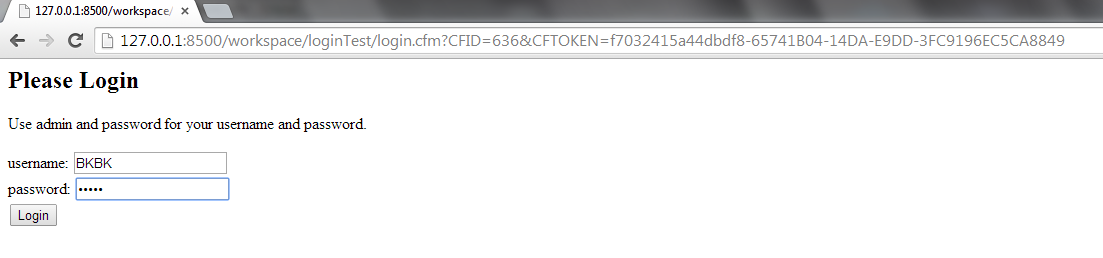
That opens the page index.cfm. I can see that BKBK is now logged in. I then click on the Logout link.
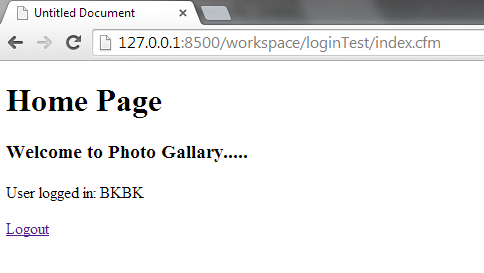
The page login.cfm opens.

When I click on the back button, Chrome displays an error page.


Copy link to clipboard
Copied
BKBK wrote:
My test works on Chrome.
When I click on the back button, Chrome displays an error page.
When you press F5/Refresh the webpage you will be shown as User Logged in:BKBK once againn. Because browser stores the past requests in history and if the past request is a POST it asks you whether to resubmit the form with the stored past post request. This is common browser behavior. So, need to perform : Post + Redirect to self
Form on Page1 posts the data to Page2, Page2 processes the data and does what needs to be done, and then it does a HTTP redirect on itself. This way the last "action" the browser remembers is a simple GET on page2, so the form is not being resubmitted upon F5.
http://en.wikipedia.org/wiki/Post/Redirect/Get
http://stackoverflow.com/questions/3923904/preventing-form-resubmission

I know this is quite an old thread however I am a follower of your BKBK. Need your inputs/suggestions!!!


Copy link to clipboard
Copied
Vishu#13 wrote:
When you press F5/Refresh the webpage you will be shown as User Logged in:BKBK once againn. Because browser stores the past requests in history and if the past request is a POST it asks you whether to resubmit the form with the stored past post request. This is common browser behavior. So, need to perform : Post + Redirect to self
Form on Page1 posts the data to Page2, Page2 processes the data and does what needs to be done, and then it does a HTTP redirect on itself. This way the last "action" the browser remembers is a simple GET on page2, so the form is not being resubmitted upon F5.
http://en.wikipedia.org/wiki/Post/Redirect/Get
http://stackoverflow.com/questions/3923904/preventing-form-resubmission
Thanks, Vishu. What you describe actually confirms my point. The issue is that Shraddha was unable in her test to get the browser to behave in the way you and I have observed.
Copy link to clipboard
Copied
<meta http-equiv="Content-Type" content="text/html"; charset="utf-8"/>
This is a mistake that has been repeated ever since the beginning. Correct is:
<meta http-equiv="Content-Type" content="text/html;charset=utf-8"/>

-
- 1
- 2

Get ready! An upgraded Adobe Community experience is coming in January.
Learn more
 AdChoices