


Participating Frequently
December 12, 2025
Answered

Solution for "axis package is not installed" error?

  • December 12, 2025
  • 1 reply
  • 289 views

We have an application (CF2013 running on Win2019)  that is failing with the error pasted below 


"Error","ajp-nio-127.0.0.1-8022-exec-8","12/03/25","15:42:36",SIRdmini11_25_p1,"The axis package is not installed.You can install package through CLI package manager (D:/ColdFusion2023/cfusion/bin/cfpm.bat) by running the command : install axis.


It is stating to install the axis package. But according to the cfpm.bat list.. its says that the axis package is installed(see below).   This package and this version of the package is installed on a different ColdFusion server of ours and the application is working just fine there.  Additionally I have cleared the Felix-cache, and that did not fix the error.  Any suggustions?  Thanks! 🙂
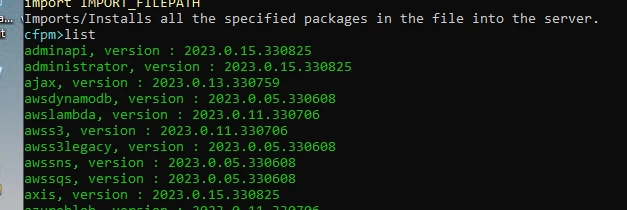
coldfusionerror.png

    Correct answer BILL314613570ssy

    Hi,

    well just prior to reading your post, I had just re-copied all of the packages into the bundles directory, deleted the felix-cache and was restarting ColdFusion.  This had fixed the problem. I am betting your solution probably would have worked as well.  Thanks!

    1 reply

    BKBK
    Community Expert
    Community Expert
    December 12, 2025

    Perhaps it was marked for installation, but something went wrong during installation.  Try the following steps, which helped to solve a similar package-installation issue in ColdFusion 2023:


    1. Stop ColdFusion 2023;
    2. Open the Command Prompt (cmd) as Administrator;
    3. Use the DOS cd command to navigate to  {CF2023_HOME_DIR}/cfusion/bin;
    4.  Type cfpm and press ENTER. You should get ColdFusion's package manager prompt cfpm;
    5.  Run the command uninstall all
      BKBK_4-1765463887506.png
    6. Wait for the CFPM tool to finish uninstalling all the packages.
      Then, leaving the Command Prompt window open, restart the ColdFusion service;
    7.  Run the CFPM command install all

    BKBK_2-1765463216769.png

    8.  Note down the name of any package that the CFPM tool says has not been installed or could not be installed.
    Keep running the command install all till the result is either an irreversible error or ColdFusion tells you that "All the packages are already installed".

    9. If any packages were not installed or if there were errors, then share that with the forum. Otherwise, restart the ColdFusion 2023 service.
    10. Test by running the code  - or by doing whatever it is that you did - that caused the error.

    Participating Frequently
    December 12, 2025

    Ok, that makes, I will try this and get back to you!  Thanks so much 🙂