
November 9, 2010
Answered

Displaying URL by concatenating CGI variables

  • November 9, 2010
  • 1 reply
  • 1544 views

Good morning,

I have been trying to display the url of the website I am working on.

I wanted to declare the url as a CGI variable:

For example:

<cfset url ='http://' & #CGI.SERVER_NAME# & #CGI.SERVER_PORT# & #CGI.SCRIPT_NAME#>

And then call the variable "url" to display the url of the page.

For example:

<cfoutput>This URL is : #url#</cfoutput><p>

My code does not seem to work. This is the error message I am receiving:
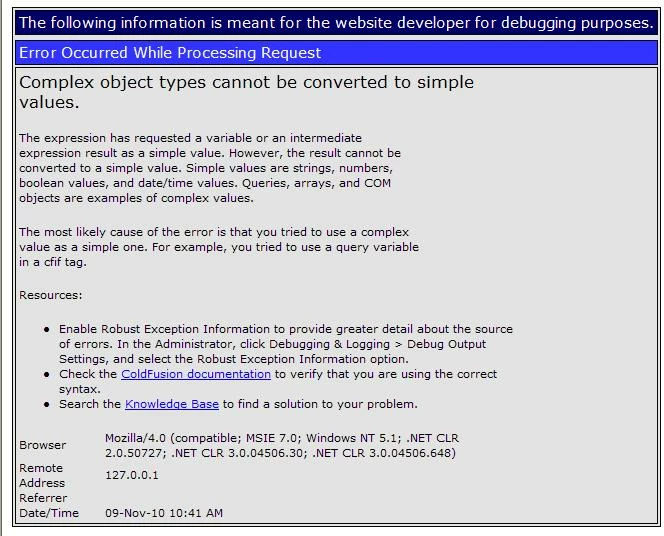
I know I can use this code:

<cfoutput>URL of this template: http://#CGI.SERVER_NAME#:#CGI.SERVER_PORT##CGI.SCRIPT_NAME#</cfoutput><p>

However, I want to be able to better manage my code by keeping with the other variables. And I am little apprehensive on using HTTP_REFERER because it is not display anything on the page.  The problem is due to some browser restrictions. Therefore, I would rather use something else that I can guarantee will display regardless of the browser being used by the user.

Does anyone have any ideas how to properly concatenate the CGI variables so I can used it to initialize the url variable?

Thanks for the help!!!

    This topic has been closed for replies.
    Correct answer ilssac

    URL is a reserved word|variable in ColdFusion.

    You just need to use something different.  The URL scope is where ColdFusion will put any get (I.E. query-string OR URL) data passed in with a request.  And it is a structure (in other words a complex) variable so you can't just output #url#.

    1 reply

    ilssac
    ilssacCorrect answer
    Inspiring
    November 9, 2010

    URL is a reserved word|variable in ColdFusion.

    You just need to use something different.  The URL scope is where ColdFusion will put any get (I.E. query-string OR URL) data passed in with a request.  And it is a structure (in other words a complex) variable so you can't just output #url#.

    November 9, 2010

    Thanks for the help. That was simple enough. I renamed "url" to "current_url" it worked!!!

    That certainly went right over my head because the Coldfusion Builder did not pick it up as a reserved word when I declared.

    Best regards,

    garjuyen1107

    WolfShade
    Legend
    November 11, 2010

    This is complex for the simple task it's doing, but I actually prefer it to the other methods I've seen.

    <cffunction name="GetURL" output="No" access="public">
         <cfscript>
              variables.theURL = "http";
              if(cgi.https eq "on") {
                   variables.theURL = "https";
                   }
              variables.theURL &= "://" & cgi.server_name;
              if(cgi.server_port neq 80 AND cgi.server_port neq 443 AND cgi.server_port neq 446) {
                   variables.theURL &= ":" & cgi.server_port;
                   }
              variables.theURL &= getPageContext().getRequest().getRequestURI();
              if(len(cgi.query_string) gt 0) {
                   variables.theURL &= "?" & cgi.query_string;
                   }
              return variables.theURL;
         </cfscript>
    </cffunction>
    <cfset thisURL = GetURL() />