Answered
HOW TO MOVE MONITOR PROFILE INTO El CAPITAN 10.11
i'm stumped
macOS El Capitan 10.11.6
how does one drag a monitor profile into System> Library> ColorSync> Profiles
so i can use it in Photoshop CS6
or what am i missing

i'm stumped
macOS El Capitan 10.11.6
how does one drag a monitor profile into System> Library> ColorSync> Profiles
so i can use it in Photoshop CS6
or what am i missing
On OSX monitor profiles should be saved in:
StartupDrive/Library/ColorSync/Profiles/Displays
You have to select the correct profile (which should be the profile generated during the most recent calibration) in System Preferences>Displays>Color for it to be used in Adobe’s color management.
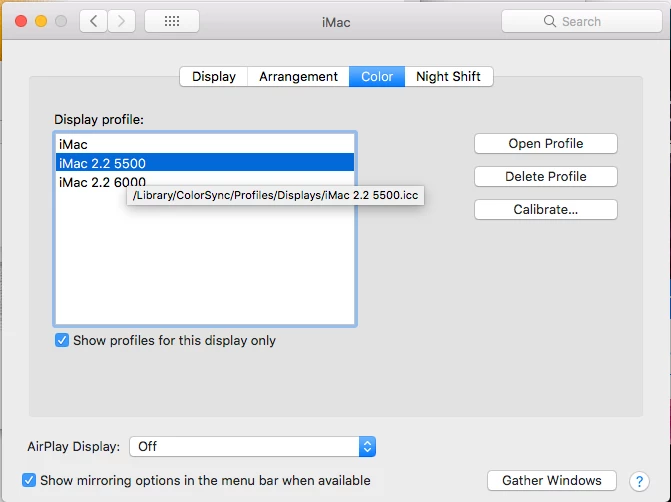
Color managed Adobe applications then automatically use the selected system monitor profile to convert color for your display—you shouldn’t normally use a monitor profile as an editing space in Photoshop. When you edit an Adobe RGB profiled document there is a conversion from AdobeRGB to Lab to your monitor profile for the soft proof display. Same with a CMYK, if the document is assigned GRACol Coated, there is a conversion from the source GRACol profile to Lab to your RGB monitor profile.
Already have an account? Login
Enter your E-mail address. We'll send you an e-mail with instructions to reset your password.
 AdChoices