


- Home
- Color Management
- Discussions
- Re: Syncronized colors still don't match?
- Re: Syncronized colors still don't match?
Syncronized colors still don't match?

Copy link to clipboard
Copied
I started this question in the illustrator forums, but couldn't figure out an answer. I was told to relay the info here.
Original Discussion:
Exported Colors don't match Preview Colors - RGB
My Problem:
Colors don't match in different adobe programs (even though color settings are synced, color modes are the same, and they are being viewed on the same monitor).
This video displays my problem, although it shows older info than the images below (You may need to use the chrome browser if you aren't already):
Color_Problems.mp4 - Google Drive
These images show the details (I shared these after I made the video, so the info is more updated)

Photoshop color settings:
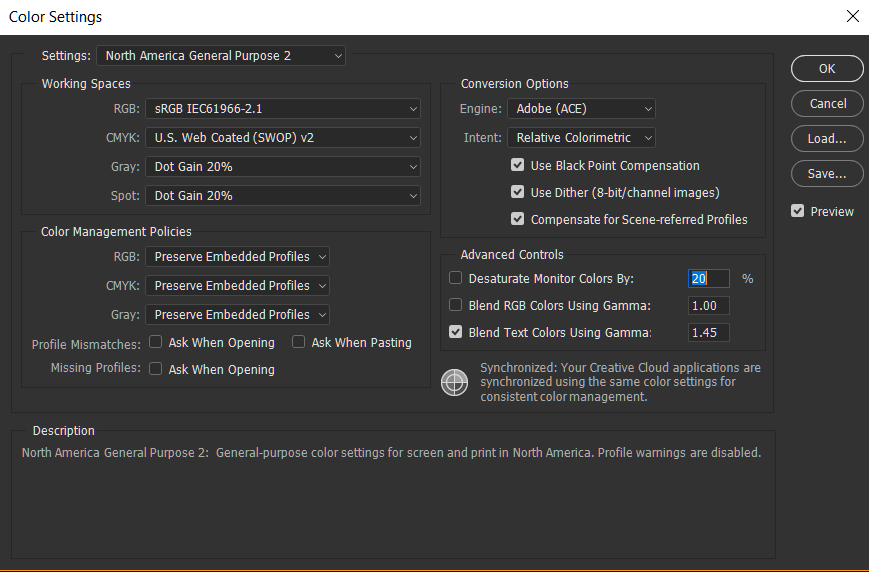
Illustrator color settings:

Any ideas? Why aren't the colors the same?


 3
Replies
3
3
Replies
3


Copy link to clipboard
Copied
See Photoshop thread: Syncronized colors still don't match?

Copy link to clipboard
Copied
What is the Rendering Intent in Illustrator?

Copy link to clipboard
Copied
As explained in the other thread I had done similar tests, which resulted as well
in appearance errors in Illu.
Working space in PhS is sRGB, working space in Illu is sRGB and the file is in
sRGB with profile (TIFF) or without (PNG-8, PNG-24). Therefore no rendering
intent is involved.
Furtheron, in my opinion, for RGB-RGB-conversions rendering intents generally
are not applied, as tested by PhS.
Best regards --Gernot Hoffmann

Find more inspiration, events, and resources on the new Adobe Community
Explore Now
 AdChoices