
Inspiring
August 10, 2020
Answered

Adobe profile list in Lightroom does not match profiles in ../Library/Colorsync/Profiles

  • August 10, 2020
  • 7 replies
  • 1726 views
I have a student who has run into a strange anomaly in Lightroom Classic and Photoshop CC 2020 in Mac Osx (all are current versions).  I'm posting for him because he is not familiar enough with the way ICC profiles are handled OSX or Adobe apps to word this question properly.
 
The student added a new paper profile to ../Library/Colorsync/Profiles/ but it is not showing up in Lightroom, Photoshop or the Canon Print application that came with his Canon Imageprograf 2100.

In fact, the list of available profiles that appears when you select Other from the profile drop-down menu in Print or Softproof, does not match the list of profiles in the Colorsync folder. He had previously deleted some profiles for a printer he no longer owns but they still show up in Lightroom's list (as well as the other apps).

We have restarted all the relevant applications and restarted the computer. No resolution.

We also downloaded the profile again using a different browser to rule out profile corruption during download and we copied the profile to both the main profile folder in ../Library/Colorsync/Profiles and to ..[user]/Library/Colorsync/Profiles.  Neither solved the problem.

I suspect that this is an OSX issue given that the problem exists in both Adobe and Canon software but I thought readers of this forum might have run into the issue and found a solution.

Thanks in advance for your help.

Alec
 
 
    This topic has been closed for replies.
    Correct answer NB, colourmanagement

    Hi,

    Could it be that some of the installed ICC profiles have different internal (shown in applications) and external names (as shown in the finder. Its not entirely unusual for a paper company supplying a profile to simplify the internal name.

    Colorsync utility can list all the profiles names. 


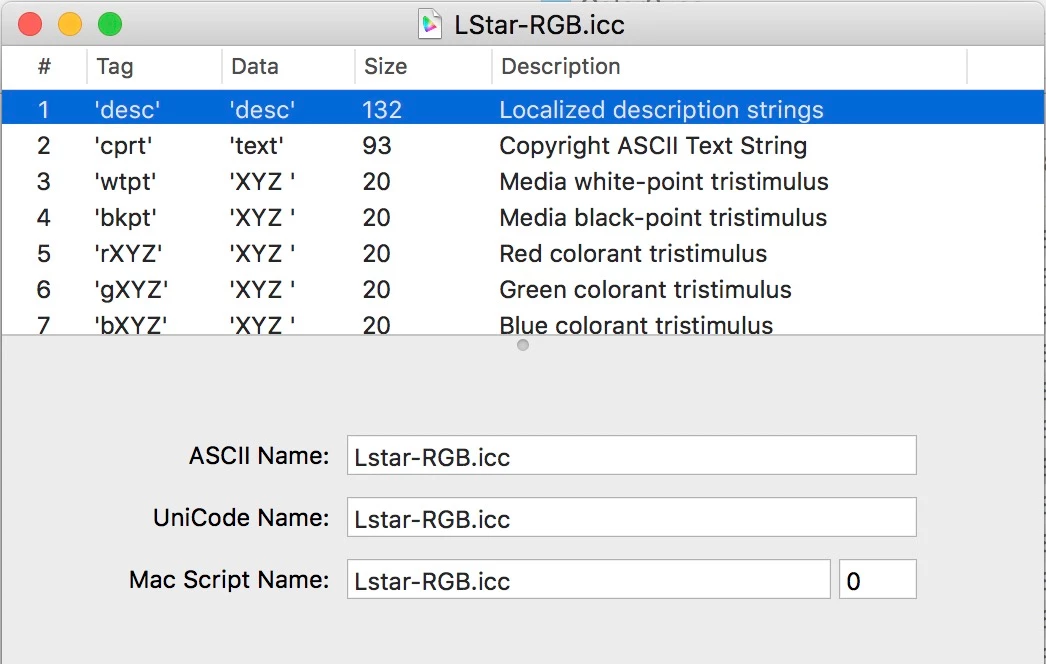
    As you can see below (in the colorsync utility) a profile can have various names, apologies that I coiuld not put my hand on one with differign names but at leasst you can see here how to check

    Open the offending profiole by double clicking it

    click on "Localised Description Strings" as below


    I hope this helps

    if so, please "like" my reply and if you're OK now, please mark it as "correct", so that others who have similar issues can see the solution

    thanks

    neil barstow, colourmanagement.net :: adobe forum volunteer

    [please do not use the reply button on a message within the thread, only use the blue reply button at the top of the page, this maintains the original thread title and chronological order of posts]

    7 replies

    adannAuthor
    Inspiring
    August 22, 2020

    Update on this problem.  We heard back from Hahnemuele support and it turns out the profiles for the Pro 2000 and Pro 2100 are the same but the internal name for the 2100 profiles didn't get changed when they copied the 2000 files and renamed them for the 2100.  Glad they clarified the issue.

    NB, colourmanagement
    Community Expert
    Community Expert
    August 23, 2020

    Yeah, me too

    What a shame they were too lazy to change the profile names properly, though, there are likely lots of users out there scratching their heads. If it's not laziness, then what they did reveals a lack of basic understanding of ICC profile structure. i.e. you can't just change the file-name, because applications display the internal profile name.


    Chromix Colorthink SW (and others) includes 'profile renamer' and that deal with this properly.


    thanks for letting us know

    neil barstow, colourmanagement.net :: adobe forum volunteer

    [please do not use the reply button on a message within the thread, only use the blue reply button at the top of the page, this maintains the original thread title and chronological order of posts]

    NB, colourmanagement
    Community Expert
    Community Expert
    August 14, 2020

    adann

    thanks for the appreciation

    I'm glad that dual naming was the issue 


    thanks

    neil barstow, colourmanagement.net :: adobe forum volunteer

    [please do not use the reply button on a message within the thread, only use the blue reply button at the top of the page, this maintains the original thread title and chronological order of posts]

    adannAuthor
    Inspiring
    August 11, 2020

    I want to post the problem profile to this thread but don't see a way to do it.  

    This is the Edit menu I see:


    This is the message I get when I try to upload the ICC file (or zip file with the profile):


    Mildly weird that the Adobe Color Management forum won't let you upload an ICC profile but that's life.


    Andrew, I will email you the profile.  You may not remember but 3 or 4 years ago you led me out of the color management desert to the revelation of matching paper color and brightness when building my monitor profile (with a nod to Solux for the illumination of the paper).  Life has been better since.


    Thanks for your help.


    Alec

    adannAuthor
    Inspiring
    August 11, 2020

    Thanks, Andrew.  The Colorsync utility set me on the path to solving this with help from Neil on one issue to focus on.


    I don't see a way to add the profile in this reply so will add that separately but there's a screen shot of the Colorsync info on it in my answer to Neil. 


    While running Profile First Aid I uncovered something that I want to share with those who find this thread later.  You know this stuff but it took me a couple of hours digging around via Google to find it so hopefully I can save others the work.


    We ran Profile First Aid (Verify process followed by the Repair process) and got a lot of errors corrected, but there were a couple of dozen that couldn't be repaired because the profiles were locked.  The profiles where this was the case were often ones that appear to have been installed with OSX or by Adobe (most of the profiles in Recommended, in fact).


    Following a recommendation in another forum, I attempted to change the Sharing status of one of the files with errors by selecting Get Info for the file in Finder (while logged in as an Administrator).  Sharing is at the bottom of the Get Info window.

    When I attempted to change the permission for Everyone to Read and Write, I got an error message:

    I'm logged in as an Administrator so why can't I change it?  Turns out you have to click the little lock icon in the lower right to unlock the sharing option.


    Once I'd made the change and reset the lock, I reran Repair and the file was corrected.  I've read that you can avoid having to reset permissions for each file by setting them at the folder level but that didn't work for me and I'd invested enough hours in this that I didn't take time to resolve that approach.


    Again, thanks for your help.


    Alec

    rob day
    Community Expert
    Community Expert
    August 11, 2020

    Does it show as installed in ColorSync Utility’s file browser?


    adannAuthor
    Inspiring
    August 11, 2020

    Rob,


    I got your response after I'd resolved the issue (except for the Hahnemuele end).  See my responses to Andrew and Neil for how I resolved it.


    You are correct -- inspection of the profile in Colorsync was the path to an answer.


    It's a bit surprising that Hahnemuele didn't do the same before publishing the profile but mistakes happen and we just have to find a way to move past them.


    Thanks for your help.


    Alec

    NB, colourmanagement
    Community Expert
    NB, colourmanagementCommunity ExpertCorrect answer
    Community Expert
    August 11, 2020

    Hi,

    Could it be that some of the installed ICC profiles have different internal (shown in applications) and external names (as shown in the finder. Its not entirely unusual for a paper company supplying a profile to simplify the internal name.

    Colorsync utility can list all the profiles names. 


    As you can see below (in the colorsync utility) a profile can have various names, apologies that I coiuld not put my hand on one with differign names but at leasst you can see here how to check

    Open the offending profiole by double clicking it

    click on "Localised Description Strings" as below


    I hope this helps

    if so, please "like" my reply and if you're OK now, please mark it as "correct", so that others who have similar issues can see the solution

    thanks

    neil barstow, colourmanagement.net :: adobe forum volunteer

    [please do not use the reply button on a message within the thread, only use the blue reply button at the top of the page, this maintains the original thread title and chronological order of posts]

    adannAuthor
    Inspiring
    August 11, 2020

    Great suggestion, Neil.


    That enabled me to sort out the problem.  The issue indeed turned out to be a mismatch between the filename and the internal profile name.  See screenshot below.  The profile filename says 2100 but the internal name (which is what appears in applications -- adding this for others reading later) says 2000.  See Name and Path in the Profile information below.  


    We downloaded the profile for the Pro 2000 and the name matches there, but it's confusing for Hahnemuele to show downloads for two different printers (Pro 2100/Pro 2000) but have the profiles carry the same internal name.


    We've contacted Hahnemuele support to find out which profile we should be using – that dumb question being a more polite way of asking if they have a naming error to fix.


    Again, thanks for your help.


    For those reading this thread, please also see my response to Andrew.  Good stuff there too.


    TheDigitalDog
    Inspiring
    August 10, 2020

    You sure it's RGB? CMYK will not fly in LR but should in PS of course.

    Run Profile First Aid in the ColorSync utility; errors?

    Author “Color Management for Photographers" & "Photoshop CC Color Management/pluralsight"
    adannAuthor
    Inspiring
    August 11, 2020

    Definitely RGB.  The profile was downloaded from Hahnemule's site with the Canon 2100 selected.


    We opened the profile in the Color Sync utility but that was just to read the profile (trying to see if the target printer was specified).  I don't know much about the Color Sync utility.  How do you use it to verify a profile?


    Alec

    TheDigitalDog
    Inspiring
    August 11, 2020

    The CS utility has the Profile First Aid option which I think you should run.


    Author “Color Management for Photographers" & "Photoshop CC Color Management/pluralsight"