Same thing happened to me. I think I found it on another thread:
Duplicate ebook in the adobe digital library in the cloud
Yes the problem is that every times you click or open the .acsm file you request the file to be copied into your library
I played around with it and found that to be true, but also another thing was creating duplicates. Apparently, Adobe thinks people will remember to open ADE in order to find and read an ebook. If you don't, things get buggy. Here's my debriefing.
You can open your ebook by:
- Opening ADE first and clicking it from the library.
- Clicking the .acsm file in Windows Explorer.
- Clicking the .pdf file in Windows Explorer.
Here's what happens with each of those:
- Opening ADE first and clicking it from the library
- Normal reading with bookmarking feature.
- Clicking the .acsm file
- Downloads another copy of the book to the My Digital Editions folder on your hard drive.
- Creates another occurrence in the ADE library.
- Normal reading with bookmark feature.
- Clicking the .pdf file
- If there's a digital copyright authorization on the book, Adobe will ask permission to open the book in ADE.
- If you say yes, the book opens with normal reading, but bookmarks disabled.
- When you try to leave the book, either to close it or view your ADE library, you trigger ADE's copying fetish:
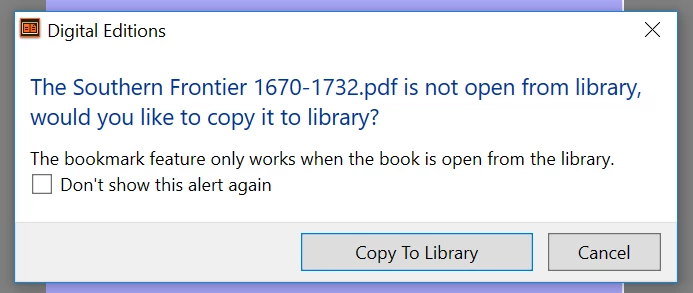
- If you click Copy to Library, you'll get duplicates, both in the library AND on your hard drive in the Digital Editions folder.
- If you click Cancel, the program will proceed with your previous request to view the library or close the program.
I hope this helps save someone a few maddening hours. Unfortunately, I don't know what to say to the poor soul whose entire ADE library (3000+ books) somehow duplicates repeatedly.



 AdChoices