


- Home
- Digital Editions
- Discussions
- Error when returning library books
- Error when returning library books

Copy link to clipboard
Copied
Hi, I managed to return a few ebooks to my library using Adobe Digital Editions without problems but many of the books I try and return give the following message:
"Error returning item. License Server Communication problem. E_BAD_LOAN_ID"
Luckily, the books are returned to the library despite this error but I'm left with the corrupted files showing up in Digital Editions. When I try and delete them I get a message saying it will delete the book from the software but not from my hard drive.
What should I do?


 1 Correct answer

The download directory is probably at C:\Users\<userid>\Downloads
The Adobe directory is probably at C:\Users\<userid>\Documents\My Digital Editions
They may be different if you have a non-standard install, or have explicitly set the downloads directory,
but fairly unlikely if you haven't heard of them before...

 12
Replies
12
12
Replies
12

Copy link to clipboard
Copied
The system tends to leave things around on your hard drive anyway;
you'll probably find all the (fairly small) .acsm files in your download directory as well as any left over .epub files in your Adobe directory.
Just delete the files from both when you are sure you are finished with them.
You may also find them still littering up any ereader you have.
v1.7.2 slightly less error prone than v2.0/2.0.1, but it will probably have many of the same problems.
~~~~~~~~~
There are lots of bugs in ADE2.0 (and 2.0.1). Try replacing ADE2.0 with the older but more reliable v1.7.2.
(You can have them both installed at once if you like.)
Version 1.7.2, it is a little difficult to find, available on Adobe site for Windows and for Mac.
http://helpx.adobe.com/digital-editions/kb/cant-install-digital-editions.html
The forum software is sometimes corrupting the link above. There shouldn't be a blank in 'editio ns.html'. The following redirects to the same page: http://tinyurl.com/diged172
Some people have found ADE trying to upgrade automatically.
It appears (not 100% sure) that if you install ADE2.0 as a new install (not as an upgrade) that your 1.7.2 will continue to run.
Probably best to say no if 2.0.x installation asks if you want to migrate your library.
Copy link to clipboard
Copied
Hi, Thank you for your help. Where is the download directory and the Adobe directory? I've never heard of those before. I'm using Windows 7, 64 bit.
Copy link to clipboard
Copied
The download directory is probably at C:\Users\<userid>\Downloads
The Adobe directory is probably at C:\Users\<userid>\Documents\My Digital Editions
They may be different if you have a non-standard install, or have explicitly set the downloads directory,
but fairly unlikely if you haven't heard of them before...
Copy link to clipboard
Copied
Hi, I tried using the earlier version of Adobe Digital Editions but I didn't see any options to return an e-book early. I re-installed the latest version again. Thanks for information about the Adobe directory. I found the useless files and deleted them. I searched my kobo e-reader but didn't find any files that looked like useless leftovers.

Copy link to clipboard
Copied
I hate digital editions 2.0! Since installing it I have not been able to return any library books. There is not an option for this. I looked on You Tube, did searches on all sites I could think of and have not found anything. With the previous version I simply hovered or clicked in the corner of the book. That does not work anymore. I know this product is free but ADE sucks. I would rather pay for something that worked than use this garbage ADE! Aren't updates done to IMPROVE the service/product? I use a MacBook Pro, so I cannot state how this version works on a PC. Adobe states to right click on the mouse, but Apples do not right click. This is annoying.
Copy link to clipboard
Copied
As you correctly say, ADE 2.0 sucks.
1.7.2 is not very good, but not nearly as bad.
~~~~~~~~~
There are lots of bugs in ADE2.0 (and 2.0.1). Try replacing ADE2.0 with the older but more reliable v1.7.2.
(You can have them both installed at once if you like.)
Version 1.7.2, it is a little difficult to find, available on Adobe site for Windows and for Mac.
http://helpx.adobe.com/digital-editions/kb/cant-install-digital-editions.html
The forum software is sometimes corrupting the link above. There shouldn't be a blank in 'editio ns.html'. The following redirects to the same page: http://tinyurl.com/diged172
Some people have found ADE trying to upgrade automatically.
It appears (not 100% sure) that if you install ADE2.0 as a new install (not as an upgrade) that your 1.7.2 will continue to run.
Probably best to say no if 2.0.x installation asks if you want to migrate your library.
Copy link to clipboard
Copied
The problem appears to have continued into ADE 3.0. I get E_BAD_LOAN_ID also. I downloaded the book with no ID so it is possible that this is the issue or maybe a part of it. I have since renewed my ID and I will try again. I just hate having a book "borrowed" that can not be returned and there fore can't be borrowed. I will make sure to let them know at Open Library so that they can reset things on their end. Thanks to all for the file locations so that I can clean things up on my pc.

Copy link to clipboard
Copied
Starting about 2 wks ago ADE 2.0.1.7 started crashing every time I tried to return a book. The program would close but the book had been returned to the library. The book would remain so I had to manually remove it from ADE. This was annoying but I could live with it. Today this same thing happened but now the books are no longer being returned to the library. I tried removing the book from ADE & download it again to see if I could get it to return. When I click on return I get I get E_BAD_LOAN_ID. I have more than on library account & it is happening with both of them. I am running Win 8.1 & did try closing everything & restarting in case it was just a Win issue but that did nothing.
I spoke to the library & they referred me to Adobe. I did an online search & this issue does happen with other ADE versions.

Copy link to clipboard
Copied
It happens with newer versions also. I'n stuck with books I cant return and can't borrow any more due to being over by borrowing limit.

Copy link to clipboard
Copied
I am getting this error when I try to return a book in ADE v4.5.5 - Windows 10 x64
"Error returning item. Please authorize your computer first"
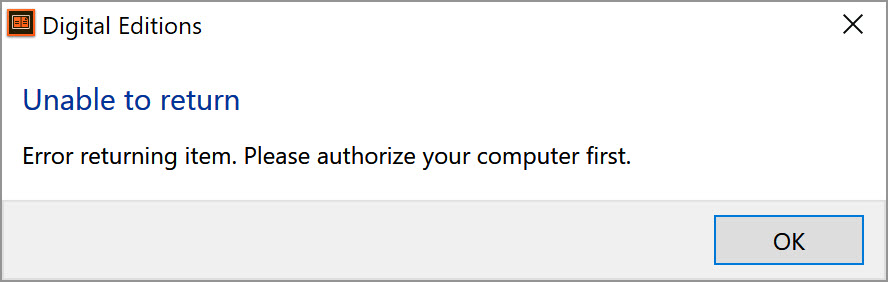
But my computer is authorised..... (I mean how else would I have borrowed the book Adobe?)

Any thoughts on how to fix this error? I am at my borrowing limit and want to get another book.
I have tried deleting authorisation and re-adding it.

Copy link to clipboard
Copied
I'm getting this, too. I can return books at Archive.org – so do I need to return them via Adobe also?
Copy link to clipboard
Copied
Am wondering if it may be to do with having updated Digital Editions while I have these books.

Get ready! An upgraded Adobe Community experience is coming in January.
Learn more
 AdChoices