

Turn on suggestions
Auto-suggest helps you quickly narrow down your search results by suggesting possible matches as you type.
Exit

- Home
- Dimension
- Discussions
- Re: Adobe Dimension CC render image showing dead p...
- Re: Adobe Dimension CC render image showing dead p...
0
Adobe Dimension CC render image showing dead pixels?

New Here
,
/t5/dimension-discussions/adobe-dimension-cc-render-image-showing-dead-pixels/td-p/11382442
Aug 24, 2020
Aug 24, 2020
Copy link to clipboard
Copied
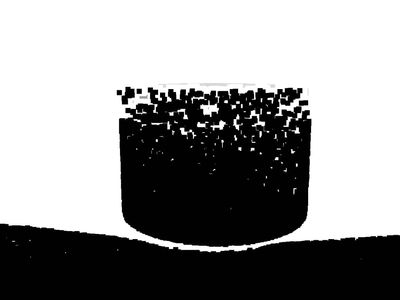
I recently updated my software. I was able to use it for a few try. After adding the glitter texture to a 3D model, it immediately started producing these kind of pictures. I have tried everything I can, what do you think is the issue?
TOPICS
Bug
,
Import and export
,
Problem or error

Community guidelines
Be kind and respectful, give credit to the original source of content, and search for duplicates before posting.
Learn more

 2
Replies
2
2
Replies
2


LEGEND
,
/t5/dimension-discussions/adobe-dimension-cc-render-image-showing-dead-pixels/m-p/11382843#M3989
Aug 24, 2020
Aug 24, 2020
Copy link to clipboard
Copied
I would assume that image is your graphics driver rendoring transparent pixels as black which is a known bug of non Nvidia drivers but without the dn to test its just a good guess
Community guidelines
Be kind and respectful, give credit to the original source of content, and search for duplicates before posting.
Learn more


Community Expert
,
LATEST
/t5/dimension-discussions/adobe-dimension-cc-render-image-showing-dead-pixels/m-p/11385704#M3990
Aug 25, 2020
Aug 25, 2020
Copy link to clipboard
Copied
Please sharu your system info. if it possible.
Community guidelines
Be kind and respectful, give credit to the original source of content, and search for duplicates before posting.
Learn more

Get ready! An upgraded Adobe Community experience is coming in January.
Learn more
Copyright © 2025 Adobe. All rights reserved.
 AdChoices