arielleb81365759
Participating Frequently
May 30, 2017
Answered

AJX Menu Bar will not operate correctly in my website

  • May 30, 2017
  • 1 reply
  • 810 views

Please bare with me as I am very new to dreamweaver. I created an entire website from scratch, very proud of myself, but now I've uploaded it onto my server and the ajx menu I found and inserted into the template files for my site does not look the way it does when I view it on dreamweaver. I think it is where I have it housed in my folder on the computer but I can't find anything online telling me where it needs to be saved to operate correctly in my files. Can anyone help me that knows how to do this correctly or knows HTML to see what I have set up incorrectly? Any help is greatly appreciated at this point in time. I am starting to get really frustrated. Thanks,

Arielle
This topic has been closed for replies.
Correct answer Nancy OShea

It is still there on the landing page of the website, I haven't removed it from there yet.


This is one heck of a mess. 

Notice this link location:

http://lovelandmediacenter.com/Templates/lovelandmediacenter/public_html/websitepages/adjuvantlogopage.html

Too many sub, sub-folders.  If your site was properly defined, the link path would look like this:

adjuvantlogopage.html

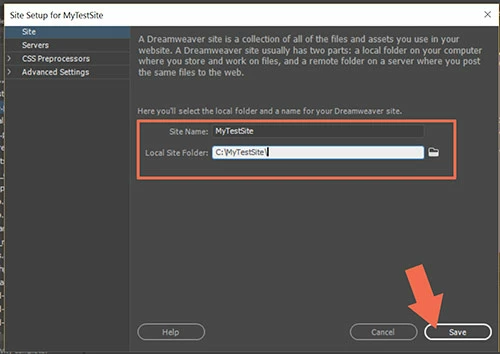
Let's start with your site definition.  Where do you keep your local site folder?  It should be something very simple like C:\\MyTestSite  or C:\\lovelandmediacenter    See screenshot from Site > Manage Sites.

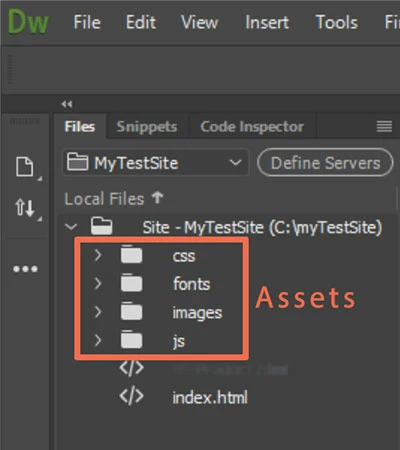
Once your local site is defined, you can open your Files Panel to see the file hierarchy.  Ideally it should be very simple like this screenshot where index.html is the site's home page.  Assets are in their respective folders -- css, js, images, etc....

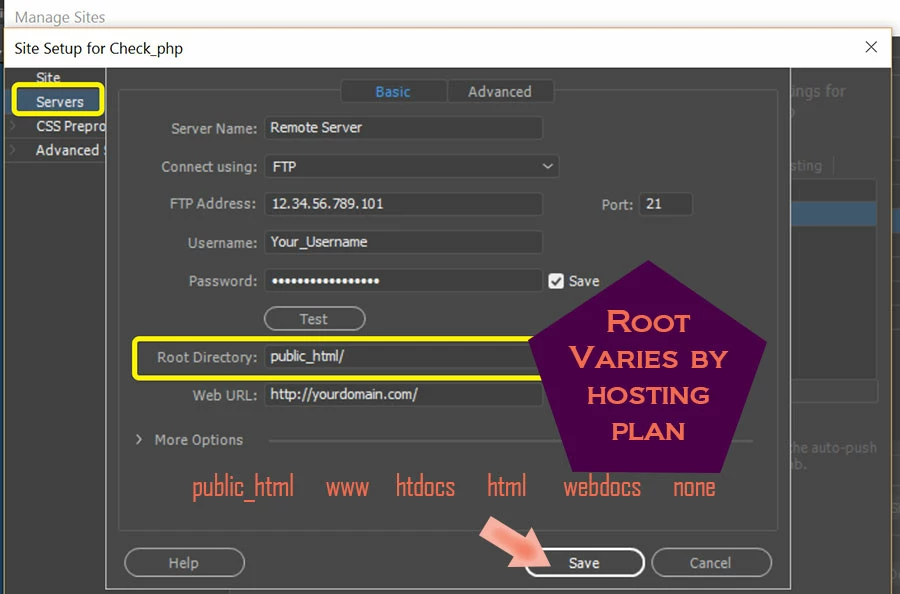
Now if you click on Define Servers, you can make sure your remote server is properly defined.   In your case, the server's Root Directory appears to be public_html.

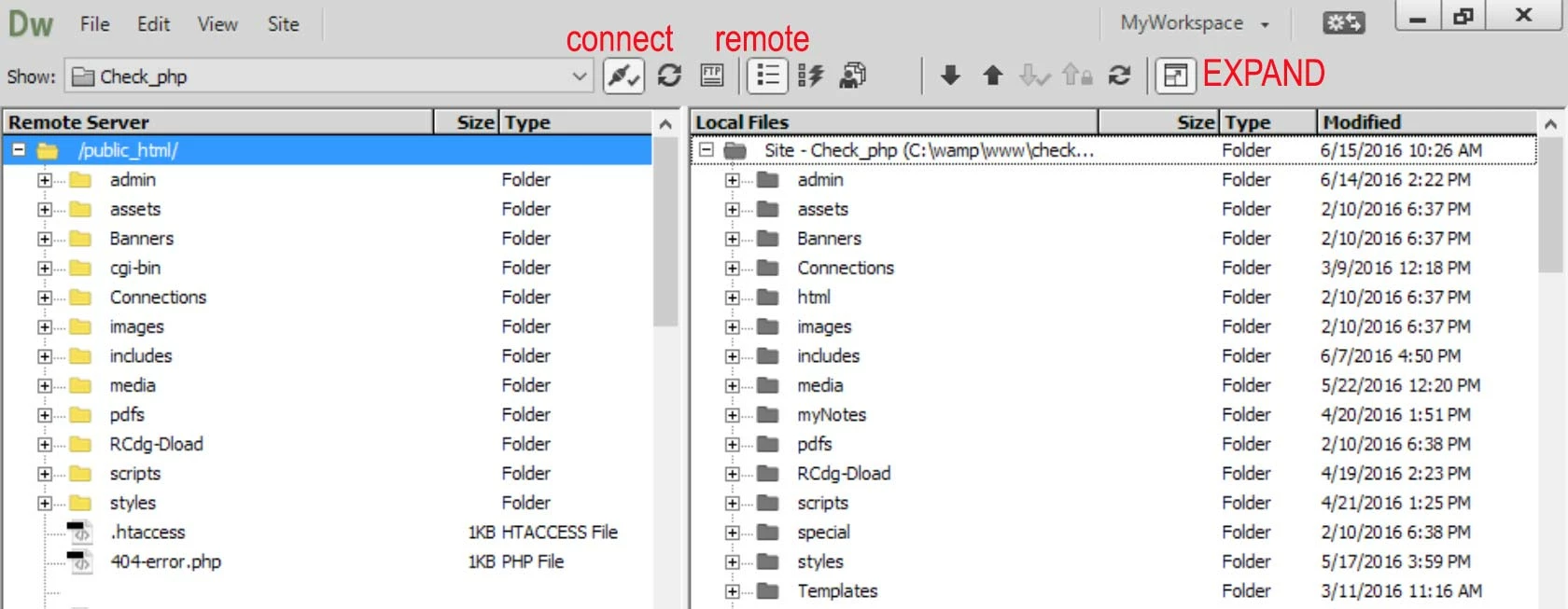
Once your site is defined, you can Expand your Files Panel and compare the Remote server with Local Files.  NOTE:  these should be nearly identical.

Nancy

1 reply

Captiv8r
Legend
May 30, 2017

Moved here from Adobe Robohelp forum.

arielleb81365759
Participating Frequently
May 30, 2017

Can you answer my question?

Jon Fritz
Community Expert
Community Expert
May 30, 2017

It is still there on the landing page of the website, I haven't removed it from there yet.


your navigation.css file is missing from the server, or uploaded to the wrong location.

404 File Not Found:

Line 8 - ../navigation.css

Line 50: ../../ajxmenu.css

Line 51: ../../ajxmenu.js

Line 52: ../../Templates/ajxmenu.css

Line 53: ../../Templates/ajxmenu.js