Inspiring
April 29, 2017
Answered

Anker setzen in Akkordeon

  • April 29, 2017
  • 2 replies
  • 1379 views

Hallo

DW CC2017 ist toll! Danke.

Ich möchte in einem Akkordeon einen Anker setzen, damit von einer anderen Seite aus direkt darauf verwiesen wird.

Beispiel:

Panel 1, Panel 2, Panel 3 im Akkordeon.

Kann ich von einer anderen Seite direkt auf den Inhalt von Panel3 führen?

Danke für Hinweise.

MS

This topic has been closed for replies.
Correct answer BenPleysier

It is not that hard. If the following is your accordion

<div class="panel-group" id="accordion1" role="tablist" aria-multiselectable="true">

  <div class="panel panel-default">

  <div class="panel-heading" role="tab">

  <h4 class="panel-title"><a data-toggle="collapse" data-parent="#accordion1" href="#panel1">Collapsible Group 1</a></h4>

  </div>

  <div id="panel1" class="panel-collapse collapse">

  <div class="panel-body">Content for Accordion Panel 1</div>

  </div>

  </div>

  <div class="panel panel-default">

  <div class="panel-heading">

  <h4 class="panel-title"><a data-toggle="collapse" data-parent="#accordion1" href="#panel2">Collapsible Group 2</a></h4>

  </div>

  <div id="panel2" class="panel-collapse collapse">

  <div class="panel-body">Content for Accordion Panel 2</div>

  </div>

  </div>

  <div class="panel panel-default">

  <div class="panel-heading">

  <h4 class="panel-title"><a data-toggle="collapse" data-parent="#accordion1" href="#panel3">Collapsible Group 3</a></h4>

  </div>

  <div id="panel3" class="panel-collapse collapse">

  <div class="panel-body">Content for Accordion Panel 3</div>

  </div>

  </div>

</div>

Then what we need to do is link to the page with the accordion to panel that needs to be open using a hash tag as in

<a href="page-with-accordion.html#panel2">Collapsible Group 2</a>

In the page with the accordion we need to get that value of the hash tag when the document has fished loading

var url = document.location.toString();

if ( url.match('#') ) {

  var hash = url.split('#')[1];

The we add a class of 'in' to the panel with the value of the hash tag. which will open the panel

$('#' + hash).addClass('in');

All of this is assuming that you are using Bootstrap. The code for the page containing the

<!doctype html>

<html>

<head>

<meta charset="utf-8">

<meta http-equiv="X-UA-Compatible" content="IE=edge">

<meta name="viewport" content="width=device-width, initial-scale=1.0">

<title>Untitled Document</title>

<link href="css/bootstrap.css" rel="stylesheet" type="text/css">

<!-- HTML5 shim and Respond.js for IE8 support of HTML5 elements and media queries -->

<!-- WARNING: Respond.js doesn't work if you view the page via file:// -->

<!--[if lt IE 9]>

<script src="https://oss.maxcdn.com/html5shiv/3.7.2/html5shiv.min.js"></script>

<script src="https://oss.maxcdn.com/respond/1.4.2/respond.min.js"></script>

<![endif]-->

</head>

<body>

<div class="panel-group" id="accordion1" role="tablist" aria-multiselectable="true">

  <div class="panel panel-default">

  <div class="panel-heading" role="tab">

  <h4 class="panel-title"><a data-toggle="collapse" data-parent="#accordion1" href="#panel1">Collapsible Group 1</a></h4>

  </div>

  <div id="panel1" class="panel-collapse collapse">

  <div class="panel-body">Content for Accordion Panel 1</div>

  </div>

  </div>

  <div class="panel panel-default">

  <div class="panel-heading">

  <h4 class="panel-title"><a data-toggle="collapse" data-parent="#accordion1" href="#panel2">Collapsible Group 2</a></h4>

  </div>

  <div id="panel2" class="panel-collapse collapse">

  <div class="panel-body">Content for Accordion Panel 2</div>

  </div>

  </div>

  <div class="panel panel-default">

  <div class="panel-heading">

  <h4 class="panel-title"><a data-toggle="collapse" data-parent="#accordion1" href="#panel3">Collapsible Group 3</a></h4>

  </div>

  <div id="panel3" class="panel-collapse collapse">

  <div class="panel-body">Content for Accordion Panel 3</div>

  </div>

  </div>

</div>

<script src="js/jquery-1.11.3.min.js"></script>

<script src="js/bootstrap.js"></script>

<script>

jQuery(document).ready(function() {

  var url = document.location.toString();

  if ( url.match('#') ) {

  var hash = url.split('#')[1];

  // expand the requested panel

  $('#' + hash).addClass('in');

  }

});

</script>

</body>

</html>

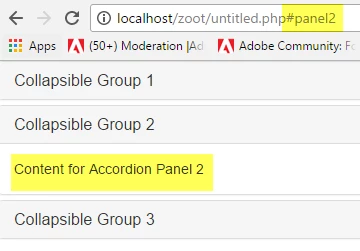
This is the result

2 replies

Inspiring
April 30, 2017

Hello Ben

your instruction is simply great - thanks a lot!

It works and I am very pleased about that.

If I could, I would give you ten times ten points.

BenPleysier
Community Expert
Community Expert
April 29, 2017
Wappler is the DMXzone-made Dreamweaver replacement and includes the best of their powerful extensions, as well as much more!
Inspiring
April 29, 2017

Thanks a lot for the immediate answer, Ben!

Give me some time to study it.

I will have to "activate my brainware" concerning javascript - I have respect for that because I know, that one can make big mistakes whith programs.

You will know about my experiences!

PizzaPasta

BenPleysier
Community Expert
BenPleysierCommunity ExpertCorrect answer
Community Expert
April 29, 2017

It is not that hard. If the following is your accordion

<div class="panel-group" id="accordion1" role="tablist" aria-multiselectable="true">

  <div class="panel panel-default">

  <div class="panel-heading" role="tab">

  <h4 class="panel-title"><a data-toggle="collapse" data-parent="#accordion1" href="#panel1">Collapsible Group 1</a></h4>

  </div>

  <div id="panel1" class="panel-collapse collapse">

  <div class="panel-body">Content for Accordion Panel 1</div>

  </div>

  </div>

  <div class="panel panel-default">

  <div class="panel-heading">

  <h4 class="panel-title"><a data-toggle="collapse" data-parent="#accordion1" href="#panel2">Collapsible Group 2</a></h4>

  </div>

  <div id="panel2" class="panel-collapse collapse">

  <div class="panel-body">Content for Accordion Panel 2</div>

  </div>

  </div>

  <div class="panel panel-default">

  <div class="panel-heading">

  <h4 class="panel-title"><a data-toggle="collapse" data-parent="#accordion1" href="#panel3">Collapsible Group 3</a></h4>

  </div>

  <div id="panel3" class="panel-collapse collapse">

  <div class="panel-body">Content for Accordion Panel 3</div>

  </div>

  </div>

</div>

Then what we need to do is link to the page with the accordion to panel that needs to be open using a hash tag as in

<a href="page-with-accordion.html#panel2">Collapsible Group 2</a>

In the page with the accordion we need to get that value of the hash tag when the document has fished loading

var url = document.location.toString();

if ( url.match('#') ) {

  var hash = url.split('#')[1];

The we add a class of 'in' to the panel with the value of the hash tag. which will open the panel

$('#' + hash).addClass('in');

All of this is assuming that you are using Bootstrap. The code for the page containing the

<!doctype html>

<html>

<head>

<meta charset="utf-8">

<meta http-equiv="X-UA-Compatible" content="IE=edge">

<meta name="viewport" content="width=device-width, initial-scale=1.0">

<title>Untitled Document</title>

<link href="css/bootstrap.css" rel="stylesheet" type="text/css">

<!-- HTML5 shim and Respond.js for IE8 support of HTML5 elements and media queries -->

<!-- WARNING: Respond.js doesn't work if you view the page via file:// -->

<!--[if lt IE 9]>

<script src="https://oss.maxcdn.com/html5shiv/3.7.2/html5shiv.min.js"></script>

<script src="https://oss.maxcdn.com/respond/1.4.2/respond.min.js"></script>

<![endif]-->

</head>

<body>

<div class="panel-group" id="accordion1" role="tablist" aria-multiselectable="true">

  <div class="panel panel-default">

  <div class="panel-heading" role="tab">

  <h4 class="panel-title"><a data-toggle="collapse" data-parent="#accordion1" href="#panel1">Collapsible Group 1</a></h4>

  </div>

  <div id="panel1" class="panel-collapse collapse">

  <div class="panel-body">Content for Accordion Panel 1</div>

  </div>

  </div>

  <div class="panel panel-default">

  <div class="panel-heading">

  <h4 class="panel-title"><a data-toggle="collapse" data-parent="#accordion1" href="#panel2">Collapsible Group 2</a></h4>

  </div>

  <div id="panel2" class="panel-collapse collapse">

  <div class="panel-body">Content for Accordion Panel 2</div>

  </div>

  </div>

  <div class="panel panel-default">

  <div class="panel-heading">

  <h4 class="panel-title"><a data-toggle="collapse" data-parent="#accordion1" href="#panel3">Collapsible Group 3</a></h4>

  </div>

  <div id="panel3" class="panel-collapse collapse">

  <div class="panel-body">Content for Accordion Panel 3</div>

  </div>

  </div>

</div>

<script src="js/jquery-1.11.3.min.js"></script>

<script src="js/bootstrap.js"></script>

<script>

jQuery(document).ready(function() {

  var url = document.location.toString();

  if ( url.match('#') ) {

  var hash = url.split('#')[1];

  // expand the requested panel

  $('#' + hash).addClass('in');

  }

});

</script>

</body>

</html>

This is the result

Wappler is the DMXzone-made Dreamweaver replacement and includes the best of their powerful extensions, as well as much more!