
Copy link to clipboard
Copied
Hi all,
I've got a strange problem. I have a css file, open in DW and there is a section that I can not open/expand.
Line 71 (below) has the collapsed code, then jumps to 228.
I have tried clicking on the arrow, usually works; selecting the line then right-hand click>Selection>Expand Selection.
Neither method works.
I can open the file in notepad and all is well, I can view it online and again all is well.
I have rebooted my computer, still nothing.
All other 'sections' work fine, just the code collapsed in line 71
Any ideas?
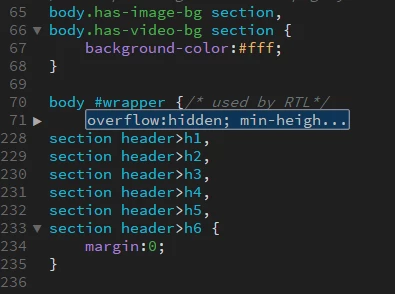
I am using DW 2017.0.1 Release 9346 build.
Weird.
Copy your css out of notepad and check it here: The W3C CSS Validation Service
See if there are any structural defects that maybe the "latest and greatest" is having major issues with.
Copy link to clipboard
Copied
Weird.
Copy your css out of notepad and check it here: The W3C CSS Validation Service
See if there are any structural defects that maybe the "latest and greatest" is having major issues with.
Copy link to clipboard
Copied
Thanks Jon,
Looks like there were a few errors in the file, but looking at them compared with a backup file, it seems they were in the original.
I've replaced my file with the backup and DW is now working correctly; maybe it was just a corrupt file...

Get ready! An upgraded Adobe Community experience is coming in January.
Learn more