
Known Participant
February 5, 2024
Answered

Cannot change BG colour in bootstrap Navbar

  • February 5, 2024
  • 1 reply
  • 3654 views

Hi everyone


I am a complete beginner in DW this question might sound stupid but I could not find anything on the internet for this specific problem.


So, I am trying to create a website, with Bootstrap, and I have a couple of questions. 


How do I change the BG colour of my navbar? I have followed a tutorial on YouTube but, despite I do everything the guy does my colour won't change.
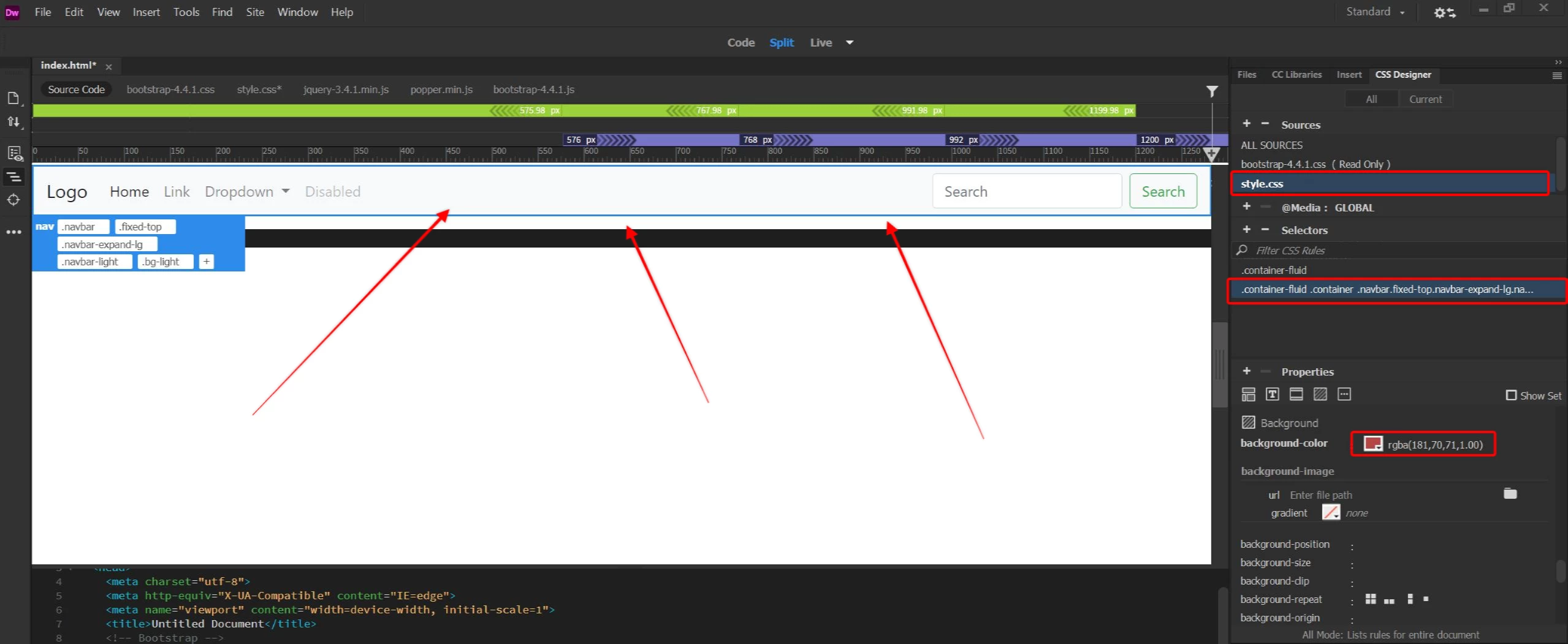


Created a new style.css sheet, added a selector for the navbar, and changed BG colour to red, but as you can see the colour is still White. 


thanks for any help you can provide


This is the code:

<nav class="navbar fixed-top navbar-expand-lg navbar-light bg-light"> <a class="navbar-brand" href="#">Logo</a>
          <button class="navbar-toggler" type="button" data-toggle="collapse" data-target="#navbarSupportedContent1" aria-controls="navbarSupportedContent1" aria-expanded="false" aria-label="Toggle navigation"> <span class="navbar-toggler-icon"></span> </button>
          <div class="collapse navbar-collapse" id="navbarSupportedContent1">
            <ul class="navbar-nav mr-auto">
              <li class="nav-item active"> <a class="nav-link" href="#">Home <span class="sr-only">(current)</span></a> </li>
              <li class="nav-item"> <a class="nav-link" href="#">Link</a> </li>
              <li class="nav-item dropdown"> <a class="nav-link dropdown-toggle" href="#" id="navbarDropdown1" role="button" data-toggle="dropdown" aria-haspopup="true" aria-expanded="false"> Dropdown </a>
                <div class="dropdown-menu" aria-labelledby="navbarDropdown1"> <a class="dropdown-item" href="#">Action</a> <a class="dropdown-item" href="#">Another action</a>
                  <div class="dropdown-divider"></div>
                  <a class="dropdown-item" href="#">Something else here</a> </div>
              </li>
              <li class="nav-item"> <a class="nav-link disabled" href="#">Disabled</a> </li>
            </ul>
            <form class="form-inline my-2 my-lg-0">
              <input class="form-control mr-sm-2" type="search" placeholder="Search" aria-label="Search">
              <button class="btn btn-outline-success my-2 my-sm-0" type="submit">Search</button>
            </form>
          </div>
        </nav>
    This topic has been closed for replies.
    Correct answer osgood_
    quote

    and if I want to make it another color other than red I can't do it


    By @Stephan5FE6


    Change the color of the Bootstrap css selector bg-danger:


    .bg-danger {

    background-color: purple!important;

    }


    or better, rather than deface the default Bootstrap values make your own css selector


    .nav-bg {

    background-color: darkolivegreen;

    }


    <nav class="navbar fixed-top navbar-expanded-lg nav-bg navbar-dark">


    Never directly alter the Bootstrap default css file, unless you're an expert. If you are going to overide the default css values do it in a seperately link stylesheet, which should be linked to your page after the link to the Bootstrap default css file, or you can embed the css styles in the head of the page whilst building.


    1 reply

    BenPleysier
    Community Expert
    Community Expert
    February 5, 2024

    Change the first line to

    <nav class="navbar fixed-top navbar-expand-lg bg-danger navbar-dark"> <a class="navbar-brand" href="#">Logo</a>


    Wappler is the DMXzone-made Dreamweaver replacement and includes the best of their powerful extensions, as well as much more!
    Known Participant
    February 5, 2024

    Thank you very much this does the trick, I do not understand why can't I change it from the properties tab, and if I want to make it another color other than red I can't do it

    Legend
    February 6, 2024

    Personally speaking in my opinion you're much better off not using Bootstrap in this day and age. It was there when responsive construction was difficult to accomplish but its simple these days with the introduction of flexbox and grid and don't forget Bootstrap was put together by Twitter (now X), you're not Twitter or X, so use something less verbose and more streamlined - you will most probably end up with 1000's of lines of redundant css linked to your page.......just my personal opinion, others will of course disagree.


    By @osgood_


    is this doable in Dreamweaver?


    quote


    is this doable in Dreamweaver?


    By @Stephan5FE6


    It really comes down to either learning how Bootstrap works which will take time or learning to code which will take time.


    All l can say is depending upon Bootstrap will box you into a small amount of default options whereas having a good grasp of coding will allow you to eventually do what you want to do not what a framework says you can do.


    I can't deny you probably couldn't get a job these days without knowing Bootstrap however a lot of developers need educating these days, rather than just following the herd.