

Nancy OShea
Community Expert
Community Expert
November 3, 2016
Question

CC 2017 Issues people are having.

  • November 3, 2016
  • 18 replies
  • 9773 views

#1 Code Color Choices removed. This needs to be easier than manually editing LESS and JSON files.   I would much prefer to have my old code colors back but they are in an XML file and it's going to take some major doing to translate that to LESS.

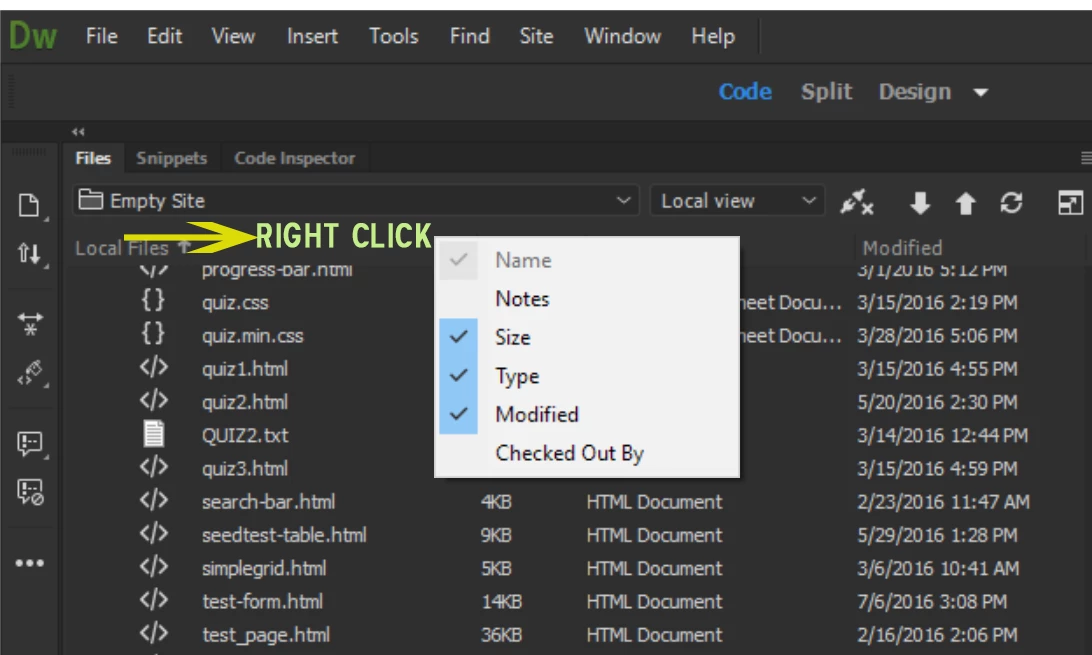
#2 Files Panel Headers.  I think this should be turned on by default instead of making people hunt for ways to turn it on.
#3 Hi-Def Aware UI Scaling. The lack of support for this is really hurting some people.  'Nuff said.

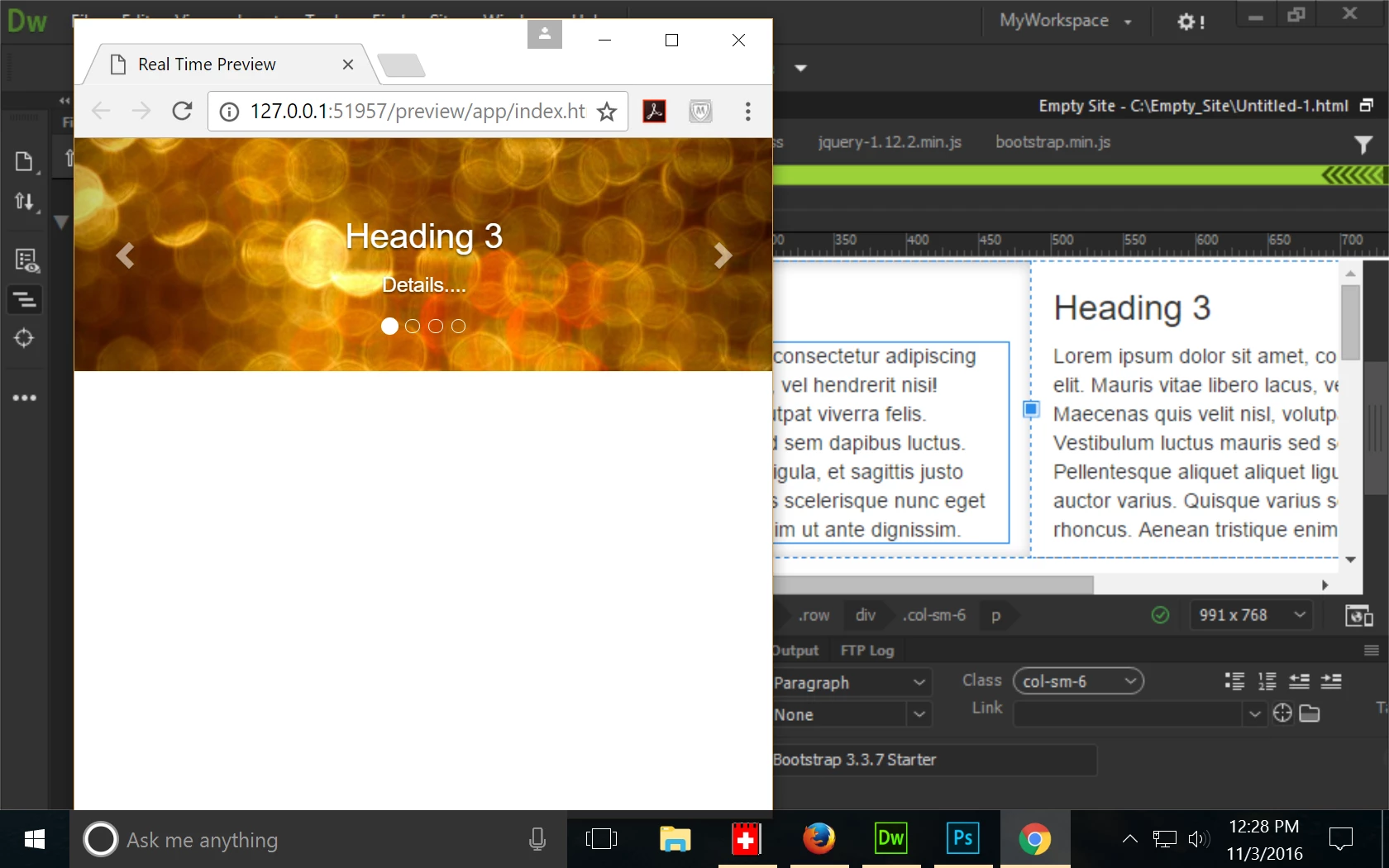
#4  Preview in Browser/Real Time Preview.  Is there any way to turn off Real Time Preview?  I'm getting really wacky results with it.

This is what I'm trying to view - a basic Bootstrap,  2-column layout.

Real Time Preview is showing a Bootstrap Carousel that doesn't exist in this document.  Not even close.
If anyone has more stuff to add, please chime in.

Nancy O.

    This topic has been closed for replies.

    18 replies

    paulk7737514
    Inspiring
    November 4, 2016

    How do revert back to the previous version? Do you have to uninstall the present one? I don't want to delete my sites!!!

    Jon Fritz
    Community Expert
    Community Expert
    November 4, 2016

    Export your .ste files first (Site > Manage Sites > Export), then import them into the old installation if they aren't there already (Site > Manage Sites > Import).

    paulk7737514
    Inspiring
    November 4, 2016

    Good grief! That's the last time I update without waiting for people's comments. I don't have time to work part time as an unpaid beta tester!!!

    turtleman1
    Participant
    November 4, 2016

    Its there,, I just clicked down the tree a little and Poof! there it was..

    I should have Known better that to upgrade as soon as I did.. it always seems to be best to wait awhile until at least 2 or 3 patches have come out..

    I upgraded to 2017,, but to be honest,, I don't really know enough on using DW to make a valid judgement.. so since I'm really just learning this and not wanting to re-learn what I have using the 2015 version.. I re-installed 2015 and Deleted 2016 from my account.. Now the Issue has come up that anytime I try to use a split view or live view I get a bunch of errors pop up,, Did 17 corrupt 15 files? can I re-load 15 again? (I cant find a way to do that except deleting 15 and loading it again).. I have to ask myself.. is this really worth it?

    Jon Fritz
    Community Expert
    Community Expert
    November 4, 2016

    Javascript errors like those can normally be fixed by clearing the program cache, but here's a page with a few other options just in case JavaScript errors in Dreamweaver

    turtleman1
    Participant
    November 4, 2016

    How do I re-install the previous version?

    John Waller
    Community Expert
    Community Expert
    November 4, 2016
    Ken Nielsen
    Legend
    November 4, 2016

    I see the CS6 version but not the 2015 version I was using and was deleted when I installed 2017... I'll go back to CS6, at least that works...

    Participant
    November 4, 2016

    In the last version of Dreamweaver cc, the file tree inside Dreamweaver allowed me to click and drag a js file to the page and it would automatically create the < link > or < script > file on that page. It seems that feature is no longer available...or is it? Does anyone know if they changed that feature or taken it completely away?

    Nancy OShea
    Community Expert
    Community Expert
    November 4, 2016

    In the last version of Dreamweaver cc, the file tree inside Dreamweaver allowed me to click and drag a js file to the page and it would automatically create the < link > or < script > file on that page.

    Yes.  I can confirm the same behavior.  You should be able to click & drag an image or CSS or JS file from files Panel and drop it into Code View but it doesn't work.  This was reported to the Public Beta team by several people.   So it must have slipped through the cracks.   Hopefully it will be fixed very soon.

    Nancy O.

    Nancy O'Shea— Product User & Community Expert
    Nancy OShea
    Community Expert
    Community Expert
    November 4, 2016

    I've created an IDEA summarizing some key issues mentioned so far.  Vote Up if you're so inclined.

    Nancy O.

    Nancy O'Shea— Product User & Community Expert
    Ken Nielsen
    Legend
    November 3, 2016

    Scrolling is whacky, It takes 24 seconds to scroll down in design view from the top of a document to the bottom. The slider can be moved, but the document does not move, until it is darned well ready in its own time... Impossible to work in this environment with that problem... Wish I had not upgraded at this point.

    Nancy OShea
    Community Expert
    Community Expert
    November 4, 2016

    Drop back to your previous version, Ken.  That's what I'm doing until the problems are fixed.

    Nancy O.

    Nancy O'Shea— Product User & Community Expert
    Participating Frequently
    November 3, 2016

    Amen to code coloring. I need to be able to actually see comments since I hide things till they go live. Comments used to be bright yellow in my setup. GONE!

    Also has crashed about 4 times so far doing very simple things.

    Nancy OShea
    Community Expert
    Community Expert
    November 3, 2016

    Philenlo, If you're having repeated crashes, be sure to report it with the official Bug Reporting form below along with your Crash Logs. 

    https://www.adobe.com/cfusion/mmform/index.cfm?name=wishform

    I will be filing a bug report re: Real Time Preview issues I'm having.

    Nancy O.

    Nancy O'Shea— Product User & Community Expert
    November 3, 2016

    Hi... about the real time preview. I don't know if anyone already tried to use it on devices (phone tablet) going through adobe.ly/.... but I'm getting absolutly different layout, size of items etc. then on real page. Is that suppose to be like that? If so then what is the point of that?

    Jon Fritz
    Community Expert
    Community Expert
    November 3, 2016

    I'd say #5 could be "Reintroduce the ability to lock all 3 main toolbars (from Window > Toolbars) together in one bar across the top"

    They're just silly now, stacking 2 horizontally and having the third go vertically.

    Nancy OShea
    Community Expert
    Community Expert
    November 3, 2016

    I think I agree with you, Jon. But I can't install any 3rd party extensions yet to see how they will "fit" into the remaining toolbar space.   I don't know if that will be another issue.

    Nancy O'Shea— Product User & Community Expert
    BenPleysier
    Community Expert
    Community Expert
    November 3, 2016

    Nancy,

    I had to re-install (after using the cleaning tool) Dreamweaver after which the DMXZone Extension Manager worked, like a charm I might add.

    All of the DMXZone extensions work, albeit that, aesthetically, some are not quite there yet when using the dark theme.

    Wappler is the DMXzone-made Dreamweaver replacement and includes the best of their powerful extensions, as well as much more!
    Preran
    Community Manager
    Community Manager
    November 3, 2016

    Hi Nancy,

    Thank you for putting these together. I will share it with the team for their observations.

    Thanks,

    Preran

    John Waller
    Community Expert
    Community Expert
    November 3, 2016

    Hi Preran,

    Were any of these issues raised in alpha/beta testing? Almost feels like we're in a beta testing group right now.