


Copy link to clipboard
Copied
Hello
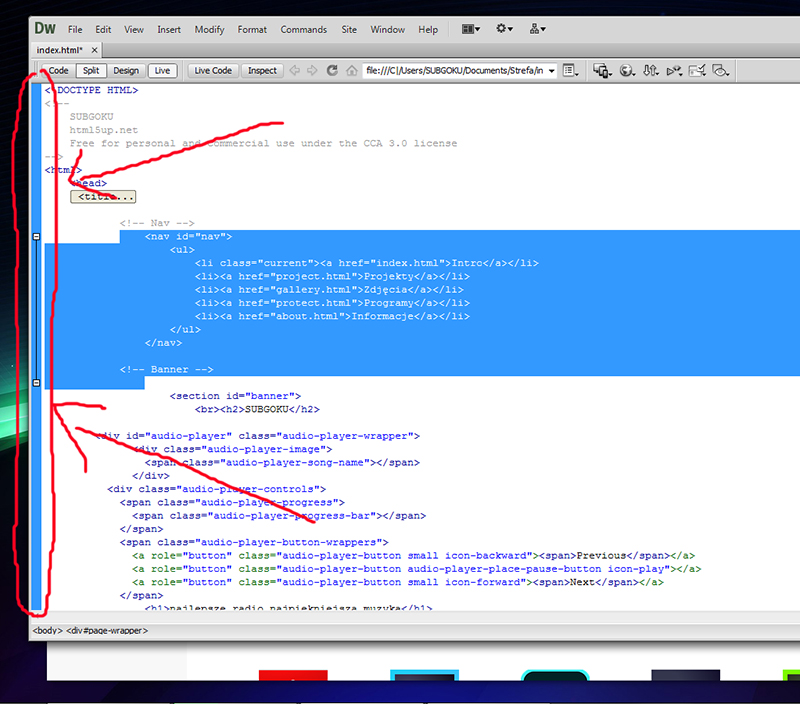
Got some simple question, its possible to hide/remove this blue veritical bar to have little more space for document view, i never use it.
Thank you for answer


 1 Correct answer


There is no option to remove the blue line. The colour denotes an active document while the space is used to show the selection with a view of collapsing the code.
In new versions, there is no blue line, yet the space is kept for the same reason.

 2
Replies
2
2
Replies
2



Copy link to clipboard
Copied
As far as I know, there isn't any option to do that. I am hoping that the others here have a better answer.
Thanks,
Preran
Copy link to clipboard
Copied
There is no option to remove the blue line. The colour denotes an active document while the space is used to show the selection with a view of collapsing the code.
In new versions, there is no blue line, yet the space is kept for the same reason.

Get ready! An upgraded Adobe Community experience is coming in January.
Learn more
 AdChoices