
Participant
November 9, 2016
Answered

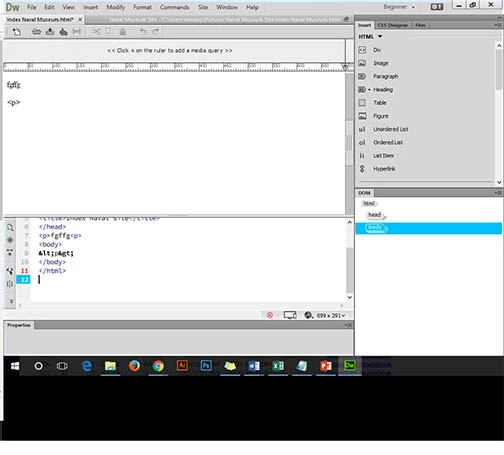
Code Split and Design view buttons missing

  • November 9, 2016
  • 3 replies
  • 2859 views

Please Help!

My Code Split and Design view buttons are missing from the top of the document.  This area is replaced with a note that says <<click +  on the ruler to add a media query>>

My version is Dreamweaver CC 2015,  I am new to Creative Cloud  I have tried to fix this in Window and view menus with no luck.

Thanks
This topic has been closed for replies.
Correct answer Jon Fritz

I am thinking that we need to uninstall/reinstall the program.

Any Thoughts?


I'd try clearing the program cache and/or restoring preferences first...

Clear program cache: Deleting a corrupted cache file

Restore Preferences: Unusual behavior in Dreamweaver? Try restoring preferences.

Then if neither work, a clean reinstall using the Adobe Cleaner Tool: Use the Creative Cloud Cleaner Tool to solve installation problems

3 replies

Participant
November 10, 2016

I have tried this, It did not fix the issue.

I have a computer lab with multiple machines.  Most do not have the issue described as above.

Jon Fritz
Community Expert
Community Expert
November 10, 2016

Go to Window > Workspace Layout > Reset 'Beginner'

By default, the Document Toolbar should be active in that workspace, unless someone has turned it off and subsequently saved the workspace without it.

If that's the case, you can turn it back on by adding a checkmark under View > Toolbars > Document

Participant
November 10, 2016

Thanks,

I have reset the workspace (and tried other workspaces)

I have also added the checkmarks-  View > Toolbars > Document -

These are all checked

the document toolbar is still missing.

I just noticed that there is the same problem on one of the student machines with the same software release.

Nancy OShea
Community Expert
Community Expert
November 9, 2016

It might help if you read the Release Notes.  This version is wildly different from previous versions.

New features summary

Overview of the Dreamweaver workspace

Dreamweaver Help | Known issues | Dreamweaver CC 2017

Nancy O'Shea— Product User & Community Expert
BenPleysier
Community Expert
Community Expert
November 9, 2016

Go to Window > Toolbars and click whatever you want.

Wappler is the DMXzone-made Dreamweaver replacement and includes the best of their powerful extensions, as well as much more!