
Inspiring
November 22, 2016
Answered

customizing the bootstrap navbar

  • November 22, 2016
  • 1 reply
  • 318 views

I'm trying to simply remove the generic "Brand" text and insert a logo, but Dreamweaver won't let me do it in Live view.  There's so much excess CSS and HTML code with all the extra elements in the "generic" bootstrap sample template that I can't even find where to put an img tag.  Is there any way to start with a completely naked window and add items as I go?
This topic has been closed for replies.
Correct answer Nancy OShea

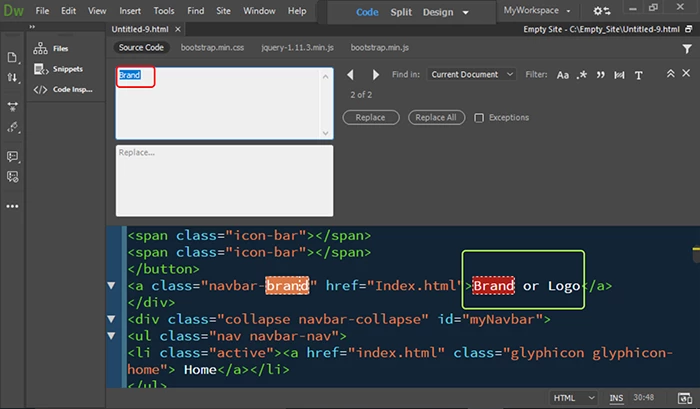
Ctrl+F (Find)

Search for: Brand

No Filters.

No Exceptions.  See screenshot.

Nancy O.

1 reply

Nancy OShea
Community Expert
Community Expert
November 22, 2016

Try switching to Code View.  It should be self-explanatory.

<!--BEGIN NAVBAR-->

<nav class="navbar navbar-default navbar-fixed-top">

<div class="container-fluid">

<div class="navbar-header">

<button type="button" class="navbar-toggle" data-toggle="collapse" data-target="#myNavbar"> <span class="icon-bar"></span> <span class="icon-bar"></span> <span class="icon-bar"></span> </button>

<a class="navbar-brand" href="Index.html">Brand or Logo Here</a>

</div>

Nancy O'Shea— Product User & Community Expert
anastasi5Author
Inspiring
November 22, 2016

I'm trying to do that, but there's so much junk code...  that's why I'd like to find a naked page to start with...

Nancy OShea
Community Expert
Nancy OSheaCommunity ExpertCorrect answer
Community Expert
November 22, 2016

Ctrl+F (Find)

Search for: Brand

No Filters.

No Exceptions.  See screenshot.

Nancy O.

Nancy O'Shea— Product User & Community Expert