


- Home
- Dreamweaver
- Discussions
- data-interval in carousel seems to be missing
- data-interval in carousel seems to be missing
data-interval in carousel seems to be missing

Copy link to clipboard
Copied
Hi Folks,
I am following a tutorial on bootstrap 4 and it tells me to put data-interval = "false" into the line below to stop the carousel whilst editing but there is no choice in the list for 'interval' in the intelisence. I have tried to add it manually anyway, saved and closed the page and re-opened it but has no affect. has this changed in 2020 DW and the bootstrap version it uses, if so what is used now to slow down the frequency?
<div id="Carousel" class="carousel slide" data-ride="carousel" data- style="background-color: grey">
Kind regards,
Dave G


 2
Replies
2
2
Replies
2


Copy link to clipboard
Copied
What are you trying to do? Speed up the carousel or slow it down?
Speed it up, use a low number:
<div id="Carousel" class="carousel slide" data-ride="carousel" data-interval="500" style="background-color: grey">
Slow it down, use a high number:
(every 6 seconds)
<div id="Carousel" class="carousel slide" data-ride="carousel" data-interval="6000" style="background-color: grey">
(every minute)
<div id="Carousel" class="carousel slide" data-ride="carousel" data-interval="60000" style="background-color: grey">
(every 5 minutes)
<div id="Carousel" class="carousel slide" data-ride="carousel" data-interval="300000" style="background-color: grey">
If you just want the carousel to slide when the arrows or indicators are clicked:
<div id="Carousel" class="carousel slide" style="background-color: grey">
data-interval="false" will stop the carousel sliding in an actual browser. I dont know how DW handles it internally.


Copy link to clipboard
Copied
You have to add the code manually.
Save document (Ctrl + S).
Refresh Live View (F5).
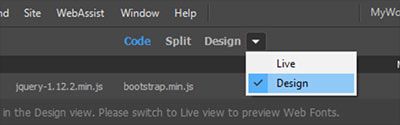
Or switch to Design View where carousel does not slide. See screenshot.

Get ready! An upgraded Adobe Community experience is coming in January.
Learn more
 AdChoices