
Inspiring
October 13, 2021
Answered

Does anyone know the way to fix the following errors whic are listed in the Safari /Inspect Element/

  • October 13, 2021
  • 4 replies
  • 1840 views

Does anyone know the way to fix the following errors whic are listed in the Safari /Inspect Element/Console:


[Error] Not allowed to load local resource: file:///MacBook%20Pro%20HD/Users/ann/Desktop/Web%20Sites/Shelbourne-America/phpmailer-contact-form/form.css (formpage-customised.html, line 11)
[Error] Not allowed to load local resource: file:///MacBook%20Pro%20HD/Users/ann/Desktop/Web%20Sites/Shelbourne-America/phpmailer-contact-form/form.js
[Error] Not allowed to load local resource: file:///MacBook%20Pro%20HD/Users/ann/Desktop/Web%20Sites/Shelbourne-America/Enable%20Submit%20Button%20in%20iOS.js


My ISP tells me that i ned to fix these erors from my end but I don't know how to do that!
    This topic has been closed for replies.
    Correct answer Nancy OShea

    I have changed the positions on my HD of both my own site and the Taumel site so there are no gaps in the names once the folders are viewed on a Browser from my ISP’s hosting site.


    If I was a visitor, to the Taumel site I would expect to be able to fill the Form and that it would then be emailed to the Contact when I hit Submit. 

    And that was working previously — but now it seems not to be?


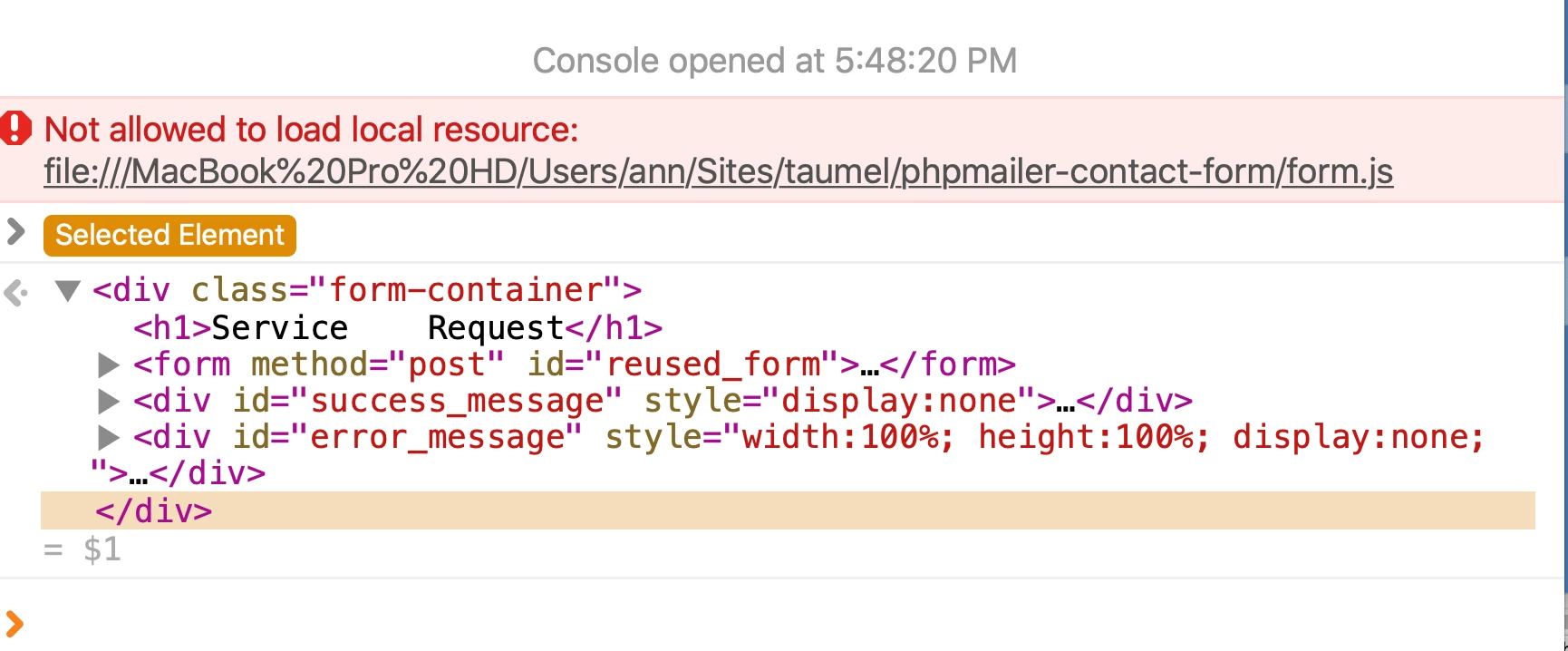
    In Safari, this is what I get from the Inspect Elements/Console when I am supposedly accessing the site across the Internet:

    And Firefox cannot find “phpmailer-contact-form/form.js” although it is present.


    The Form worked when I had it on my own site but things went wrong when I tried to access it through the 

    https://taumel.shelbourne-america.net

    link.


    I though that adding the required “event conversion” Google scripts to the end of the html files  might have caused the problem so I removed them again but it hasn’t helped.


    What can I try next?


    No browser can find it because it's pointing to FILE:/// on your MacBook.  Until your resolve that manually in your code, it won't work from any server.


    To save time, you could change the path to an absolute URL.

    https : // domain / folder / filename/


    4 replies

    B i r n o u
    Legend
    October 13, 2021
    Inspiring
    October 13, 2021

    To get rid of the spaces, I would have to rename all of my folders and the name of the MacBook Pro?!

    That is quite some undertaking?!

    Can I install the websites at System-level on a Mac  in-order to by-pass the file-renaming problem?

    Community Expert
    October 15, 2021

    Nancy:

    Thank you hugely: your recipe worked perfectly!


    I had had trouble trying to understand how to fix the issue with a Test Site piggy-backing on top of my own site.

    (I will have to remeber to cadjust those new codings when I eventually hand the finished site over and we install it on their own site-hosting server.)


    Ben:

    You raised a very interesting point.

    The piggy-backed sub-domain is a good work-around in this case because 

    I want the clients to be able to log-in at any time to test the Site as we go along.


    I also need their technical input (in case my copy-writing wanders too far off-beam!); and also I welcome their comments concerning what images or services we add or remove or change.

    This is a rather symbiotic project — which is a good thing.

    🙂


    I definitely understand the need for testing and desire to have that for clients and agree with you 100% on that.  I was just stating that in shared hosting environments that you appear to be in, you are forced to have additional domains or sub-domains hosted within your primary domain. Subdomains are typically an A record that can be pointed anywhere.  As you move into higher hosting plans with many providers you can get access to setup those subdomains in their own contained site roots that don't impact or live within your site root.  So for instance:


    Today:

    /youraccountroot/public_html --> your root folder

    /youraccountroot/public_html/subfolder --> your client's test site root folder


    Proposed:

    /yoursiteroot/public_html --> your root folder

    /yourclientsroot/public_html --> your client's test site root folder


    In this setup it also allows you to separate the sites in DW as the sites don't have to be within one another and can be completely separate in all respects.  Hosts typically give you access with "reseller" or higher hosting packages where they offer a control panel that gives you access to this type of setup.

    Nancy OShea
    Community Expert
    Community Expert
    October 13, 2021

    You're not working within a defined local site folder as evidenced by the FILE:/// paths pointing to resrouces on a  local MacBook computer.   Once your site is properly defined, the file paths should resolve to site assets within your local site folder, not your computer HD.


    Nancy O'Shea— Product User & Community Expert
    Inspiring
    October 13, 2021

    Nancy;

    I did think that I had set up my DW Site correctly but it seems not?!


    This is what I am seeing in DW:


    The image is very small but the line (which may be the one that counts?) seems to lead back to my MBP?

    :

    Nancy OShea
    Community Expert
    Community Expert
    October 13, 2021

    When you save a file, paths to asset files should resolve to the correct ones in your site folder.  DW gets confused by code errors though and may not resolve corerctly if there are errors in your code. 


    Failing that, remove the old asset and reinsert it.  Save document (Cmd + S).


    Nancy O'Shea— Product User & Community Expert
    B i r n o u
    Legend
    October 13, 2021

    first question... if you use Dreamweaver, have you created a site, or at least defined a site from Dreamweaver ?


    These errors occur because the file paths shown are files using local sources on the computer. They cannot be loaded by browsers for security reasons, most of the time because they are called by a script.


    Use a relative path either to the document or to the root of the site.

    if you don't understand what I'm saying, don't hesitate to say so, I'll try to be more clear 😉

    Inspiring
    October 13, 2021

    Birnou:

    Thank you so much for your very quick reponse.

    Yes, I do work within a DW-Site and I thought that the scripts were all safely contained within the Site folder.

    I uploaded the complete Site folder manually to my ISP using Filezilla.

    The strange thing is that the PHPMailer Contact Form was working perfectly but just stopped working?

    This what my Site Folder contains:

    I don't know how to "Use a relative path either to the document or to the root of the site." so I would love to know how to do that!

    B i r n o u
    Legend
    October 13, 2021

    instead of using such a path

    file:///MacBook%20Pro%20HD/Users/ann/Desktop/Web%20Sites/Shelbourne-America/phpmailer-contact-form/form.css

    I suppose that your web site is located in the folder Shelbourne-America, so

    if you want to define a path relative to the web site, it means relative to the root of the folder where your web site is contained... you use a slash to start the path... so the path will

    /phpmailer-contact-form/form.css


    now if you want to use a path relative to the document... the starting point wont be the web site root folder, but the document that call (or include) the related file... but this time the path doesn't start at all by a slash. so in the previous exemple, if the hosting file is located at the root folder (sibling of the phpmailer-contact-form, the new path will be

    phpmailer-contact-form/form.css

    same as the previous one but without the starting slash


    does this makes sense for you ?


    by the way I see in the current path you use, that you use spaces... space are represented by the %20 string ... it is completly not permited in safe web... so use a - or a _ but not a space

    see... you have thre %20

    file:///MacBook%20Pro%20HD/Users/ann/Desktop/Web%20Sites/Shelbourne-America/phpmailer-contact-form/form.css


    anyway if you define corretly the web site in dreamweaver and use relative path (document or website, whatever) those %20 will not appear, because your path will be resume to

    /phpmailer-contact-form/form.css

    or to

    phpmailer-contact-form/form.css

    and there is now spaces in those ones...

    Inspiring
    October 13, 2021

    Sorry for the appalling typos in my previous message! I tried to edit but the Edit button doesn't work