


- Home
- Dreamweaver
- Discussions
- Dreamweaver 2017.5 won't connect via FTP to 1&1 se...
- Dreamweaver 2017.5 won't connect via FTP to 1&1 se...
Dreamweaver 2017.5 won't connect via FTP to 1&1 server

Copy link to clipboard
Copied
I have been using 1&1 for my Web site server for many years. I have used Dreamweaver for building my Web sites for many years. I have never had any problem with Dreamweaver making an FTP connection to 1&1 for uploading my files. However, with the latest Dreamweaver (2017.5) I cannot get it to connect with any settings. I have tried FTP, SFTP, Passive on and off, Performance optimizations on and off. I've turned off Anti-virus and Firewall. Nothing works. However, when I attempted a connection using Beyond Compare's FTP feature, the connection was immediately made and I was able to upload my files with no problem.
Can anyone help me get this working? I prefer to upload through Dreamweaver rather than a separate program.
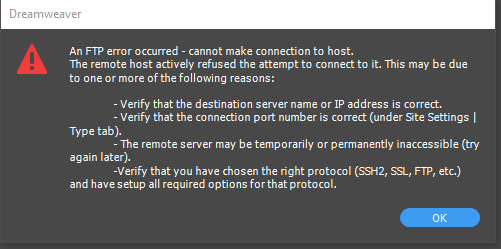
Here's the error message I get every time I try to connect.


 7
Replies
7
7
Replies
7


Copy link to clipboard
Copied
I would create a new site definition and delete the old one. Ensure the log-in credentials are correct and hit the TEST button.

Copy link to clipboard
Copied
This did not work. Still get same message.
Copy link to clipboard
Copied
Common Causes of FTP Connection Failures - 1&1 Help Center
SFTP Connection Credentials - 1&1 Help Center
Copy link to clipboard
Copied
Given that Beyond Compare works perfectly fine with 1&1 makes me think that the problem is with Dreamweaver rather than 1&1.


Copy link to clipboard
Copied
I am not sure if this is related but we have heard of issues related to support for TLS 1.2 in Dreamweaver. Can you try uploading your site using Filezilla and let us know if it works fine?
Also can you check with your service provider (1&1) about what could be leading to the error message?
Let us know of your observations, and we will take it from there.
Thanks,
Preran
Copy link to clipboard
Copied
I haven't contacted 1&1 about my recent finding based on Preran's suggestions. Perhaps you will know what is going on, or can help with what questions I need to ask of 1&1 since this does not make sense.
Dreamweaver: Does not work with either FTP or SFTP.
Beyond Compare: Works with FTP. (SFTP is not available.)
Filezilla: Does not work with FTP. Works with SFTP.
1&1 recommends using SFTP, but apparently still works with FTP in at least one program. When I originally talked to 1&1, they told me the password I gave them was not correct and recommended that I wait 30 minutes after changing it before testing. Well, that didn't work. And since Beyond Compare and Filezilla at least work some, it would seem that the password has to be correct.
What do you make of this?
Copy link to clipboard
Copied
Sounds like your web host has some issues to sort out. I would use Filezilla and SFTP for now.

Get ready! An upgraded Adobe Community experience is coming in January.
Learn more
 AdChoices