
Participant
November 22, 2016
Answered

Dreamweaver 2017 BlueHost FTP setup

  • November 22, 2016
  • 2 replies
  • 2902 views

I'm trying to get the FTP setup to work on dreamweaver with bluehost.
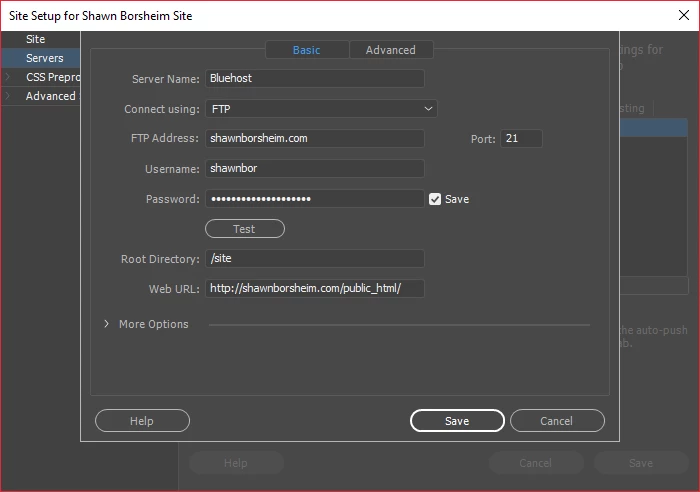
I really don't know if I'm doing this right. I check out youtube videos and it seems like all it is is just put in the address and the hosting password and username.

My site contents are in public_html > site. It's a wordpress network.

This topic has been closed for replies.
Correct answer Nancy OShea

Root Directory:  public_html/site/

2 replies

John Waller
Community Expert
Community Expert
November 23, 2016

furryfan87243 wrote:

I really don't know if I'm doing this right. I check out youtube videos and it seems like all it is is just put in the address and the hosting password and username.

My site contents are in public_html > site. It's a wordpress network.

Have you checked Bluehost's instructions?

FTP Setup on Dreamweaver CC 2014

  • Server name is any name you would like to give this server.
  • The "Connect Using" setting should be set to FTP
  • The FTP Address is normally your domain with "ftp." added in front. If my domain was example.com I would use ftp.example.com
  • Username should be your hosting account username.
  • Passsword should be you hosting account password.
  • The Root Directory is normally public_html if your site is hosted out of another folder use that folder.
  • Web URL should be just the URL you access the site from.
Dewan9598
Known Participant
November 27, 2016

I don't have this save or cancel button at the bottom of this screen

Nancy OShea
Community Expert
Community Expert
November 27, 2016

You have it, you just can't see it.

If you set your system's display settings to the recommended 100%, I think you'll see the buttons.

Nancy

Nancy O'Shea— Product User & Community Expert
Nancy OShea
Community Expert
Community Expert
November 22, 2016

Root Directory should be public_html/

Is your WP at domain root level or is it inside a sub-folder under your main domain?

main domain = yoursite.com

subfolder = yoursite.com/blog/

Nancy

Nancy O'Shea— Product User & Community Expert
Participant
November 23, 2016

Thanks for your time, it was in a folder called "site". So yes it's in a sub folder.