
Inspiring
June 21, 2017
Answered

Dreamweaver CC 2017.5 - Missing Get and Put arrows in toolbar

  • June 21, 2017
  • 1 reply
  • 734 views

I use the Developer mode and have the Standard Tools Bars enabled:
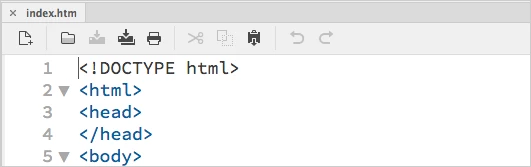
Please add the Get and Put arrows which will effect the selected tab. Here's a mock up:
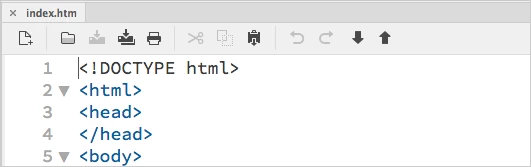
Currently I have to click the Site tab and then select either Get or Put, this is very inconvenient.

Please don't tell me to use keyboard shortcuts, I don't use keyboard shortcuts for anything other than copy and paste functions.

Thank you.

    This topic has been closed for replies.
    Correct answer Andrew Bajka

    In Dreamweaver go to Help > Submit Bug/Feature Request to get your request in front of the dev team.

    If enough people up-vote your request, Adobe could put it back in the Standard Toolbar. We've had a few other "upgrades" get reversed that way.


    I added the feature request here for others to vote on.

    Put back the Get and Put arrows into the standard toolbar – Adobe Dreamweaver CC: Feature Ideas

    1 reply

    Jon Fritz
    Community Expert
    Community Expert
    June 21, 2017

    Keyboard shortcuts are still demonstrably faster than anything you can click in the interface, the default ones make perfect sense Ctrl + Shift + U to upload and Ctrl + Shift + D for download.

    Either way, the buttons are still in the program, just moved and "simplified" like so many other things. Check the Common Toolbar (the vertically aligned one) and it's also in the Code Inspector window. It's 2 clicks though, one to open the menu, one to choose the action you want. You also still have the Get and Put arrows in the Files window.

    Inspiring
    June 21, 2017

    Hi Jon,

    Thank you for your reply.

    Please understand it's not about speed, it's about memorizing things, I don't want to have to memorize any more shortcuts.

    The Up and Down arrows have been in Dreamweaver since 1993, that's over 19 years, removing them in Dreamweaver CC 2017 was a bad move, please help to see it returned.

    Regarding the "the Common Toolbar (the vertically aligned one)" that's a completely useless toolbar, I don't want that covering any portion of my screen.

    Jon Fritz
    Community Expert
    Community Expert
    June 21, 2017

    In Dreamweaver go to Help > Submit Bug/Feature Request to get your request in front of the dev team.

    If enough people up-vote your request, Adobe could put it back in the Standard Toolbar. We've had a few other "upgrades" get reversed that way.