
Participant
November 23, 2016
Answered

Dreamweaver CC 2017 has stopped working (won't launch)

  • November 23, 2016
  • 4 replies
  • 3216 views

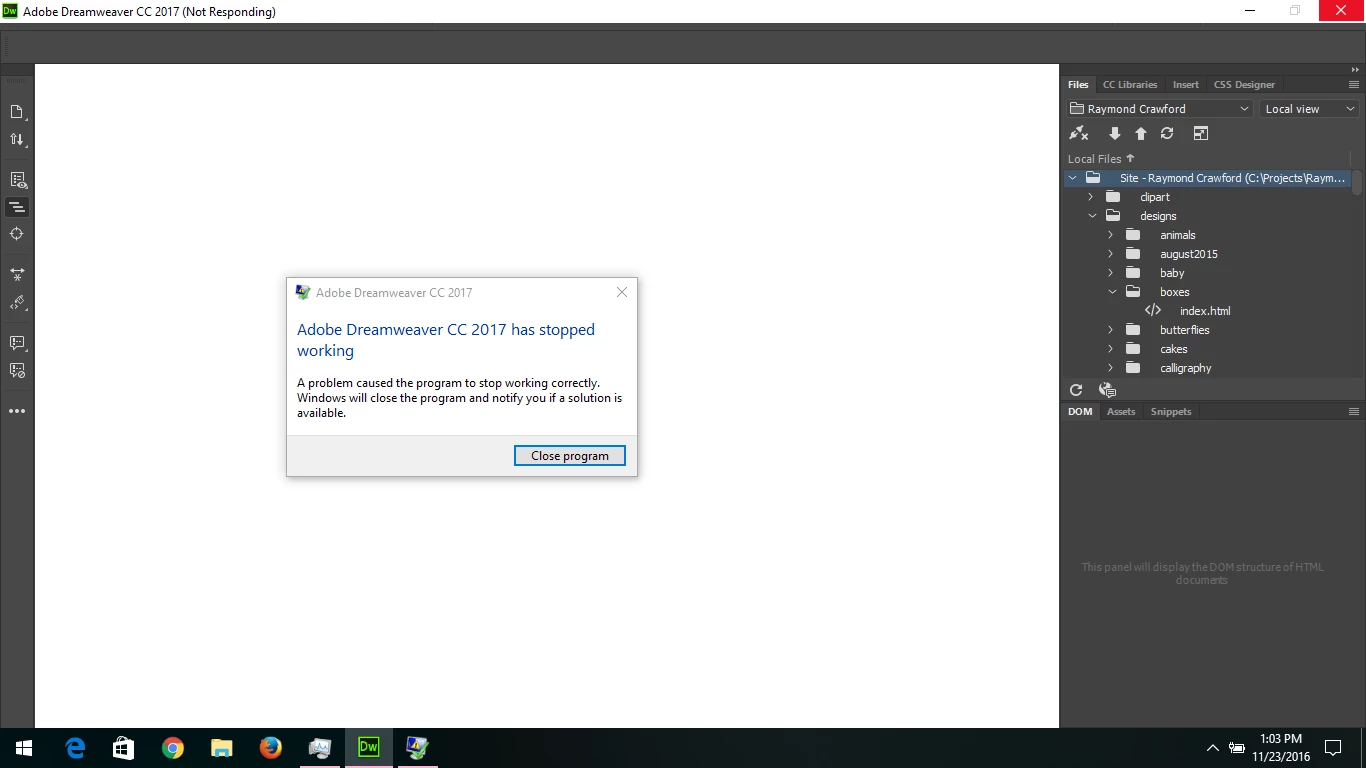
Please help! I have been trying to get into Dreamweaver for over a week. I try to open the program and it freezes (see screen capture below). I haven't been able to find anything on the forums here as a resolution. Am having the same problem with Photoshop. I am running the latest version of Windows 10. Thanks!
This topic has been closed for replies.
Correct answer Nancy OShea

What does your Window Event Viewer or Mac Crash Log tell you is the faulting module?

Photoshop & Dreamweaver have a big problem with Lavasoft's Web Companion software.  Uninstalling Lavasoft takes care of it.

Another known cause of problems are missing or corrupted Graphics libraries (.dll files).  Updating your graphics drivers may help.

Nancy

4 replies

Participant
December 20, 2016

I have the same problem, i run my dreamweaver cc 2017 on windows 10 and it crashed (app has stopped working)

1. deleting the Dreamweaver folder in the "roaming" directory

2. do sfc /scannow

3. reset my preferences (ctrl+shift+windows key)

4. uninstall web companion - lavasoft from my control panel,

it doesn't work

I solved my problem after i do this steps :

1. uninstall all cc programs, https://helpx.adobe.com/creative-cloud/help/uninstall-remove-app.html

2. uninstall the cc desktop app, https://helpx.adobe.com/creative-cloud/help/uninstall-creative-cloud-desktop-app.html

3. cleaning installation http://www.adobe.com/support/contact/cscleanertool.html

4. use adw cleaner to clean adware,,

5. restart my computer

6. reinstall the cc desktop app, https://creative.adobe.com/products/creative-cloud

7. reinstall adobe dreamweaver CC 2017 ---- and then dreamweaver can launch properly

These files are deleted by Adw cleaner from my computer :

[#] File deleted: C:\WINDOWS\SysNative\LavasoftTcpService64.dll

[-] File deleted: C:\WINDOWS\SysNative\LavasoftTcpServiceOff.ini

[-] File deleted: C:\WINDOWS\SysWoW64\lavasofttcpservice.dll

[-] File deleted: C:\WINDOWS\SysWoW64\LavasoftTcpServiceOff.ini

[-] File deleted: C:\Users\Greg\AppData\Roaming\Mozilla\Firefox\Profiles\k5wi8z3g.default-1465383609254\searchplugins\yahoo-lavasoft.xml

[-] File deleted: C:\Users\Greg\AppData\Local\Google\Chrome\User Data\Profile 2\Local Storage\hxxp_www.azlyrics.com_0.localstorage

[-] File deleted: C:\Users\Greg\AppData\Local\Google\Chrome\User Data\Profile 2\Local Storage\hxxp_www.azlyrics.com_0.localstorage-journal

looks like the problem is because creative cloud crashed with other software (Web Companion - lavasoft) but simply uninstall it from our control panel didn't delete the dll files (such as LavasoftTcpService64.dll)

laurazicAuthor
Participant
November 28, 2016

Thank you Nancy, I uninstalled Lavasoft and I'm now able to open Dreamweaver!

I appreciate your help.

best,

Laura

Preran
Legend
November 24, 2016

If Nancy's suggestions don't work, can you try the solution in Installing or opening issues in Dreamweaver CS6 ?

If you still need help, I suggest getting in touch with Customer Support for help Contact us | Adobe

Thanks,

Preran

Nancy OShea
Community Expert
Nancy OSheaCommunity ExpertCorrect answer
Community Expert
November 23, 2016

What does your Window Event Viewer or Mac Crash Log tell you is the faulting module?

Photoshop & Dreamweaver have a big problem with Lavasoft's Web Companion software.  Uninstalling Lavasoft takes care of it.

Another known cause of problems are missing or corrupted Graphics libraries (.dll files).  Updating your graphics drivers may help.

Nancy

Nancy O'Shea— Product User & Community Expert