


- Home
- Dreamweaver
- Discussions
- Dreamweaver CC and email webform via PHP help need...
- Dreamweaver CC and email webform via PHP help need...
Dreamweaver CC and email webform via PHP help needed

Copy link to clipboard
Copied
Firstly,
Thankyou for a wonderful resource. It has allowed me to build my own website and upload it.
I have got to a point that has me stumped and I am looking for assistance. Happy to pay if someone can help me out so it works properly.
Basically, I have developed a form to capture some basic details that I want to receive via email upon the user pressing submit.
I have followed the tutorials / google searches / examples without success so far. In the meantime, I am using a web built form generated by a third party. I want to have my own creation uploaded and understand how it works.
I got as far as the form creation using the following guide - Alt-Web Design & Publishing: Responsive Contact Form with Bootstrap 3.2 and PHP (Part 1)
I then also downloaded Wampserver in another guide, but this is where things fell apart.
I also tried to save the page as a PHP page, but that didn't work for me either. I have uploaded the code in a page for ease of viewing the form I want.
The main issues:
1. I added more fields and options than the guide above had and tried to update all the relevant links. I don't think I got it quite right, so will need to fix that up
2. I can't work out how to use Wampserver or how it connects to my remote server
3. I want the form to work so I receive an email upon submission and the user is redirected to a thankyou page
I will post relevant codes below.


 5
Replies
5
5
Replies
5


Copy link to clipboard
Copied
This is the form code which appears to work to work.
<!--begin HTML Form-->
<form class="form-horizontal" role="form" method="post" action=" ">
<div class="form-group">
<label for="name" class="col-sm-3 control-label"><span class="required">*</span> First Name:</label>
<div class="col-sm-5">
<input type="text" class="form-control" id="name" name="name" placeholder="First Name">
</div>
</div>
<div class="form-group">
<label for="email" class="col-sm-3 control-label"><span class="required">*</span> Email: </label>
<div class="col-sm-5">
<input type="email" class="form-control" id="email" name="email" placeholder="you@domain.com">
</div>
</div>
<div class="form-group">
<label for="phone" class="col-sm-3 control-label"><span class="required">*</span> Phone Number: </label>
<div class="col-sm-5">
<input type="tel" class="form-control" id="phone" name="phone" placeholder="0400 000 000 or 02 1234 5678">
</div>
</div>
<div class="form-group">
<label for="Business Name" class="col-sm-3 control-label"> Business Trading Name</label>
<div class="col-sm-7">
<input class="form-control" row="4" name="Business Name" placeholder="Business / Company Name">
</div>
</div>
<div class="form-group">
<label for="State" class="col-sm-3 control-label"> Select your State</label>
<div class="col-sm-9">
<select name="State" class="col-sm-3 control-label">
<option value="">Select</option>
<option value="NSW">NSW</option>
<option value="QLD">QLD</option>
<option value="VIC">VIC</option>
<option value="WA">WA</option>
<option value="SA">SA</option>
<option value="SA">NT</option>
<option value="SA">ACT</option>
<option value="SA">Other</option>
</select>
</div>
</div>
<p class="required">Time in Business
</p>
<p>
<label>
<input type="radio" name="Time In Business" value="radio" id="Less than 6 months">
Less than 6 months</label>
<br>
<label>
<input type="radio" name="Time In Business" value="radio" id="6 to 12 months">
6 to 12 months</label>
<br>
<label>
<input type="radio" name="Time In Business" value="radio" id="Over 1 year">
Over 1 Year</label>
<br>
</p>
<p class="required">Loan Amount Required
</p>
<p>
<label>
<input type="radio" name="Loan Size" value="radio" id="up to $50K">
$5K to $50K</label>
<br>
<label>
<input type="radio" name="Loan Size" value="radio" id="up to $250K">
$50K to $250K</label>
<br>
<label>
<input type="radio" name="Loan Size" value="radio" id="over $250K">
Over $250K</label>
<br>
</p>
<p> </p>
<div class="form-group">
<p>
<label>
<input type="checkbox" name="PrivacyCheck" value="checkbox" id="PrivacyCheck">
I have reviewed, understand and consent to the privacy policy</label>
<br>
</p>
</div>
<div class="form-group">
<div class="col-sm-offset-3 col-sm-6 col-sm-offset-3">
<button type="submit" id="submit" name="submit" class="btn-lg btn-primary btn-block">SUBMIT (Free and No obligation)</button>
</div>
</div>
<!--end Form--></form>
Copy link to clipboard
Copied
This is the corresponding PHP - the current form is saved as a html page here - Get started. Enquire here for Loanfinder Business Loans.
<?php
// NOTE: this page must be saved as a .php file.
// And your server must support PHP 5.3+ and PHP Mail().
// Define variables and set to empty values
$result = $name = $email = $phone = $BusinessName = $State = $TimeInBusiness = $LoanSize = $PrivacyCheck = "";
$errName = $errEmail = $errPhone = "";
if (isset($_POST["submit"])) {
$name = $_POST['name'];
$email = $_POST['email'];
$phone = $_POST['phone'];
$Businessname = $_POST['Businessname'];
$State = $_POST['State'];
$TimeInBusiness = $_POST['TimeInBusiness'];
$LoanSize = $_POST['LoanSize'];
$PrivacyCheck = $_POST['PrivacyCheck'];
//valid address on your web server
$from = 'loan@mywebsite.com.au';
//your email address where you wish to receive mail
$to = 'loan@mywebsite.com.au';
$subject = 'Loan Enquiry';
$headers = "From:$from\r\nReply-to:$email";
$body = "From: $name\n E-Mail: $email\n Phone: $phone\n BusinessName: $BusinessName\n State: $State\n TimeInBusiness: $TimeInBusiness\n LoanSize: $LoanSize\n";
}
//end form processing script
// Check if name is entered
if (empty($_POST["name"])) {
$errName = "Please enter your name.";
} else {
$name = test_input($_POST["name"]);
}
// Check if email is entered
if (empty($_POST["email"])) {
$errEmail = "Please enter your email address.";
} else {
$email = test_input($_POST["email"]);
// check if e-mail address is valid format
if (!filter_var($email, FILTER_VALIDATE_EMAIL)) {
$errEmail = "Invalid email format.";
}
}
// Check if phone is entered
if (empty($_POST["phone"])) {
$phone = "Please enter your phone number.";
} else {
$phone = test_input($_POST["phone"]);
}
//Check if privacy is entered
if (empty($_POST["PrivacyCheck"])) {
$errMessage = "Please check box for consent to privacy policy.";
} else {
$message = test_input($_POST["PrivacyCheck"]);
}
//sanitize data inputs
function test_input($data) {
$data = trim($data);
$data = stripslashes($data);
$data = htmlspecialchars($data);
$data = (filter_var($data, FILTER_SANITIZE_STRING));
return $data;
}
// If there are no errors, send the email & output results to the form
if (!$errName && !$errEmail && !$errPhone && !$errPrivacyCheck) {
if (mail ($to, $subject, $body, $from)) {
$result='<div class="alert alert-success"><h2><span class="glyphicon glyphicon-ok"></span> Message sent!</h2><h3>Thank you for contacting us. Someone will be in touch with you soon.</h3></div>';
} else {
$result='<div class="alert alert-danger"><h2><span class="glyphicon glyphicon-warning-sign"></span> Sorry there was a form processing error.</h2> <h3>Please try again later.</h3></div>';
}
}
//sanitize data inputs
function test_input($data) {
$data = trim($data);
$data = stripslashes($data);
$data = htmlspecialchars($data);
$data = (filter_var($data, FILTER_SANITIZE_STRING));
return $data;
}
//end form processing script
?>
[email address changed by Mod]
Mod Note: Please ensure that you do not post valid personal details. These can be used by unsavoury elements to your detriment.


Copy link to clipboard
Copied
1. I added more fields and options than the guide above had and tried to update all the relevant links. I don't think I got it quite right, so will need to fix that up
2. I can't work out how to use Wampserver or how it connects to my remote server
3. I want the form to work so I receive an email upon submission and the user is redirected to a thankyou page
One item at a time please. To answer all of this at once takes too much of my time. Incidentally, I reside on the Mornington Peninsula near Melbourne. If that is your location we may be able to find a better way to communicate.
Starting with 2., the Wamp server is so that you can develop and test the site on your local machine before you upload to the wide world. The Wamp server does not extend to outside of your machine unless you make it available through an IP address.
The normal setup using Dreamweaver, is to place the files in the 'www' directory like in
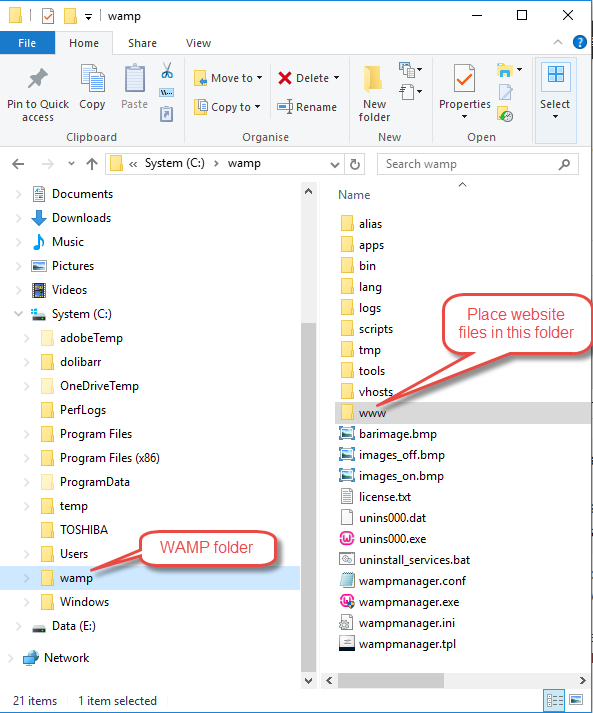
You will also need to set the site up in Dreamweaver as per How to set up connection between Dreamweaver and the publishing server
Once all of the above has been done, then rename WIP.html to WIP.php and we'll take it from there. At this stage, you will need to start a new topic.
Copy link to clipboard
Copied
Thanks for your reply Ben.
I have amended the WIP.html to WIP.php - same location - Get started. Enquire here for Loanfinder Business Loans.
I will start a new thread specific to the form and PHP coding. ( New thread below )
I am based in QLD, but happy to discuss via email.

Copy link to clipboard
Copied
Fix code errors on your form page.
Showing results for http://www.loanfinder.com.au/WIP.php - Nu Html Checker

Get ready! An upgraded Adobe Community experience is coming in January.
Learn more
 AdChoices