danep11465962
Participant
December 29, 2016
Answered

Dropdown menu Problems

  • December 29, 2016
  • 3 replies
  • 2165 views

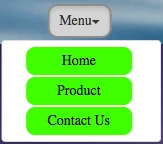
I have a a dropdown menu and can't figure out how to customise it.

This is it before I click it and shown below it what is looks like after.

I'm trying to figure out how to change the colours of the menu button when clicked.

Ive tried editing in the style.css using the code

.style-nav button:active {}

But did not help. Does anyone know how to do this?.

Also how do i change the background of the home, product and contact us buttons.

I have tried using

.style-nav ul {

background colour: transparent

}

But this leaves a shadow at the border.


The dropdown menu code is shown below.

<nav class="style-nav">


       <div class="btn-group" role="group">

       <div class="btn-group" role="group">

         <button id="btnDropdown1" type="button" class="btn btn-default dropdown-toggle" data-toggle="dropdown" aria-haspopup="true" aria-expanded="false">Menu<span class="caret"></span></button>

         <ul class="dropdown-menu" aria-labelledby="btnDropdown1">

           <li><a href="#">Home</a></li>

           <li><a href="#">Product</a></li>

           <li><a href="#">Contact Us</a></li>

            </ul>


          </div>

        </div>


      </nav>

    This topic has been closed for replies.
    Correct answer osgood_

    Welcome to the weird, wonderful and complex world of Bootstrap. Example below, if you can live with it then youre a better person than I am. I'd rather write my own code any day than use this tripe of a framework where half the time its a complete guessing game as to what selectors to use to change anything.

    You should make sure the css goes in an independent stylesheet linked to your page which comes AFTER the default bootstrap.css file. Never touch the default bootstrap stylesheet unless you know exactly what you are doing. It looks to me like you may already have an independent stylesheet as you have managed to change some of the properties.

    <!doctype html>

    <html>

    <head>

    <meta charset="utf-8">

    <title>Bootstrap Demo</title>

    <meta name="viewport" content="width=device-width, initial-scale=1">

    <meta http-equiv="X-UA-Compatible" content="IE=edge">

    <script src="http://code.jquery.com/jquery-latest.min.js">

    </script>

    <!--Bootstrap-->

    <link rel="stylesheet" href="http://maxcdn.bootstrapcdn.com/bootstrap/3.2.0/css/bootstrap.min.css">

    <script src="http://maxcdn.bootstrapcdn.com/bootstrap/3.2.0/js/bootstrap.min.js"></script>

    <style>

    body {

    font-family: helvetica, sans-serif;

    font-size: 18px;

    }

    .nav_holder {

    background-color: #06C;

    padding: 10px 0;

    text-align: center;

    }

    /* BUTTON DEFAULT */

    .btn.btn-default  {

    border: 2px solid #fff;

    font-size: 16px;

    background-color: transparent!important;

    color: #fff;

    border-radius: none!important;

    }

    /* CHANGE BUTTON DEFAULT PROPERTIES ONCLICK */

    .dropdown-toggle:active, .open .dropdown-toggle {

    background: #80aaff !important;

    color:#fff !important;

    border: 2px solid #fff!important;

    }

    /* CLEAR BORDER AND SHADOW ON MENU HOLDER */

    .dropdown-menu {

    border: none!important;

    -webkit-box-shadow: none!important;

    box-shadow: none !important;

    margin: 20px 0 0 0;

    padding: 0;

    }

    /* STYLE ANCHOR TAGS IN DROPDOWN MENU */

    .dropdown-menu > li > a {

    background-color: #80aaff;

    font-size: 16px;

    color: #fff;

    margin: 0 0 4px 0;

    border-radius: 8px;

    display: block;

    padding: 10px 0;

    text-align: center;

    }

    /* ANCHOR HOVER COLOR */

    .dropdown-menu > li > a:hover {

    background-color: #66F;

    color: #fff;

    }

    .caret {

    margin: 0 0 0 10px!important;

    display: inline-block;

    }

    </style>

    </head>

    <body>

    <div class="nav_holder">

    <div class="btn-group" role="group">

    <button id="btnDropdown1" type="button" class="btn btn-default dropdown-toggle" data-toggle="dropdown" aria-haspopup="true" aria-expanded="false">Menu<span class="caret"></span></button>

    <ul class="dropdown-menu" aria-labelledby="btnDropdown1">

    <li><a href="#">Home</a></li>

    <li><a href="#">Product</a></li>

    <li><a href="#">Contact Us</a></li>

    </ul>

    </div>

    </div>

    </body>

    </html>

    3 replies

    BenPleysier
    Community Expert
    Community Expert
    December 29, 2016

    Because some people are not clever enough to figure Bootstrap out, it does not mean that it should be dismissed as tripe. Millions of web publications have been made and are still being made using Bootstrap and for good reason, namely to save time and money.

    Another, hardly publicised fact, when using a framework, it is easy for others, who are au fait with the framework, to recognise the code with a view to continue/rectify your work. Proprietary coding makes this much more difficult.

    Without further diversion, Hans-Günter has asked for you to upload the site and supply the URL. This way we can look at your code in situ and be able to help you with your question.

    Wappler is the DMXzone-made Dreamweaver replacement and includes the best of their powerful extensions, as well as much more!
    Legend
    December 29, 2016

    BenPleysier wrote:

    Because some people are not clever enough to figure Bootstrap out, it does not mean that it should be dismissed as tripe.

    That just about accounts for everyone in this forum then apart from those that are clever enough to have figured it out and can dismiss it as tripe.

    Why should the OP upload anything. They have supplied the Bootstrap code, anyone who assumes they know anything about Bootstrap should know how to link it to the Framework to resolve the issue.

    BenPleysier
    Community Expert
    Community Expert
    December 30, 2016

    how can i access these styles to change them?


    Copy and paste the following into a new document and view in browser.

    <!doctype html>

    <html>

    <head>

      <meta charset="utf-8">

      <meta name="viewport" content="width=device-width, initial-scale=1">

      <meta http-equiv="X-UA-Compatible" content="IE=edge">

      <title>Bootstrap Demo</title>

      <link rel="stylesheet" href="https://maxcdn.bootstrapcdn.com/bootstrap/3.3.7/css/bootstrap.min.css" integrity="sha384-BVYiiSIFeK1dGmJRAkycuHAHRg32OmUcww7on3RYdg4Va+PmSTsz/K68vbdEjh4u" crossorigin="anonymous">

       <style>

    .btn-active {

      background-color: purple !important;

      color: white !important;

      }

      </style>

    </head>

    <body class="container">

      <div class="btn-group">

      <h2>Nesting Button Groups</h2>

      <button type="button" class="btn btn-success dropdown-toggle" data-toggle="dropdown">Menu <span class="caret"></span></button>

      <ul class="dropdown-menu" role="menu">

      <li><a href="#" class="btn btn-active">Home</a></li>

      <li><a href="#" class="btn btn-danger">Product</a></li>

      <li><a href="#" class="btn btn-danger">Contact Us</a></li>

      </ul>

      </div>

       <script src="http://code.jquery.com/jquery-latest.min.js"></script>

      <script src="https://maxcdn.bootstrapcdn.com/bootstrap/3.3.7/js/bootstrap.min.js" integrity="sha384-Tc5IQib027qvyjSMfHjOMaLkfuWVxZxUPnCJA7l2mCWNIpG9mGCD8wGNIcPD7Txa" crossorigin="anonymous"></script>

    </body>

    </html>

    Don't forget to include !important to override the original code

    Wappler is the DMXzone-made Dreamweaver replacement and includes the best of their powerful extensions, as well as much more!
    osgood_Correct answer
    Legend
    December 29, 2016

    Welcome to the weird, wonderful and complex world of Bootstrap. Example below, if you can live with it then youre a better person than I am. I'd rather write my own code any day than use this tripe of a framework where half the time its a complete guessing game as to what selectors to use to change anything.

    You should make sure the css goes in an independent stylesheet linked to your page which comes AFTER the default bootstrap.css file. Never touch the default bootstrap stylesheet unless you know exactly what you are doing. It looks to me like you may already have an independent stylesheet as you have managed to change some of the properties.

    <!doctype html>

    <html>

    <head>

    <meta charset="utf-8">

    <title>Bootstrap Demo</title>

    <meta name="viewport" content="width=device-width, initial-scale=1">

    <meta http-equiv="X-UA-Compatible" content="IE=edge">

    <script src="http://code.jquery.com/jquery-latest.min.js">

    </script>

    <!--Bootstrap-->

    <link rel="stylesheet" href="http://maxcdn.bootstrapcdn.com/bootstrap/3.2.0/css/bootstrap.min.css">

    <script src="http://maxcdn.bootstrapcdn.com/bootstrap/3.2.0/js/bootstrap.min.js"></script>

    <style>

    body {

    font-family: helvetica, sans-serif;

    font-size: 18px;

    }

    .nav_holder {

    background-color: #06C;

    padding: 10px 0;

    text-align: center;

    }

    /* BUTTON DEFAULT */

    .btn.btn-default  {

    border: 2px solid #fff;

    font-size: 16px;

    background-color: transparent!important;

    color: #fff;

    border-radius: none!important;

    }

    /* CHANGE BUTTON DEFAULT PROPERTIES ONCLICK */

    .dropdown-toggle:active, .open .dropdown-toggle {

    background: #80aaff !important;

    color:#fff !important;

    border: 2px solid #fff!important;

    }

    /* CLEAR BORDER AND SHADOW ON MENU HOLDER */

    .dropdown-menu {

    border: none!important;

    -webkit-box-shadow: none!important;

    box-shadow: none !important;

    margin: 20px 0 0 0;

    padding: 0;

    }

    /* STYLE ANCHOR TAGS IN DROPDOWN MENU */

    .dropdown-menu > li > a {

    background-color: #80aaff;

    font-size: 16px;

    color: #fff;

    margin: 0 0 4px 0;

    border-radius: 8px;

    display: block;

    padding: 10px 0;

    text-align: center;

    }

    /* ANCHOR HOVER COLOR */

    .dropdown-menu > li > a:hover {

    background-color: #66F;

    color: #fff;

    }

    .caret {

    margin: 0 0 0 10px!important;

    display: inline-block;

    }

    </style>

    </head>

    <body>

    <div class="nav_holder">

    <div class="btn-group" role="group">

    <button id="btnDropdown1" type="button" class="btn btn-default dropdown-toggle" data-toggle="dropdown" aria-haspopup="true" aria-expanded="false">Menu<span class="caret"></span></button>

    <ul class="dropdown-menu" aria-labelledby="btnDropdown1">

    <li><a href="#">Home</a></li>

    <li><a href="#">Product</a></li>

    <li><a href="#">Contact Us</a></li>

    </ul>

    </div>

    </div>

    </body>

    </html>

    hans-g.
    Legend
    December 29, 2016

    Hi,

    please load up your website in question up to your server (no matter how it looks like ) and send us the link, so we can better help.

    Hans-Günter