Copy link to clipboard
Copied
It is very easy to make the Dropdown menu form Ms Access.
But how can i make the Dropdown menu from Phpmyadmin........
Advice or article....
Thank you for reading..

First of all, you must create recordset for the drop down menu (Server Behaviour > Recordset). Then, insert the drop down menu on page (Insert > Form > List/Menu) and insert the appropriate id for it. Click it and look at the properties panel below. You can see "Dynamic" button, click it and you will get popup window as below.
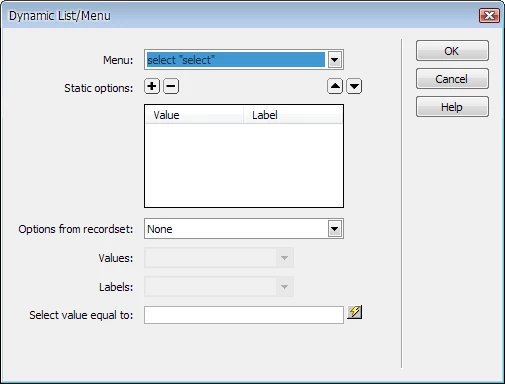
You can see "Options from recordset" field. Choose the recordset that u have made before. Values field is for attribute that you want to store in database and Labels field
...
Copy link to clipboard
Copied
Do u mean that u want to make dynamic drop down that will list some values from table in databse?
Copy link to clipboard
Copied
thank you very much for read my mind...![]()
The answer is Yes.
Copy link to clipboard
Copied
First of all, you must create recordset for the drop down menu (Server Behaviour > Recordset). Then, insert the drop down menu on page (Insert > Form > List/Menu) and insert the appropriate id for it. Click it and look at the properties panel below. You can see "Dynamic" button, click it and you will get popup window as below.

You can see "Options from recordset" field. Choose the recordset that u have made before. Values field is for attribute that you want to store in database and Labels field to show the list to users when they choose.
Copy link to clipboard
Copied
Thank you all you guys for informations..
and your time.![]()
Copy link to clipboard
Copied
1. <select name="my_drop_down" id="drop_down_id"> 2. <?php 3. do { ?>
4. <option value="<?php echo $row_recordset['row_containing_value']?>">
5. <?php echo $row_recordset['row_containing_display']?></option> 6. <?php 7. } while ($row_recordset = mysql_fetch_assoc($recordset)); 8. $rows = mysql_num_rows($recordset); 9. if($rows > 0) { 10. mysql_data_seek($recordset, 0); 11. $row_recordset = mysql_fetch_assoc($recordset); 12. } ?> 13. </select>
In line 4 we are setting the value from the table that will act as the value for the menu. Whereas in line 5 we are setting the value from the table that will be displayed in the menu... in many cases this is the same (but also in many cases it won't be)... most notably if you want to, for example, display someone's name in the menu, but set the value as the id number of that person's record.
Copy link to clipboard
Copied
Oh, also in DW you can just make the menu and then click "Dynamic..." in the properties panel and follow the steps. ![]()
Find more inspiration, events, and resources on the new Adobe Community
Explore Now