
Inspiring
November 17, 2016
Answered

DW 2017 - Code is jumping all over the place!

  • November 17, 2016
  • 1 reply
  • 1253 views

Since the update to DW 2017, I am having a horrible time with editing code in ASP pages.

Here's the issues:

1) When adding HTML code on an ASP page, there is no HTML code sense/code complete. (Or ASP code sense either)

2) The code coloring is all wrong (as I've posted in another thread)

3) The biggest problem - the code jumps to the center of the screen (the line I'm working on) when I add code to an existing line. For instance, if I have this line:

<p> </p>

and I put my cursor in the beginning tag after the P and hit space (to say, create a class like <p class="whatever">), the entire line of code jumps to the center of the screen.

I have to say, I am very unhappy with DW 2017 and thinking about rolling back. It's just too difficult to work with all these bugs.

Thanks for any help or suggestions.
    This topic has been closed for replies.
    Correct answer Jon Fritz

    1. ASP support has been getting removed, piece by piece, over the last several versions. There is no plan currently to give any of it back that we've seen from Adobe.

    2. Adobe is aware of the code coloring issues and there are ways for you to change it, however it requires changing less and json files in the program directory vs simply changing settings in the preferences area. Hopefully they've heard the outcry of frustrated users and will give some, if not all, of that functionality back

    3. I'm not sure I understand what's happening there, I don't see the same effect under Windows 7.

    They removed the old source code interface and replaced it with a watered-down version of Brackets. As far as I can tell, it had no effect on what one can do with the code, could you please explain what you're seeing?

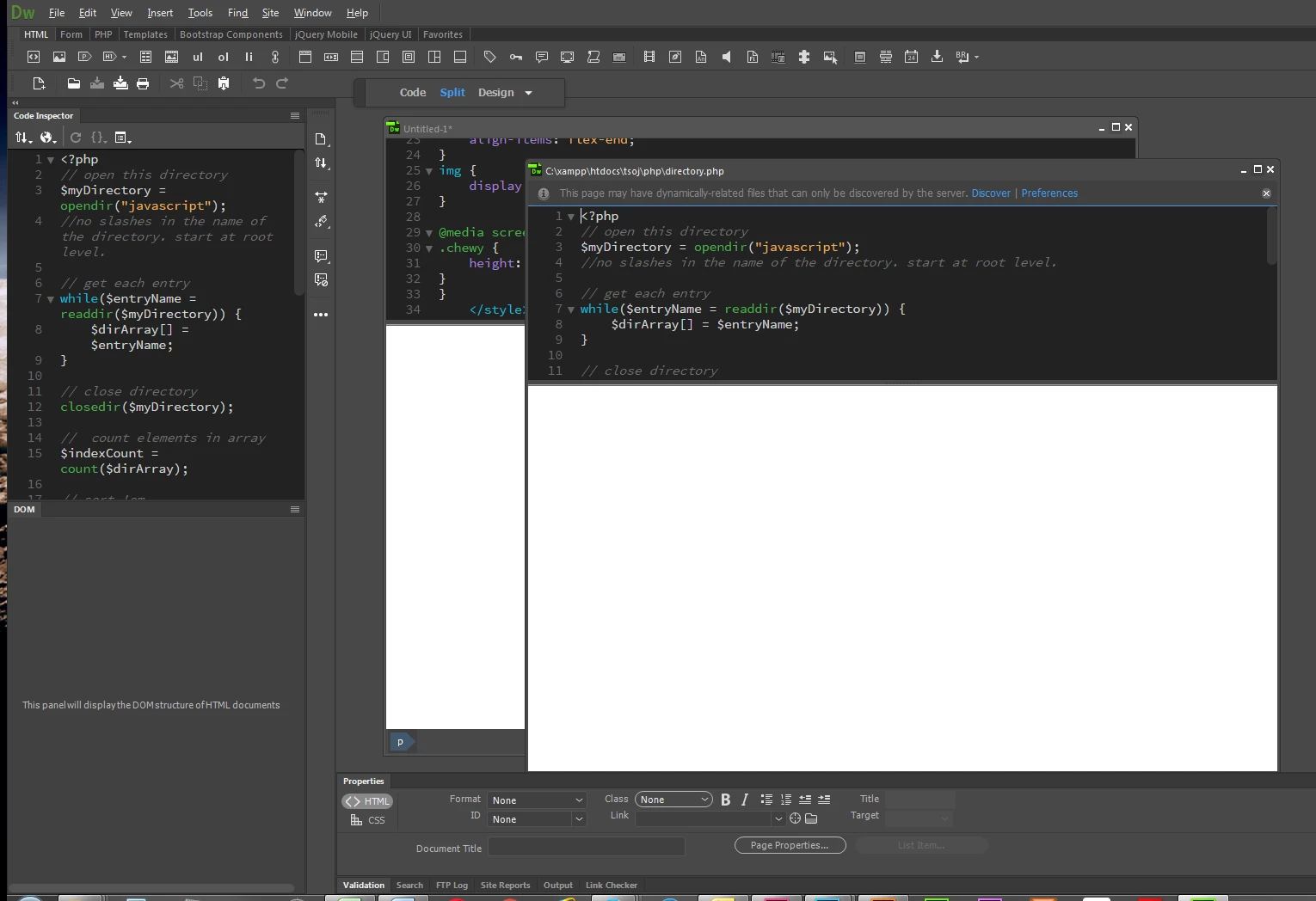
    As for only having one file open at a time, click the small Minimize icon in the upper right of your document window to have multiple documents open side by side, tiled or stacked as the screenshot below shows...

    I also went back to CC2015 due to the html entity re-write bug explained here: Dreamweaver Help | Known issues | Dreamweaver CC 2017 this version of CC2017 is not ready for production use in my opinion.

    1 reply

    Participant
    November 17, 2016

    An additional problem with DW 2017 is that they have apparently made the source code editor a stand-alone app.  This imposes severe limits on what you can do with the code.  Moreover, you can only have ONE page open at a time and expect to do anything at all because DW essentially freezes up if you open more than one page.  I had to go back to the 2015 version to get any work done.  DW 2017 is useless for me and I am very disappointed.

    Jon Fritz
    Community Expert
    Jon FritzCommunity ExpertCorrect answer
    Community Expert
    November 17, 2016

    1. ASP support has been getting removed, piece by piece, over the last several versions. There is no plan currently to give any of it back that we've seen from Adobe.

    2. Adobe is aware of the code coloring issues and there are ways for you to change it, however it requires changing less and json files in the program directory vs simply changing settings in the preferences area. Hopefully they've heard the outcry of frustrated users and will give some, if not all, of that functionality back

    3. I'm not sure I understand what's happening there, I don't see the same effect under Windows 7.

    They removed the old source code interface and replaced it with a watered-down version of Brackets. As far as I can tell, it had no effect on what one can do with the code, could you please explain what you're seeing?

    As for only having one file open at a time, click the small Minimize icon in the upper right of your document window to have multiple documents open side by side, tiled or stacked as the screenshot below shows...

    I also went back to CC2015 due to the html entity re-write bug explained here: Dreamweaver Help | Known issues | Dreamweaver CC 2017 this version of CC2017 is not ready for production use in my opinion.

    Inspiring
    November 17, 2016

    Their "Known Issues" page seems to be lacking some issues...