
Inspiring
May 29, 2017
Answered

DW 2017 is absolutely terrible

  • May 29, 2017
  • 6 replies
  • 1044 views

The code changes when I'm working. The first characters of each line just disappear sometimes - and other things get messed up.

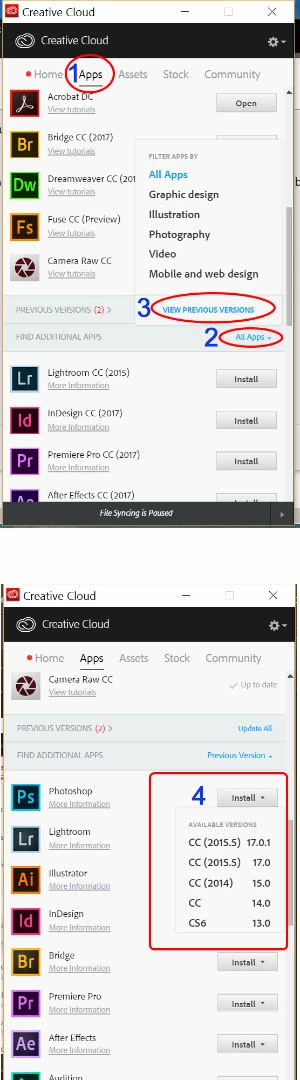
I need to install the previous version. How do I do that?

I saw another thread where you just select "Previous versions" in Creative Cloud app but its showing up there.
    This topic has been closed for replies.
    Correct answer Nancy OShea

    See screenshot.

    6 replies

    Niharika Jha
    Adobe Employee
    Adobe Employee
    May 30, 2017

    Hi,

    Can you please help us with more details of the issue with characters disappearing? Can you share a small video clip demonstrating the issue when that happens? Also, platform details, build details etc.

    Regards,

    Niharika Gupta

    Adobe Dreamweaver

    Inspiring
    May 31, 2017

    Niharika,

    I'll be honest - I don't really care to waste my time doing Adobe's job. This isn't free software where everyone contributes and works on it together. I pay a lot for CC and deserve a better product than this.

    BenPleysier
    Community Expert
    Community Expert
    May 30, 2017

    I have been using DW 2017 ever since it was released. I do have some problems that are being looked at by the DW-team and some that have already been fixed. However, disappearing characters has not been an issue in my case nor have I heard of the problem being mentioned by other users.

    The problem can sometimes be caused by having chosen OVR instead of INS as per

    Wappler is the DMXzone-made Dreamweaver replacement and includes the best of their powerful extensions, as well as much more!
    Nancy OShea
    Community Expert
    Community Expert
    May 29, 2017

    macuser2000  wrote

    The code changes when I'm working. The first characters of each line just disappear sometimes - and other things get messed up.

    Try Restore Preferences:

    Unusual behavior in Dreamweaver? Try restoring preferences.

    Nancy

    Nancy O'Shea— Product User & Community Expert
    Nancy OShea
    Community Expert
    Nancy OSheaCommunity ExpertCorrect answer
    Community Expert
    May 29, 2017

    See screenshot.

    Nancy O'Shea— Product User & Community Expert
    Inspiring
    May 31, 2017

    Thank you Nancy. I found the older versions and installed 2015.

    Inspiring
    May 29, 2017

    Sorry I meant "not" showing up.

    John Waller
    Community Expert
    Community Expert
    May 29, 2017

    macuser2000  wrote

    I saw another thread where you just select "Previous versions" in Creative Cloud app but its showing up there.

    Please post a screenshot showing us what you do see.

    Inspiring
    May 29, 2017

    John Waller
    Community Expert
    Community Expert
    May 29, 2017

    Thanks.

    The directions (Step 2 at Download and install Creative Cloud apps​) say click on Find Additional Apps > select All Apps and View Previous Versions should appear at the bottom of the menu.

    Can you post a screenshot of that menu?