

John_Allred
Inspiring
April 19, 2020
Answered

DW Copy paste (and other menu functions) not working

  • April 19, 2020
  • 1 reply
  • 2212 views

Using DW v 20.1 under Windows 10 64-bit, many menu functions are grayed out/nonfunctional. Includes copy, cut, paste, about Dreamweaver, open, close, close all, etc.


With a file open and with text selected, this is the status of my Edit menu:
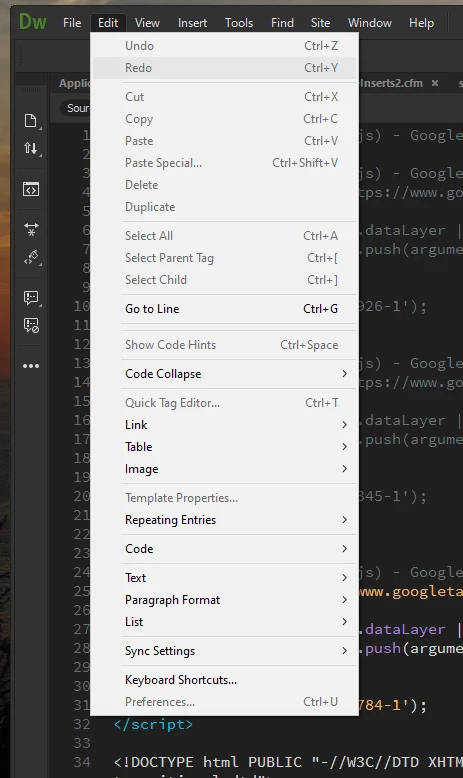
I have uninstalled and reinstalled DW. This issue does not occur in other Adobe CC apps.


I saw this issue cropped up a bit in 2017 and 2018, but I haven't seen more recent complaints. Advice would be greatly appreciated.
This topic has been closed for replies.
Correct answer Nancy OShea

Yes, ma'am.


Try Restore Preferences.

https://helpx.adobe.com/dreamweaver/kb/restore-preferences-dreamweaver.html


1 reply

John_Allred
Inspiring
April 19, 2020

For whatever insight it may provide, here is the status of my File menu:


Nancy OShea
Community Expert
Community Expert
April 19, 2020

1. Switch to Live View from your Document Toolbar.

2. Make certain the active tab is Source Code, not a dependent file tab.

3. Ensure that underlying code is error-free, denoted by a green checkmark in a circle. 

See screenshot.


Post back if you still need help.


Nancy O'Shea— Product User & Community Expert
Nancy OShea
Community Expert
Community Expert
April 20, 2020

This is close to becoming a pattern with us, Nancy. Last time I had a Dreamweaver issue, you suggested resetting my preferences, too. It worked then, and it worked now. I'm going to put a sticky note on the edge of my browser for how to reset the app.


Thanks, once again!


Unfortunately, the files that store preferences are easily corrupted.  It's not just in Dreamweaver.  It's all Adobe products. 


Nancy O'Shea— Product User & Community Expert