


- Home
- Dreamweaver
- Discussions
- DW error message: Before using this feature you mu...
- DW error message: Before using this feature you mu...

Copy link to clipboard
Copied
Been uploading files to my server with no problems for 5 years when suddenly I get this message which blocks all uploads. As far as I know I have never had or used a 'testing server'? Your help is solving this would be most appreciated.


 1 Correct answer
To everyone who has toiled diligently to solve my DW problem these many days, I want to express my sincere and heartfelt gratitude. That you do this for the few bones Adobe sees fit to throw your way, demonstrates just how dedicated you really are to your profession and helping people like me manage, for over 20 years, with a technology it hardy understands.
Having said that, I regret to add you all wasted your time with me for the problem was not with DW at all, but with my ISP the past 12 year
...
 76
Replies
76
76
Replies
76

Copy link to clipboard
Copied
In Local Files I highlight the modified html file I want to upload. I use the keyboard shortcut Ctrl+Shift+U and the highlight simply jumps to another file with no noticeable upload action. When I check, the file has not been uploaded.


Copy link to clipboard
Copied
If the number of files wanting to be transferred is seen as a problem, then this adds another dimension. The fact that they are not transferred points to the fact that the files are already present at the designated end point. In other words, the system works as it should.
The main problem (this is what we should be concentrating on) is your designated end point. We still do not have an answer from you. In your site setup and using the information that you have previously supplied, I assume that you do not have a testing server, I assume that you do have a remote server, I assume that the setting for the root directory is correctly set. In this case, if you are uploading to the remote, the uploaded files should reflect the files on the remote.
As you say, the files on the remote have not changed, which means that you are uploading elsewhere. Because you mention in your original post that you are getting an error message regarding a testing server, my assumption is that you are trying to upload to a non-existant testing server. However, in your later posts you do not mention an error message, which leads me to believe that you have now created a testing server. In this case, the files are most likely being sent to the testing server with the result that I see in your reply #48.
Please be aware that we cannot see your setup, nor can we see what you are doing. This means that you must advise us properly so that we can help you. Also please be advised that we do not get any remuneration for helping you, this assistance is on a voluntary basis.
My advice is that you execute reply #3 using reply #40 as a guide.
Copy link to clipboard
Copied
I'm shocked to read that Adobe does not fund this effort when they obviously do little to help their customers. Why is this the case and why have you allowed this to happen? You may guess by my reaction that I have some union organizing experience behind me. How can you allow Adobe to exploit your expertise like that? Workers (and you are workers for this can't be fun) should always unite against big business!
To get to the matter at hand, sorry I did not respond to specifics asked earlier. Yes, I did correct from testing server position when first notified. Right now when I click to expand the DW menu I see two listing, LOCAL FILES, the on the left and REMOTE SERVER on the right.
When I attempt to upload a file from Local Files, the date change appears on the file in the Remote Server listing. However, when I check my live website, the change has not occurred to the file online even after several attempts to Reload the Page.
Copy link to clipboard
Copied
Are you using Chrome? Chrome has a very sticky cache and you may need to get rid of it. In the Chrome address bar type chrome://settings/clearBrowserData and follow the prompts. You could also use another browser, I tend to use Firefox for testing.
As a side note: Hover over my image and you will see that I, along with other ACP's, am not an Adobe employee.
Copy link to clipboard
Copied
No, I don't use Chrome. I did realize you were not employees of Adobe, but getting free products from Adobe is not in my view adequate compensation for having to deal with people like me 😉
Copy link to clipboard
Copied
To get to the bottom of the problem, please post a screen capture of the expanded files window. One of my sites looks like

Please excuse the horrible mess. I am in the process of finding out what is wanted of the site going forward rather than getting pelted with ad hoc modifications. Some Developers Do 'Ave 'Em.
Copy link to clipboard
Copied
No problem doing screenshot, but how do i upload it here? (I'm glad this problem occurred between upload times, but eventually I would like to post new pics again.)
Copy link to clipboard
Copied
Either
- save the image and use the Insert Image button

- copy the image and paste here
Copy link to clipboard
Copied
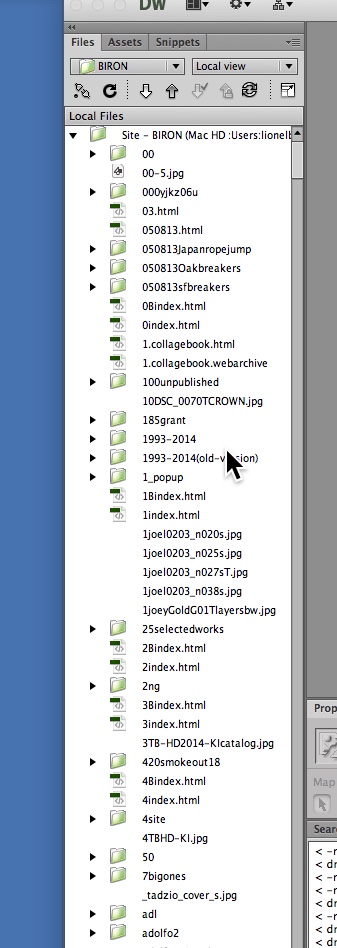
For some strange reason, I cannot capture the expanded screen which disappears when I go to screenshot. However, I can capture the Local Files. The Remote Server that appears on the right when expanded contain all the same files.
:
Copy link to clipboard
Copied
What does the root folder of the remote look like?

Copy link to clipboard
Copied
The Root Folder (at the top) reads: "/home/virtual/site31/fst/var/www/html/"
The Root Folder of my 2nd site, on the same server, reads: "/home/virtual/site21/fst/var/www/html/"
Copy link to clipboard
Copied
https://forums.adobe.com/people/Photos+by+BIRON wrote
For some strange reason, I cannot capture the expanded screen which disappears when I go to screenshot. However, I can capture the Local Files. The Remote Server that appears on the right when expanded contain all the same files.
I just tried by clicking the PRTSC keyboard button which places the image into the Clipboard. You can then paste (CTRL+V) the image into your reply. Please show us the Expanded Files window as I have done in reply #55
Copy link to clipboard
Copied
What is the PRTSC keyboard button?
Copy link to clipboard
Copied
Depends on your keyboard. Have a look at https://www.google.com.au/search?hl=en&authuser=0&tbm=isch&source=hp&biw=1398&bih=791&ei=YV7uWq6uJcO...
Copy link to clipboard
Copied
I only have an Apple keyboard with no such key.
Copy link to clipboard
Copied
How to take a screenshot on your Mac - Apple Support
Copy link to clipboard
Copied

Copy link to clipboard
Copied
Nothing wrong with what I see in the screen-capture.
Now, while in the screen that you have shown, right-click on a file (in the left part of the window) that you want to upload and choose Put. If you are asked to also download dependent files, answer No.

What is the result? Do you see the file appear in on the right side of the window? Please give us an accurate description so that we can follow the process.
Copy link to clipboard
Copied
I've only have had Apple computers since the 80s; 'right-click' is a pc instruction that I don't recognize.

Copy link to clipboard
Copied
On Mac, Ctrl key + click will invoke contextual menus the same as a right-click on Win.
Five ways to right-click on a Mac trackpad - CNET
https://www.imore.com/how-activate-right-click-functionality-mac
Copy link to clipboard
Copied
Right-liked on file wanting to upload. (see screenshot above) clicked on PUT as advised, and that file appeared on top with "same - not transferred" indication and the stream of other files with "same - not transferred"designation as before.

Copy link to clipboard
Copied
"Same - Not Transferred" is very often a sign of incorrect permissions on the server.
As a test...
1. Create a new page
2. Add the text "Hello World" to it
3. Save it to your site as testpermissions.html
4. Try uploading it to the server
It "should" upload without issue, if my hunch is correct.
5. Change the text in DW
6. Try uploading again
You should now see the "Same - Not Transferred" error
7. Delete the testpermissions.html page from your server
8. Try uploading the local file again
It "should" work again.
If it works on the first upload, fails the second, and works in the third, it would point to your FTP permissions being goofed up. You don't appear to have the ability to overwrite existing files.
If that's the case, you'll need to call your hosting company and have them repair your permissions. It's something that happens from time to time, especially with one specific shared hosting provider with an affinity for NASCAR and Neon Green.
Copy link to clipboard
Copied
Thank you. I have just sent an email with your comment to the technician at the server which hosts my two websites and will get back to you in either case -- if he is able to eliminate or not eliminate my upload to server problem.
Copy link to clipboard
Copied
Another thing to check. If you have no server space remaining, your server won't accept more uploads until you delete old files to make room for new files.

Copy link to clipboard
Copied
Hello Photos by Biron,
I was traveling and could not answer before, so, I'm sorry if that offended you in a few ways but these winks on the muppet (or other videos of the genre) are quite nice and allow us to let go a little ballast ... no one in particular is targeted, nor should they be targeted. they're just funny... and talk about web...
actually i should not be light, but then the forum would become ... i have a problem ... hmm do this ... i have another problem ... hmm so do that ... or I don't know what could help... a little austere do not do not you think ?

Get ready! An upgraded Adobe Community experience is coming in January.
Learn more
 AdChoices